

Audient
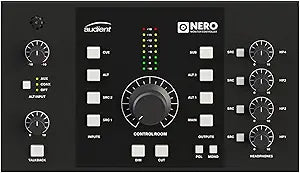
Audient NERO Desktop Studio Monitor Controller
Elevate Your Monitoring with Console-Grade PrecisionIntroducing the Audient Nero Desktop Monitor Controller, a centerpiece for your studio that puts comprehensive monitoring control at your fingertips. Drawing from over two decades of analog console expertise, Nero centralizes your monitoring wor...
$719.99*
View on Amazon
✓ In Stock on Amazon.com
*Price sourced from Amazon.com. Last updated:Oct 25, 2026.Price and availability are subject to change — details.
Affiliate Disclosure: As an Amazon Associate, Studio Supplies earns from qualifying purchases made through links on this page, at no additional cost to you. This helps support our editorial team.
Notice a mistake? Let Us Know
Overview
Elevate Your Monitoring with Console-Grade Precision
Introducing the Audient Nero Desktop Monitor Controller, a centerpiece for your studio that puts comprehensive monitoring control at your fingertips. Drawing from over two decades of analog console expertise, Nero centralizes your monitoring workflow with a range of I/O options, console-style controls, and precision-matched attenuation technology.
Nero offers an intuitive solution to manage your growing studio, providing the cleanest possible monitoring path and streamlined control over all your audio connections.
Specifications:
- Inputs: 4 x Stereo Analogue sources, 2 x Line Level Inputs, 1 x Dedicated Cue Mix Input
- Outputs: 3 x Stereo Speaker Outputs
- Headphone Outputs: 4 x Headphone Outputs with flexible routing
- Monitor Controls: Dim, Cut, Mono, and Polarity Monitor Controls
- Customization: Smart Touchpoints for user customization
- Talkback: External Talkback Input
Key Features
4 x Stereo Analogue sources, 2 x Line Level Inputs , 1 x Dedicated Cue Mix Input, and 3 x Stereo Speaker Outputs
4 x Headphone Outputs with flexible routing
Dim, Cut, Mono, and Polarity Monitor Controls
Smart Touchpoints for user customisation
External Talkback Input
Specifications
Analogue Sources
4 x Stereo
Line Level Inputs
2
Cue Mix Inputs
1 x Dedicated
Speaker Outputs
3 x Stereo
Headphone Outputs
4
Monitor Controls
Dim, Cut, Mono, Polarity
Customisation
Smart Touchpoints
Talkback Input
External
Frequently Asked Questions
How many stereo analogue sources can the Audient NERO controller handle?
The Audient NERO Desktop Studio Monitor Controller can manage 4 stereo analogue sources.
Does this monitor controller have multiple speaker outputs?
Yes, it features 3 stereo speaker outputs, allowing you to connect and switch between different sets of monitors.
How many headphone outputs are available on the NERO?
The NERO is equipped with 4 headphone outputs, each with flexible routing capabilities.
What monitor control functions are included?
Essential monitor controls such as Dim, Cut, Mono, and Polarity are included for comprehensive audio monitoring.
Does the Audient NERO have a built-in talkback microphone?
No, it features an external talkback input, meaning you will need to connect your own microphone for talkback functionality.
Can the NERO's controls be customized?
Yes, the unit includes Smart Touchpoints for user customisation, allowing you to tailor certain functions to your workflow.
Related Products


