
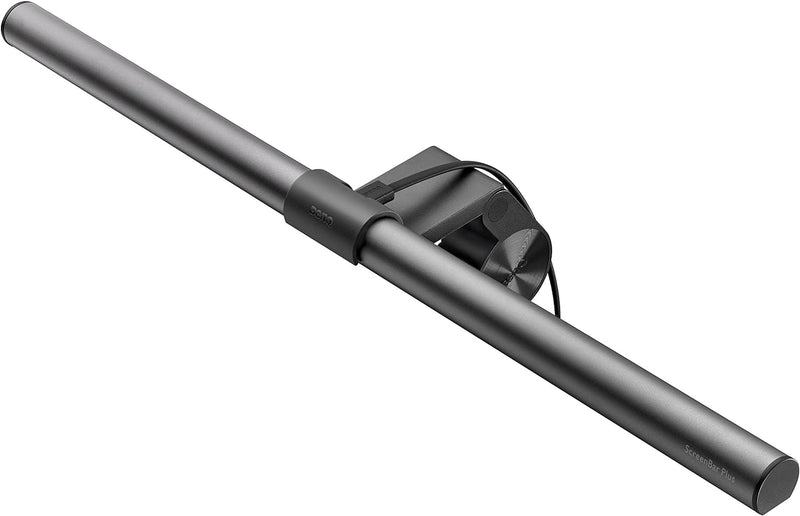


BenQ ScreenBar Plus e-Reading LED Monitor Light — Editorial Review & Use Cases
The BenQ ScreenBar Plus is BenQ's monitor-mounted task light — a slim LED bar that clips onto the top edge of a flat-panel monitor and casts down-angled illumination onto the desk surface and keyboard without producing glare on the monitor itself. The Plus variant adds a desktop rotary controller (dimming + color temperature dial) connected via cable to the bar. Per BenQ's official ScreenBar Plus product page, the unit produces 500 lux at desk surface, supports 2700K-6500K color temperature range, includes built-in auto-dimming sensors that respond to ambient room light, and powers via USB-A from the monitor or laptop.
What the ScreenBar Plus Specifically Wins
- Eliminates glare on the monitor — the asymmetric beam casts light down toward the desk + keyboard, not onto the screen. Subject sees illuminated paperwork without reflections washing out monitor display
- Saves desk space — replaces a desktop task lamp + base + arm with a slim monitor-clipped bar. Critical for cramped home-office desks
- Auto-dimming sensor — built-in light sensor adjusts brightness to match ambient room light. Works well from full-bright daylight to evening darkness without manual adjustment
- 2700K-6500K range — full warm-tungsten to daylight-cool range for matching room lighting or shifting throughout the day (warm evening, cool work hours)
- Desktop rotary controller (Plus variant) — dedicated dial on the desk surface for brightness + color temperature. Avoids reaching up to bar's tiny buttons
- USB-powered — no AC adapter — runs from any USB-A port (monitor's hub port, laptop USB-A, USB hub). No additional wall outlet needed
- Premium build quality — aluminum body + adjustable clamp + soft-glow LED bar. The clamp mechanism fits most monitor top edges (3-30mm thick)
- Suitable for monitor + dual-monitor setups — single bar lights typical desk surface from a centered monitor; dual-bar setups available for ultrawide / dual-monitor users
Where the ScreenBar Plus Specifically Fits
- Knowledge workers / writers / coders with desktop monitor setups working in mixed lighting throughout the day
- Designers / illustrators needing accurate color rendering of physical reference material + screen-side notes
- Students with crowded desks where a separate task lamp would take needed space
- Home office workers in shared / multi-purpose rooms with varying ambient light
- Reading / studying setups where the user alternates between reading printed material + screen reading
- Sleep-quality-conscious workers using warm 2700K in the evening to limit blue-light exposure before sleep
- Photographers / videographers reviewing prints at the desk — accurate color rendering of physical photos at variable color temperatures
- Architects / drafters reviewing physical drawings + plans alongside CAD displays
- Office-grade environments where standard overhead fluorescent / LED ceiling light is harsh or insufficient at the desk surface
Honest Limits Buyers Should Know
- Premium price ($129-149) vs commodity desk LED lamps ($30-60). The auto-dim sensor + USB power + glare elimination justifies the premium for users who experience monitor glare. Commodity lamps work fine for users who don't.
- Monitor clip requires flat-edge monitor. Curved-front monitors (e.g., LG UltraWide curved) may not clamp cleanly. Verify monitor's edge geometry first; BenQ publishes a compatibility list
- Limited to 1 monitor. Dual-monitor users need a second ScreenBar (or BenQ ScreenBar Halo for ultrawide span). For triple-monitor setups, the math gets expensive ($400+)
- Lighting is desk-surface-focused, not ambient-room. The bar lights the immediate task area + keyboard; doesn't replace overhead room lighting. Pair with overhead room light for full-room illumination
- USB-A only (no USB-C cable native). Modern laptops with USB-C-only ports need USB-A-to-C adapter or USB-A hub. Most desktop monitors have USB-A passthrough so it's a non-issue for desktop setups
- Color temperature change feels sudden. Fast steps between 2700K-6500K — users prefer the "Auto" mode that interpolates smoothly
- Cable from desktop dial to bar is fixed-length. Run from bar to dial is ~1.5m; positioning the dial requires planning desk routing
- Single point of failure. If the bar fails, the entire light is out. No redundancy. Commodity dual-LED lamps have multiple LEDs that fail individually
Where Buyers Should Look Elsewhere
- Ultrawide / dual-monitor setups → BenQ ScreenBar Halo (curved bar for ultrawide + connected dual-monitors)
- Pro paid color-critical work → Light Genie 3000K LED + properly-calibrated room lighting (color-managed studios)
- Pure budget → BenQ ScreenBar (non-Plus, no dial, manual control), Xiaomi monitor light ($40-60 Amazon)
- Aesthetic statement lamp → Tom Dixon, Anglepoise, Lampe Berger artisanal lighting (form vs function)
- Wireless / battery operated → BenQ ScreenBar isn't battery — for cordless desk lighting, look at rechargeable USB-C task lamps
- Reading-only mode → dedicated e-reading lamp (BenQ MindDuo) optimized for paper-reading positions
Sources & Citations
- BenQ, "ScreenBar Plus product page," benq.com (accessed 2026-05-18)
- The Verge, "BenQ ScreenBar Plus review coverage," theverge.com (accessed 2026-05-18)
- The Wirecutter (NYT), "Best desk lamp + monitor light buying guide," nytimes.com/wirecutter (accessed 2026-05-18)
Last verified: 2026-05-18


