

Blackmagic Design
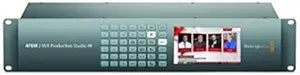
Blackmagic Design ATEM 2 M/E Production Studio 4K SDI HDMI Switcher
4KXLR
Unleash Your Creative Vision with the Blackmagic Design ATEM 2 M/E Production Studio 4K The Blackmagic Design ATEM Production Studio 4K Switcher is a powerhouse for live production, offering advanced features and connectivity for professional results. Encased in a machined aluminum front panel, ...
$4,969.00*
View on Amazon
✓ In Stock on Amazon.com
*Price sourced from Amazon.com. Last updated:Oct 20, 2026.Price and availability are subject to change — details.
Affiliate Disclosure: As an Amazon Associate, Studio Supplies earns from qualifying purchases made through links on this page, at no additional cost to you. This helps support our editorial team.
Notice a mistake? Let Us Know
Overview
Unleash Your Creative Vision with the Blackmagic Design ATEM 2 M/E Production Studio 4K
The Blackmagic Design ATEM Production Studio 4K Switcher is a powerhouse for live production, offering advanced features and connectivity for professional results. Encased in a machined aluminum front panel, this switcher gives you hands-on control and comprehensive monitoring capabilities, ensuring a seamless production workflow.
Specifications:
- Brand: Blackmagic Design
- Model: ATEM 2 M/E Production Studio 4K
- Upstream Keyers: 4
- Downstream Keyers: 2
- Audio Mixer: 22-Input
- 6G-SDI Inputs: 20
- HDMI Inputs: 1
- Control: Software and Hardware
- Multi View Monitoring: Built-in
Key Features
Innovative Design: ATEM Production Studio 4K switchers feature an machined aluminum front panel with dedicated buttons to let you switch auxiliary outputs. You can use the built in video screen to monitor auxiliary outputs or as technical monitoring to help during set up
Powerful Software and Hardware Control: ATEM live production switchers feature full switcher control from any laptop or desktop computer with the included ATEM software control panel for both Mac and Windows
Inputs: ATEM Production Studio includes advanced 6G-SDI and HDMI 4K inputs that are SD, HD or Ultra HD switchable so you can connect to virtually anything. Every input supports embedded audio mixing and features a frame resynchronizer so you can use sources without genlock such as consumer HDMI cameras or even computers for live PowerPoint presentations
Outputs: ATEM includes program and down converted program outputs plus auxiliary outputs allowing clean feeds, perfect for connecting to giant outdoor LED screens, projectors, disk recorders, monitors and broadcast decks. The multi view outputs are 1080i HD so you can use any TV or monitor. You also get a balanced XLR output of your audio mix, which is also embedded into all video outputs
Multi View Monitoring: ATEM's built in multi view lets you monitor the switcher’s video inputs on a single SDI monitor or regular HDMI TV. Multi view outputs in regular 1080i HD, so even if your broadcast is in SD or Ultra HD you can still use a standard TV for monitoring. You can customize the multi view layout and also add custom labels. Multi view makes it easy to watch your program, preview, and live sources all simultaneously on a single monitor
Specifications
Brand
Blackmagic Design
Inputs
6G-SDI, HDMI 4K
Input Compatibility
SD, HD, Ultra HD switchable
Input Feature
Embedded Audio Mixing, Frame Resynchronizer
Outputs
Program, Down Converted Program, Auxiliary, Balanced XLR Audio
Multi View Output
1080i HD
Control
Software Control Panel (Mac, Windows), Hardware Buttons
Front Panel Material
Machined Aluminum
Frequently Asked Questions
How does the ATEM Production Studio 4K switcher facilitate monitoring?
The ATEM Production Studio 4K switcher includes a built-in video screen on the machined aluminum front panel to monitor auxiliary outputs or for technical setup.
What operating systems are compatible with the ATEM live production switcher's software control?
The ATEM live production switchers feature full control from any laptop or desktop computer running either Mac or Windows operating systems with the included ATEM software control panel.
What types of video inputs does this switcher support?
The ATEM Production Studio 4K includes advanced 6G-SDI and HDMI 4K inputs that are switchable between SD, HD, or Ultra HD formats, allowing connection to a wide range of sources.
Does this switcher accommodate sources without genlock, like consumer cameras?
Yes, every input on the ATEM Production Studio 4K supports embedded audio mixing and features a frame resynchronizer, enabling the use of sources without genlock, such as consumer HDMI cameras or computers.
What types of outputs are available on the ATEM Production Studio 4K?
This switcher provides program and down-converted program outputs, along with auxiliary outputs for clean feeds, suitable for connecting to LED screens, projectors, disk recorders, monitors, and broadcast decks.
Can I monitor multiple video inputs simultaneously with this switcher?
Yes, the ATEM's built-in multi view feature allows monitoring of the switcher’s video inputs on a single SDI monitor or regular HDMI TV. The multi view outputs in 1080i HD.
Is the multi view layout customizable?
Yes, you can customize the multi view layout and add custom labels to help organize your monitoring setup.
Related Products


