



Blackmagic Design
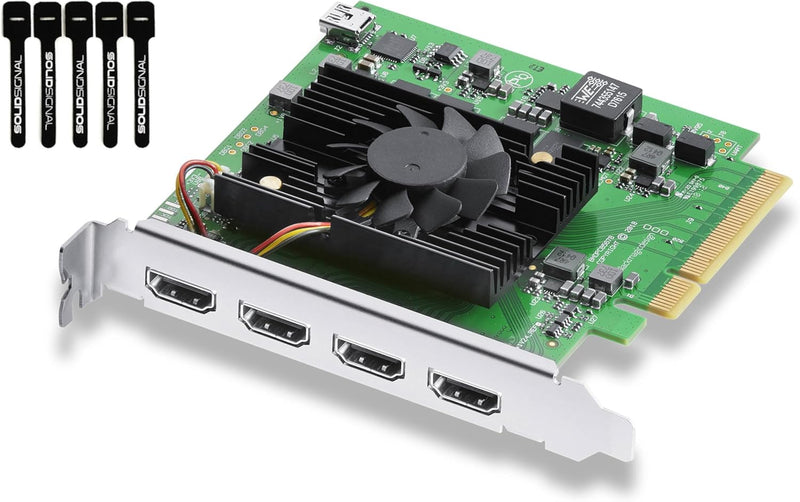
Blackmagic Design BDLKDVQDHDMI4K DeckLink Quad HDMI Capture Card
4K4 in2 inHDR
Capture four simultaneous 4K HDMI sources in one PCIe slot — your multi-cam stream finally looks as pro as your setup.
$545.00*
Check availability
*Price sourced from Amazon.com. Last updated:Oct 21, 2026.Price and availability are subject to change — details.
Affiliate Disclosure: As an Amazon Associate, Studio Supplies earns from qualifying purchases made through links on this page, at no additional cost to you. This helps support our editorial team.
Notice a mistake? Let Us Know
Overview
Key Features
Quad HDMI Connections: Equipped with four HDMI 2.0b connections allowing for simultaneous capture of multiple HDMI sources (8, 10, 12-bit RGB 4:4:4 in all modes up to 4Kp30 DCI and 8, 10-bit YUV 4:2:2 in all modes
PCIe Interface: Utilizes a high-speed PCIe interface for reliable data transfer and low-latency performance. PCI Express 8 lane generation 3 required, compatible with 8 and 16 lane PCI Express slots on Mac OS, Windows and Linux.
Wide Format Support: Compatible with a range of SD, HD, and 4K video standards. Supports Deep Color and HDR. Supports Rec. 601, Rec. 709, Rec. 2020 color spaces. Supports 8 channels of embedded 24-bit 48 kHz audio.
Software Compatibility: Works seamlessly with Blackmagic Design’s Media Express software, as well as other major applications such as Wirecast, vMix, OBS, and more.
Copy Protection: HDMI inputs are unable to capture from copy protected HDMI sources.
Specifications
Inputs
4 × HDMI 2.0b
Maximum Resolution
4Kp30 DCI (all four inputs simultaneously)
Color Sampling
8, 10, 12-bit RGB 4:4:4; 8, 10-bit YUV 4:2:2
Interface
PCI Express x8 Gen 3 (compatible with x16 slots)
Audio
8 channels embedded 24-bit 48 kHz per input
HDR Support
Yes — Deep Color and HDR
Color Spaces
Rec. 601, Rec. 709, Rec. 2020
Operating Systems
macOS, Windows, Linux
Software Compatibility
OBS, Streamlabs, vMix, Wirecast, Blackmagic Media Express
Copy Protection
Cannot capture HDCP-protected sources
Frequently Asked Questions
Does the DeckLink Quad HDMI work with OBS and Streamlabs out of the box?
Yes — OBS and Streamlabs both recognize the DeckLink Quad HDMI as a capture device via Blackmagic's desktop video driver. You'll need to install the Blackmagic Desktop Video driver and Desktop Video Setup utility first, then each of the four HDMI inputs appears as a separate capture source in OBS, letting you assign individual inputs to different scenes.
What latency should I expect when using this card for live streaming?
The PCIe Gen 3 x8 interface keeps capture latency extremely low — well under a frame at typical streaming resolutions. This card is designed for broadcast-grade live switching, so latency introduced by the card itself is negligible. Your stream delay will be dominated by encoder settings and platform buffering, not the capture card.
Can I run all four HDMI inputs at 4K simultaneously, or is there a trade-off?
All four inputs support up to 4Kp30 DCI simultaneously at 8, 10, or 12-bit RGB 4:4:4. If you need 4Kp60, you'll be limited by the per-input bandwidth — check Blackmagic's format matrix for the specific resolution/frame rate combinations available across all four channels concurrently.
Does this card work on Mac, Windows, and Linux?
Yes — Blackmagic publishes Desktop Video drivers for all three platforms. The card requires a PCIe x8 Gen 3 slot (compatible with x16 physical slots), so it works in any desktop with an available full-size PCIe slot running macOS, Windows, or Linux.
Will this card capture from a game console or any HDMI source with copy protection?
No — like all capture cards, the DeckLink Quad HDMI cannot capture from HDCP-protected HDMI sources. Standard game console output in streaming/capture mode (non-protected), cameras, and video switchers all work fine.
Related Products


