



Blackmagic Design
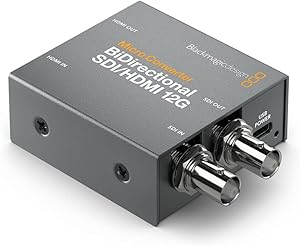
Blackmagic Design CONVBDC/SDI/HDMI12G Micro Converter BiDirectional 12G
The Blackmagic Micro Converter BiDirectional 12G bridges SDI and HDMI simultaneously in both directions — keeping 12G signal chains intact without a rack full of dedicated converters.
$189.00*
View on Amazon
✓ In Stock on Amazon.com
*Price sourced from Amazon.com. Last updated:Oct 20, 2026.Price and availability are subject to change — details.
Affiliate Disclosure: As an Amazon Associate, Studio Supplies earns from qualifying purchases made through links on this page, at no additional cost to you. This helps support our editorial team.
Notice a mistake? Let Us Know
Overview
Key Features
Micro Bidirectional Video Convertor for SDI
SD Devices
HD
Specifications
SDI Video Inputs
1 × BNC
SDI Video Outputs
Automatically matches HDMI video input
HDMI Video Inputs
1 × Type A HDMI 2.0
HDMI Video Outputs
1 × Type A HDMI 2.0
Supported Standards
SD, HD, 2K, Ultra HD, 4K (auto detection)
SDI Bandwidth
12G
SDI Re-Clocking
Yes
HDMI Timecode Support
Yes
Conversion Direction
Simultaneous bidirectional (SDI↔HDMI)
Frequently Asked Questions
What does "bidirectional" mean in a production context, and why does it matter on set?
Bidirectional means the converter handles SDI-to-HDMI and HDMI-to-SDI conversion simultaneously in both directions — a single unit replaces two dedicated one-way converters in a signal chain. On set, this reduces rack space, cable runs, and points of failure when feeding a monitor from an SDI source while also returning an HDMI signal to a recorder or switcher.
What video standards does the 12G BiDirectional converter support?
The converter auto-detects SD, HD, 2K, Ultra HD, and 4K video signals. The 12G designation means it can handle 12G-SDI bandwidth, which supports 4K at up to 60fps over a single BNC cable — eliminating the need for quad-link SDI configurations that 4K previously required.
What does SDI re-clocking do, and when does it matter?
SDI re-clocking regenerates a clean, properly timed signal from the incoming SDI stream before conversion. On long cable runs — where signal jitter and timing errors accumulate — re-clocking restores signal integrity and prevents the artifacts that a degraded signal would introduce downstream. For cable runs exceeding 30–40 meters, re-clocking is the difference between a clean output and a noisy or dropped signal.
Does the converter pass timecode from HDMI sources to SDI outputs?
Yes — the converter supports HDMI timecode passthrough to the SDI output. This is significant for multi-camera productions where timecode sync is required for post-production alignment. HDMI devices that embed timecode will have that timecode preserved in the converted SDI stream.
How is the converter powered, and can it be used in a mobile rig?
Power requirements are not detailed in the provided specifications — consult Blackmagic Design's official product page for power input details. The unit's micro form factor makes it physically suitable for mobile and field rigs where rack space is unavailable, and it can be mounted directly into cable runs or behind monitors.
Related Products


