



Blackmagic Design
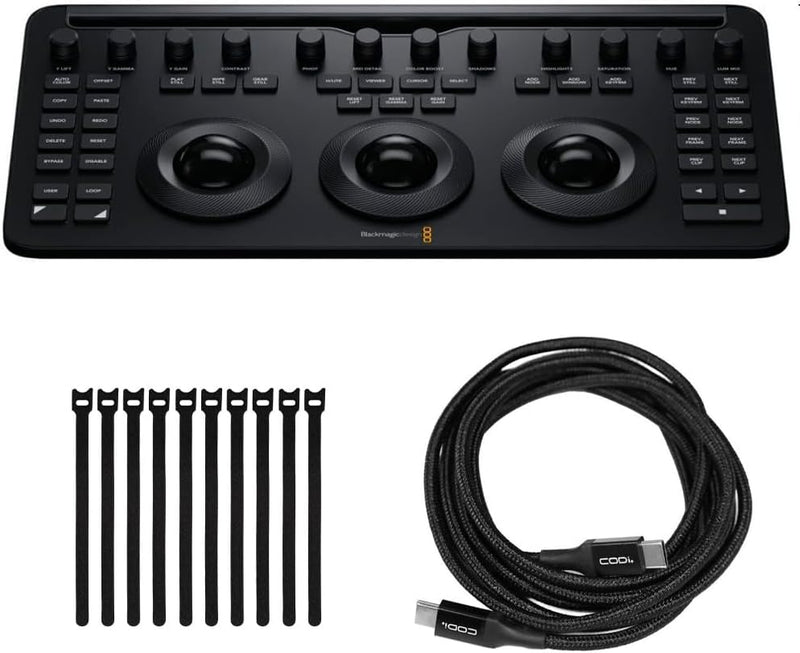
Blackmagic Design Davinci Resolve Micro Color Panel Bundle
USB-C
Bring DaVinci Resolve's trackball grading workflow to a compact, Bluetooth-connected panel — the Micro Color Panel closes the gap between software grading and physical control without requiring a dedicated grading suite.
$509.99*
Check availability
*Price sourced from Amazon.com. Last updated:Oct 21, 2026.Price and availability are subject to change — details.
Affiliate Disclosure: As an Amazon Associate, Studio Supplies earns from qualifying purchases made through links on this page, at no additional cost to you. This helps support our editorial team.
Notice a mistake? Let Us Know
Overview
Key Features
Bundle Includes: Blackmagic Design DaVinci Resolve Micro Color Panel (Black), 6-Feet USB-C to USB-C Charge Cable and Focus Camera 9-Inch x 1/2-Inch Hook-and-Loop Fastening Cable Ties (10-Pack)
Arrangement: The Micro Panel features a row of direct control knobs at the top of the panel, three trackballs with rings for color grading, and transport keys to speed up your grading session
Handy Design: It includes controls for refined color grading including adding windows and a tablet slot designed to hold an Apple iPad
Connections: The DaVinci Resolve Micro connects via Bluetooth or USB-C
Easy Operation: DaVinci Resolve lets you work faster and at a higher quality because you don’t have to learn multiple apps or switch software for different tasks
Specifications
Connectivity
USB-C, Bluetooth
Trackballs
3 (Lift, Gamma, Gain with luminance rings)
Controls
Direct control knobs, transport keys, refinement controls
Tablet Slot
Apple iPad compatible
Compatible Software
DaVinci Resolve (free and Studio)
Color
Black
Bundle Includes
Micro Color Panel, 6ft USB-C to USB-C cable, cable ties (10-pack)
Frequently Asked Questions
How does the Micro Color Panel connect to a workstation running DaVinci Resolve?
The Micro Panel connects via either USB-C or Bluetooth. USB-C provides a wired, low-latency connection suitable for dedicated grading workstations. Bluetooth enables cable-free operation, which is practical for laptop-based colorists working on location or in mobile post setups. Both modes are natively recognized by DaVinci Resolve without third-party drivers.
What does the trackball layout on the Micro Panel control in DaVinci Resolve?
The three trackballs map directly to the Lift, Gamma, and Gain (shadows, midtones, highlights) color wheels in Resolve's Color page. The rings surrounding each trackball control luminance for those same tonal ranges. This physical mapping eliminates the need to reach for a mouse during grading, allowing continuous, two-handed adjustments that are faster and more precise than cursor-based control.
Does the Micro Panel replace the need for a full-size Mini or Advanced panel in a professional post environment?
For solo colorists and smaller post suites, the Micro Panel handles the core grading workflow efficiently. Where larger panels provide additional dedicated buttons for node navigation, qualifiers, and scope toggling — tasks that require keyboard shortcuts on the Micro — the trade-off is physical footprint and budget. The Micro is a legitimate production tool, not a stripped-down consumer device.
What is the tablet slot on the Micro Panel designed for?
It accommodates an Apple iPad, which can display Resolve's scopes, reference images, or secondary controls directly on the panel surface. In a grading session, this eliminates the need to dedicate a second monitor for scopes, keeping the colorist's attention on the primary display and the reference image.
Is DaVinci Resolve Studio required to use the Micro Color Panel, or does the free version support it?
The Micro Color Panel is compatible with both the free version of DaVinci Resolve and Resolve Studio. However, some advanced Color page features available in Studio — noise reduction, certain effects, and collaboration tools — require the paid license. The panel hardware itself functions with the free tier.
Related Products


