



Blackmagic Design
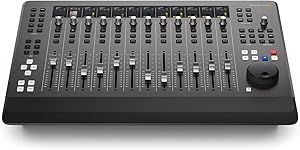
Blackmagic Design DV/RESF/EDTAUSMIN Fairlight Desktop Console
Professional 12-fader mixing control surface with motorized faders and touch-sensitive knobs for DaVinci Resolve Fairlight audio.
$3,525.00*
Check availability
*Price sourced from Amazon.com. Last updated:Oct 21, 2026.Price and availability are subject to change — details.
Affiliate Disclosure: As an Amazon Associate, Studio Supplies earns from qualifying purchases made through links on this page, at no additional cost to you. This helps support our editorial team.
Notice a mistake? Let Us Know
Overview
Key Features
12-fader Mixing Control Surface f DaVinci Resolve with Motized Faders
Touch-sensitive Encoder Knobs
Channel Status Displays
External HDMI Moniting
Navigation Controls
Specifications
Brand
Blackmagic Design
Model
DV/RESF/EDTAUSMIN
Faders
12 Motorized Faders
Encoder Knobs
Touch-Sensitive
Channel Displays
Channel Strip LCDs
Buttons
Illuminated
Connectivity
USB-C
Display Output
HDMI
Controls
Navigation, Transport, and Task-Based Controls
Software Compatibility
DaVinci Resolve (Fairlight)
Frequently Asked Questions
What software is the Fairlight Desktop Console designed to work with?
The Fairlight Desktop Console is purpose-built to work with the Fairlight audio page in DaVinci Resolve, providing hardware control over the software's mixing, EQ, dynamics, and automation features.
How does the console connect to a computer?
The console connects via USB-C, making setup straightforward with a single cable connection to your editing workstation.
What are the motorized faders used for?
The 12 motorized faders automatically move to reflect the current mix state when switching between tracks or recalling settings, providing instant visual and tactile feedback of your audio levels.
Does the console have its own display, or does it require an external monitor?
The console features built-in channel strip LCD displays on each fader for track information. It also includes an HDMI output for connecting an external monitor to display additional graphical feedback and metering.
Can this console be used as a standalone audio mixer?
No, the Fairlight Desktop Console is a control surface, not a standalone mixer. It requires a computer running DaVinci Resolve to function and does not process audio on its own.
Related Products


