

Blackmagic Design
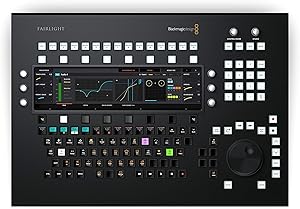
Blackmagic Design DV Fairlight Console Audio Editor Desktop
Streamline Your Audio Workflow with Blackmagic Design Fairlight Console Audio Editor Designed for professional sound editors, the Blackmagic Design Fairlight Console Audio Editor is a dedicated desktop control surface that accelerates your workflow in DaVinci Resolve's Fairlight audio environment...
$5,169.00*
Check availability
*Price sourced from Amazon.com. Last updated:Oct 21, 2026.Price and availability are subject to change — details.
Affiliate Disclosure: As an Amazon Associate, Studio Supplies earns from qualifying purchases made through links on this page, at no additional cost to you. This helps support our editorial team.
Notice a mistake? Let Us Know
Overview
Streamline Your Audio Workflow with Blackmagic Design Fairlight Console Audio Editor
Designed for professional sound editors, the Blackmagic Design Fairlight Console Audio Editor is a dedicated desktop control surface that accelerates your workflow in DaVinci Resolve's Fairlight audio environment. Connecting via Ethernet, this console offers tactile control over mixing, EQ, plugins, and more, allowing for precise and efficient audio editing to meet even the tightest deadlines.
- Brand: Blackmagic Design
- Model: DV/RESF/EDTDSKTOP
- Connectivity: Ethernet
- Layouts: Standard Mixing, Clip EQ, Plug-ins, Aux Sends, Monitor Mode
- Controls: Touch-sensitive
- Features: Custom Keyboard Support
Key Features
Fairlight Console Audio Edit with Custom Keyboard
Touch-sensitive Controls
5 Auto-switching Layouts
Ethernet Connectivity
Plug-in Suppt
Specifications
Type
Fairlight Console Audio Editor Desktop
Controls
Touch-sensitive
Layouts
5 Auto-switching
Connectivity
Ethernet
Software Features
Plug-in Support
Frequently Asked Questions
What is the Blackmagic Design DV Fairlight Console designed for?
The Fairlight Console Audio Editor Desktop is specifically designed for audio post-production, offering specialized controls and a custom keyboard for editing tasks.
How does the auto-switching layout feature work on this console?
The 5 auto-switching layouts automatically adapt the console's interface to different editing tasks, streamlining your workflow without manual configuration.
Can this audio editor integrate with existing studio networks?
Yes, with its Ethernet connectivity, the Fairlight Console can be reliably integrated into studio networks for efficient data transfer and system communication.
Does the console support third-party audio plug-ins?
Yes, the Fairlight Console Audio Editor features plug-in support, allowing users to expand its functionality with various audio processing tools.
Are the controls on the console tactile or digital?
The console is equipped with touch-sensitive controls, providing a responsive and intuitive user experience for precise audio adjustments.
Related Products


