Blackmagic Design

Blackmagic Design BMD-DV/RES/BBPNLMIC Davinci Resolve Micro Panel - Control Surface

4.6 (104 reviews)

A portable, USB-powered color grading control surface with three trackballs and 12 precision knobs for DaVinci Resolve.

$949.00*
In Stock on Amazon.com
View on Amazon

*Price sourced from Amazon.com. Last updated:Jun 19, 2026.Price and availability are subject to change.

Affiliate Disclosure: Studio Supplies may earn a commission from qualifying purchases made through links on this page, at no additional cost to you. This helps support our editorial team.

Notice a mistake? Let Us Know

Overview

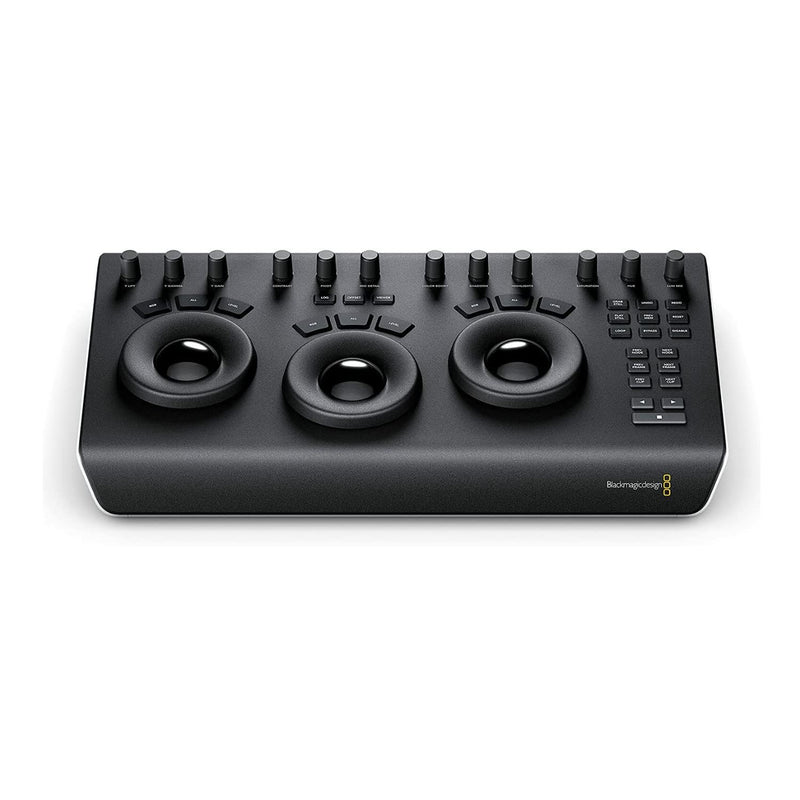
The Blackmagic Design DaVinci Resolve Micro Panel is a portable control surface purpose-built for color grading in DaVinci Resolve. At its core are three professional-grade trackballs that map directly to the lift, gamma, and gain color wheels, giving colorists the physical, intuitive control that is difficult to replicate with a mouse. Surrounding the trackballs are 12 precision knobs dedicated to primary color correction parameters such as contrast, saturation, hue, and individual color channel adjustments, all accessible without navigating on-screen menus.

The Micro Panel is powered entirely through USB, eliminating the need for an external power supply and making setup as simple as plugging in a single cable. Its low-profile, compact chassis is designed to sit comfortably alongside a keyboard on a standard desk, and it is light enough to transport between edit suites or carry to on-set grading sessions. Dedicated keys for still store management let you quickly save and recall reference frames while grading. While the Micro Panel focuses on primary correction and does not include the LCD displays or extended secondary controls of the larger Mini and Advanced panels, it covers the tools most frequently used in everyday grading work, making it an effective and accessible entry point into hardware-based color correction for independent editors, freelance colorists, and on-set professionals.

Key Features

PURPOSE – A high quality, portable low profile panel that features three high resolution trackballs and 12 precision machined control knobs for accessing all essential primary color correction tools

PRIMARY CORRECTION CREATIVE CONTROLS - To take your color grading to the next creative level, the DaVinci Resolve Micro panels include 12 dedicated primary color correction control knobs

PROFESSIONAL TRACKBALLS - Trackballs provide RGB balance adjustments for lift, gamma and gain, each with a master level control

STILL STORE REFERENCE MANAGEMENT - Micro panels have dedicated keys to quickly save and recall stills. Colorists constantly grab and play stills to compare grades using the gallery

FLEXIBLE POWER OPTIONS - The DaVinci Resolve Micro Panel is fully powered via USB so you can simply plug and play to get up and running. Power over USB means you can use it with a laptop and it will operate from the laptop’s battery, making it ideal for on set grading

Specifications

Brand
Blackmagic Design
Model
BMD-DV/RES/BBPNLMIC
Product Type
Color Grading Control Surface
Trackballs
3 (Lift, Gamma, Gain)
Control Knobs
12 dedicated primary color correction knobs
Still Store
Dedicated save and recall keys
Power
USB-powered
Software Compatibility
DaVinci Resolve
Form Factor
Compact, low-profile desktop panel

Blackmagic DaVinci Resolve Micro Panel — Editorial Review & Use Cases

The Blackmagic Design DaVinci Resolve Micro Panel (BMD-DV/RES/BBPNLMIC) is the entry-tier dedicated control surface for the DaVinci Resolve color-grading interface — three precision-machined trackballs, twelve illuminated function buttons, and a USB-C connection to a Mac or PC running Resolve Studio. Per Blackmagic's official DaVinci Resolve Panels page, the Micro Panel maps the lift/gamma/gain trackballs + most-used grading buttons (apply node, bypass, reset, undo) to dedicated hardware — replacing 90% of the mouse-and-keyboard color workflow with tactile controls.

What the Micro Panel Specifically Wins

  • Three weighted trackballs for lift / gamma / gain — simultaneous control of shadows, midtones, and highlights via tactile spheres beats the GUI sliders for speed and feel
  • 12 illuminated buttons mapped to the most-used grading functions — Apply Node, Bypass, Reset, Auto Balance, Add Node, Add Serial Node, Add Parallel Node, Add Layer Node, Add Outside Node, Reset Color, Reset Sliders, Undo
  • USB-C connection — no proprietary PSU — bus-powered from the Mac/PC; no extra cables. Ships with both USB-C and USB-A cables
  • Free version of Resolve doesn't unlock all functions — the Micro Panel requires Resolve Studio (the paid version, ~$295 one-time). Resolve Studio paired with the panel unlocks 30+ FPS color, 8K timelines, advanced HDR, and Fairlight features
  • Substantially cheaper than the Mini Panel + Advanced Panel tiers — entry to the dedicated-color-surface ecosystem at <$1,000 vs $30K+ for the Advanced Panel
  • Industry-standard ergonomics — once you've trained on a trackball + dedicated-button workflow, switching back to mouse/keyboard feels like a step backward for color work

Where the Micro Panel Specifically Fits

  • Indie colorists / freelance editors who color-grade as part of their post workflow but don't need full Mini Panel functionality
  • Educational / school post-production labs teaching color grading to film students at affordable scale
  • Wedding videographers / event editors who color-finish hundreds of hours per year and want the speed gain
  • Documentary post production grading on Resolve Studio with limited budget but high volume
  • Hybrid editors who color in Resolve as one phase of a broader edit workflow (Premiere → Resolve → back to Premiere)
  • Trainee / junior colorists learning the trade with a real-world panel
  • YouTuber / content-creator who learns Resolve color tooling as part of monetized workflow

Honest Limits Buyers Should Know

  • Requires DaVinci Resolve Studio (paid). The free version of Resolve does NOT support hardware panels. Buyers commit to ~$295 one-time for Resolve Studio in addition to the panel
  • No dedicated Wheels (Y/Cb/Cr / hue / sat). The Mini Panel and Advanced Panel add dedicated rings for hue / saturation / curves; the Micro Panel limits these to trackballs + button shortcuts. Heavy curve-and-secondary work still needs mouse + keyboard or a Mini/Advanced upgrade
  • Only 12 dedicated buttons. Power users with complex node graphs / many keyboard shortcuts will find themselves switching back to keyboard for less-common functions. Customizable button mapping helps but the hardware count is the limit
  • Mac / PC platform — not standalone. The panel does nothing without a host computer running Resolve Studio. It's a peripheral, not a standalone device
  • Trackball calibration drifts under heavy use. Standard maintenance: occasional firmware updates from Blackmagic Desktop Video address sensor calibration; users in heavy production environments report drift checking quarterly
  • Plastic chassis at this price point. The Mini and Advanced Panels are metal; the Micro Panel uses a polycarbonate / ABS housing. Durable but doesn't feel premium like the higher tiers

Where Buyers Should Look Elsewhere

  • Professional / paid colorist workflow → DaVinci Resolve Mini Panel (full curves + secondaries) or Advanced Panel (full feature set)
  • Cross-platform color work (FCPX / Premiere) → Tangent Wave2 / Tangent Element panels (work with multiple host applications, not Resolve-only)
  • Pure budget approach → Mouse + keyboard with Resolve free version, plus Stream Deck for shortcut buttons
  • HDR / cinema-tier finishing → DaVinci Advanced Panel (for full theatrical finishing workflow)
  • Editing + color hybrid setup → Loupedeck CT or Loupedeck Live S (handles edit + color hotkeys without Resolve dependency)

Sources & Citations

  1. Blackmagic Design, "DaVinci Resolve Panels product page," blackmagicdesign.com (accessed 2026-05-18)
  2. No Film School, "DaVinci Resolve Micro Panel coverage," nofilmschool.com (accessed 2026-05-18)
  3. CineD (Cinema5D), "DaVinci Resolve hardware panel coverage," cined.com (accessed 2026-05-18)

Last verified: 2026-05-18

Now that you've seen the details — ready to take a closer look?

View on Amazon

Pros & Cons

👍 Pros

  • Three high-resolution trackballs provide tactile, precise control over lift, gamma, and gain adjustments
  • 12 dedicated knobs give direct access to primary color correction parameters without menu diving
  • USB-powered operation eliminates the need for a separate power supply and simplifies setup
  • Compact, low-profile design fits on crowded desks and travels easily to on-set or remote grading sessions
  • Dedicated still store keys allow quick saving and recalling of reference stills during grading

👎 Cons

  • Only compatible with DaVinci Resolve, offering no support for other color grading or editing applications
  • Lacks the secondary correction controls, LCD screens, and extended knob sets found on the Mini and Advanced panels
  • No built-in display for viewing node trees, scopes, or parameter values directly on the panel
  • Limited to primary color correction workflows, so complex grading sessions may still require mouse interaction

Frequently Asked Questions

The Micro Panel is designed specifically for DaVinci Resolve and communicates directly with its color grading tools. It does not natively support other NLEs or color grading software.
It is powered entirely via USB, so there is no separate power adapter needed. Just plug it into your computer's USB port and it is ready to use.
The three trackballs correspond to the lift, gamma, and gain color balance controls in DaVinci Resolve, allowing you to adjust shadows, midtones, and highlights by physically rolling and pressing the balls.
Yes, it is designed for professional use by independent colorists, editors, and on-set grading work. While Blackmagic offers larger panels with more controls, the Micro Panel covers the essential primary correction tools needed for professional results.
The Micro Panel has a compact, low-profile form factor that fits easily on a desk alongside a keyboard. Its USB-powered design and small footprint make it practical to transport between edit suites or take on location.