



Blackmagic Design
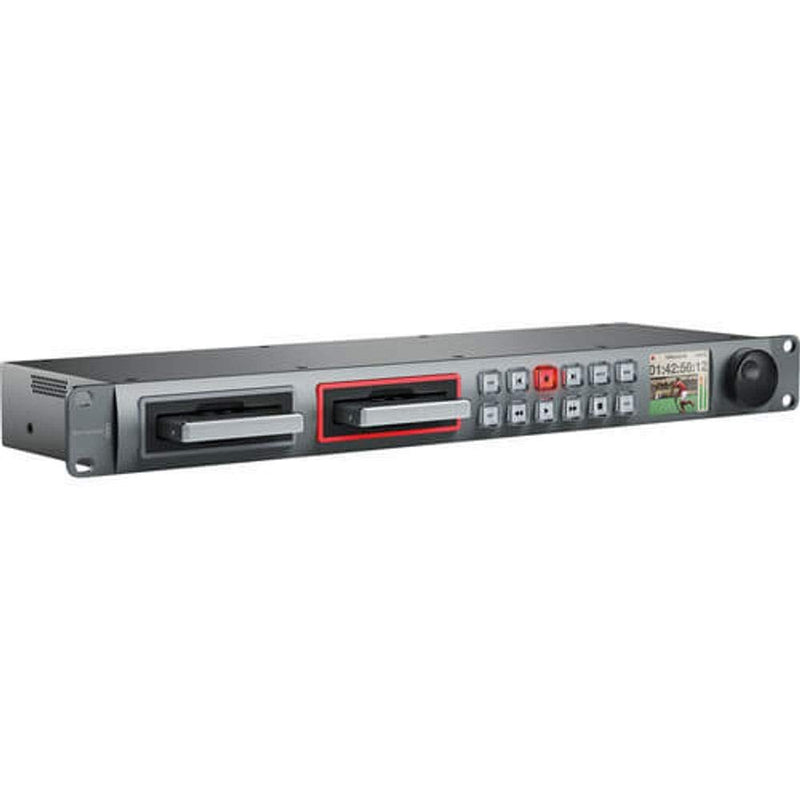
Blackmagic Design HYPERD/ST HyperDeck Studio SSD Recorder
Seamlessly Record and Playback Uncompressed Video The Blackmagic Design HyperDeck Studio is a broadcast-quality solid state video recorder. With dual SSD slots for continuous recording and universal file compatibility, the HyperDeck Studio streamlines your production workflow from capture to post...
Check availability
Affiliate Disclosure: As an Amazon Associate, Studio Supplies earns from qualifying purchases made through links on this page, at no additional cost to you. This helps support our editorial team.
Notice a mistake? Let Us Know
Overview
Seamlessly Record and Playback Uncompressed Video
The Blackmagic Design HyperDeck Studio is a broadcast-quality solid state video recorder. With dual SSD slots for continuous recording and universal file compatibility, the HyperDeck Studio streamlines your production workflow from capture to post-production.
Specifications:
- Brand: Blackmagic Design
- Model: HYPERD/ST
- Recording Media: 2.5" Solid State Drives (SSD)
- Video Format Support: SD/HD
- Inputs/Outputs: SD/HD-SDI, HDMI
- File Format: Uncompressed QuickTime
Key Features
The two hot-swappable 2.5" solid state drive (SSD) slots in HyperDeck Studio give you blazing fast speed, low power consumption and totally silent operation. Now you can eliminate complicated and expensive disk arrays
Compression destroys image quality. Now you'll never need to compromise your quality or your creativity, because you can bypass the camera compression to get perfect uncompressed 10-bit SD/HD video
With SD/HD-SDI and HDMI inputs and outputs, HyperDeck Studio works with virtually every camera, deck and monitor. Effortlessly plug into monitors or televisions for instant on-set preview
HyperDeck Studio captures universally compatible uncompressed QuickTime files that can be used with all popular software packages like Final Cut Pro, Premiere Pro, After Effects, Resolve and Apple Color, both now and into the future
HyperDeck Studio improves nearly every step of your production workflow pipeline. For quick on set QC or client preview, connect HyperDeck Studio to a projector or television via the HDMI or SDI outputs. You can even edit directly from the SSD with no digitizing or file copying
Specifications
Brand
Blackmagic Design
Model
HyperDeck Studio SSD Recorder
Storage Type
SSD (2.5")
Video Compression
Uncompressed 10-bit SD/HD
File Format
Uncompressed QuickTime
Inputs
SD/HD-SDI, HDMI
Outputs
SD/HD-SDI, HDMI
Drive Slots
Two hot-swappable
Frequently Asked Questions
What type of storage does the HyperDeck Studio use?
The HyperDeck Studio utilizes two hot-swappable 2.5" Solid State Drives (SSDs) for fast and silent recording performance.
Does this recorder compress video files?
No, the HyperDeck Studio is designed to bypass camera compression, capturing perfect uncompressed 10-bit SD/HD video for maximum quality.
What kind of inputs and outputs does the HyperDeck Studio have?
It features both SD/HD-SDI and HDMI inputs and outputs, offering wide compatibility with various cameras, decks, and monitors.
Which software programs are compatible with the files recorded by this device?
The HyperDeck Studio captures universally compatible uncompressed QuickTime files, which can be used with popular software like Final Cut Pro, Premiere Pro, After Effects, Resolve, and Apple Color.
Can I edit directly from the recorded media?
Yes, you can edit directly from the SSDs recorded by the HyperDeck Studio, which eliminates the need for digitizing or file copying, streamlining your workflow.
Related Products


