



Blackmagic Design
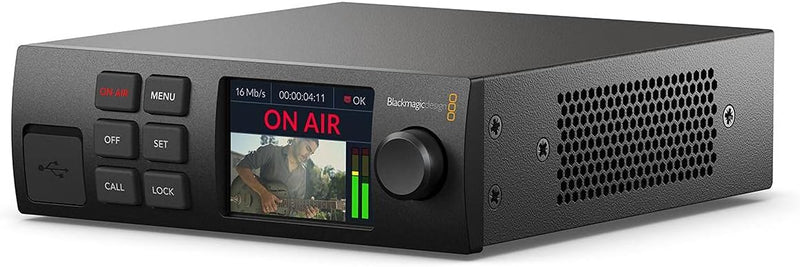
Blackmagic Design OB02476 Web Presenter HD - Streaming
Feed any SDI camera directly into OBS as a clean 1080p webcam source — no capture card, no encoder PC required.
$565.00*
View on Amazon
✓ In Stock on Amazon.com
*Price sourced from Amazon.com. Last updated:Oct 07, 2026.Price and availability are subject to change — details.
Affiliate Disclosure: As an Amazon Associate, Studio Supplies earns from qualifying purchases made through links on this page, at no additional cost to you. This helps support our editorial team.
Notice a mistake? Let Us Know
Overview
Key Features
Direct Streaming Interface with 12G-SDI In/Out
HDMI Monit Out
USB Webcam Out
SDI Monit Out
LCD Display
Specifications
Model
OB02476
Brand
Blackmagic Design
SDI Input
12G-SDI
SDI Output
12G-SDI (Monitor Out)
HDMI Output
HDMI Monitor Out
USB Output
USB (UVC Webcam, 1080p HD)
Network
Ethernet (direct RTMP streaming)
Mobile Connectivity
5G/4G phone tethering
Streaming Resolution
1080p HD
Display
LCD status display
Supported Platforms
YouTube, Facebook, Twitter, and more
Configuration Software
Blackmagic Web Presenter Utility
Frequently Asked Questions
How does OBS see the Web Presenter HD — as a capture card or a webcam?
OBS sees it as a standard USB webcam. The Web Presenter HD enumerates as a UVC (USB Video Class) device, which means it shows up in the Video Capture Device source in OBS without any driver installation on Windows or macOS. No proprietary capture card plugin needed — if OBS can see a webcam, it can see this unit.
Does using it as a USB webcam source introduce noticeable latency into an OBS scene?
USB webcam output through the Web Presenter HD introduces approximately one to two frames of additional latency compared to a native capture card path. For a face cam scene source in OBS, this is imperceptible to viewers and does not cause sync issues with audio that is captured separately. It is not suitable for low-latency monitoring feedback during broadcast, but for the video feed viewers see on stream, it is a non-issue.
Can I stream directly from the unit without a PC?
Yes. The Web Presenter HD has an Ethernet port and supports direct RTMP streaming to platforms like YouTube and Facebook without a PC encoder in the path. You configure stream keys and platform settings through the Blackmagic Web Presenter Utility software, then the unit handles encoding and delivery independently. The unit also supports tethered 5G/4G mobile connections for streaming from locations without fixed internet.
What cameras will work with the 12G-SDI input?
Any camera with an SDI output — including cameras outputting 3G-SDI (1080p), 6G-SDI, or 12G-SDI signals — will work. The unit accepts SDI signals from broadcast cameras, cinema cameras with SDI monitoring outputs (like BMPCC 6K, Sony FX series), and production switchers. Cameras with HDMI-only output require an HDMI-to-SDI converter before connecting; there is no direct HDMI input on this unit.
What does the SDI monitoring output let me do during a stream?
The SDI monitor output passes the input signal through to a connected monitor or production monitor for confidence monitoring. In a multi-unit SDI router setup, you can chain multiple Web Presenter HDs and route program feeds. For a solo streamer, it lets you connect a field monitor to verify the camera signal while simultaneously streaming — useful for checking framing and exposure without breaking the streaming path.
Related Products


