

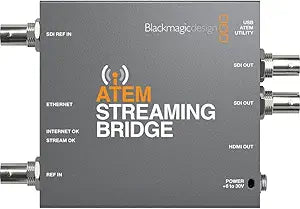


Blackmagic Design
Blackmagic Design ATEM Streaming Bridge SWATEMMINISBPR
Decode any ATEM Mini stream and output clean SDI and HDMI simultaneously — the missing link that brings ATEM streaming into professional multi-display and broadcast workflows.
$286.90*$305.00Save 5%
View on Amazon
✓ In Stock on Amazon.com
*Price sourced from Amazon.com. Last updated:Oct 09, 2026.Price and availability are subject to change — details.
Affiliate Disclosure: As an Amazon Associate, Studio Supplies earns from qualifying purchases made through links on this page, at no additional cost to you. This helps support our editorial team.
Notice a mistake? Let Us Know
Overview
Key Features
Blackmagic Design ATEM Streaming Bridge
Specifications
Function
ATEM stream decoder / converter
Input
ATEM Mini H.264 stream (via network)
Outputs
SDI, HDMI (simultaneous)
Compatible Source Devices
ATEM Mini switcher family
Configuration Software
Blackmagic ATEM Software Control
Network Connection
Ethernet (required)
Model
SWATEMMINISBPR
Frequently Asked Questions
What does the ATEM Streaming Bridge actually do in a streaming workflow?
It receives an H.264 stream from an ATEM Mini switcher over a network connection and converts it back to real-time video, outputting simultaneously via SDI and HDMI. It is a decode-and-output device — it does not encode, switch, or manage scenes. Its job is to get the ATEM's stream onto a physical video output at a remote location on your network.
Does the Streaming Bridge work with OBS or Streamlabs directly?
No. The Streaming Bridge is designed specifically to receive streams from ATEM Mini switchers — it decodes the ATEM's proprietary streaming output, not a generic RTMP or SRT feed. OBS does not output to a Streaming Bridge natively; this device is part of the ATEM hardware ecosystem, not a general software streaming tool.
Can I use this to get my ATEM stream onto a second monitor or confidence display on set?
Yes, this is a primary use case. The Streaming Bridge receives the ATEM stream over Ethernet and outputs it to any HDMI or SDI display, making it the practical solution for remote confidence monitors, secondary rooms, or broadcast distribution without running long HDMI cables from the switcher.
Does it introduce latency into the video signal?
Yes — decoding a compressed H.264 stream introduces some latency compared to a direct SDI or HDMI run. The exact latency depends on network conditions and encoding settings on the ATEM. For live confidence monitoring or broadcast distribution this is typically acceptable; for frame-accurate production switching it is not the right tool.
Is any software configuration required, or is it plug-and-play?
Basic configuration is handled through the Blackmagic ATEM Software Control application. The Streaming Bridge and the ATEM Mini need to be pointed at each other via IP address; once configured, operation is automatic. No ongoing software is required once the connection is established.
Related Products


