



Blackmagic Design
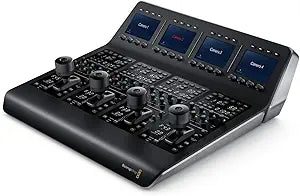
Blackmagic Design SWPANELCCU4 ATEM Camera Control Panel
Control iris, white balance, and paint on up to four Blackmagic cameras from one panel — consistent, professional-grade color across your entire live production.
$3,099.00*
Check availability
*Price sourced from Amazon.com. Last updated:Oct 21, 2026.Price and availability are subject to change — details.
Affiliate Disclosure: As an Amazon Associate, Studio Supplies earns from qualifying purchases made through links on this page, at no additional cost to you. This helps support our editorial team.
Notice a mistake? Let Us Know
Overview
Key Features
per-Camera LCD Screens Joysticks f Blackmagic Video Cameras ATEM Switchers
4-camera Ethernet Remote Control Panel with Col Lighting Controls
Specifications
Device Type
ATEM Camera Control Panel
Camera Control
4 Cameras
Controls
Color Lighting Controls, Joysticks
Display
Per-Camera LCD Screens
Connectivity
Ethernet Remote Control
Frequently Asked Questions
How many Blackmagic cameras can the ATEM Camera Control Panel manage simultaneously?
The panel controls up to four cameras at once, each with its own dedicated LCD screen and joystick column. This makes it practical for broadcast-style multi-camera setups — studio interviews, live events, sports coverage — where a single operator needs to match color and exposure across all sources in real time without diving into software menus.
What is the connection interface between the ATEM Camera Control Panel and the switcher?
The panel connects via Ethernet, not proprietary cabling. This means it integrates cleanly into standard production network infrastructure and can be positioned at a reasonable distance from the ATEM switcher. On a live stage or broadcast set, that separation matters — the CCO can be at FOH or in a separate control area while cameras are on-stage.
Which Blackmagic cameras are compatible with the SWPANELCCU4?
The panel is designed specifically for Blackmagic URSA and Studio Camera models that support ATEM camera control protocol. It does not provide camera control for third-party cameras or cameras that connect via SDI without Blackmagic's control metadata. Before integrating this panel into a mixed-camera setup, verify each camera model supports ATEM CCU control.
What parameters can the operator control per-camera from this panel?
Each camera column gives the operator control over iris, shutter speed, white balance, gain, pedestal (black level), and RGB color paint. The per-camera LCD screens display the current settings for each camera. This is the full parameter set needed for broadcast-standard matching — critical when cutting between cameras on a live multicam production.
Can the ATEM Camera Control Panel be used without an ATEM switcher — for example, connected directly to cameras?
No — the SWPANELCCU4 requires an ATEM switcher in the signal chain. The control data flows through the switcher to the cameras, not directly. If your production doesn't include an ATEM switcher, this panel has no operational path. It is purpose-built for the ATEM ecosystem and is not a standalone camera controller.
Related Products


