



Canon
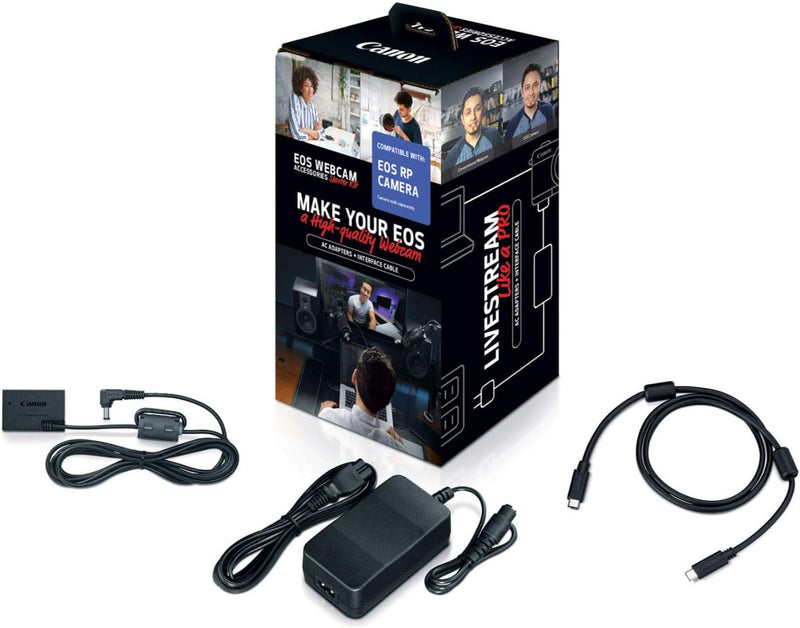
Canon 1425C009 EOS Webcam Starter Kit - R Series, AC Adapter
Turn your Canon EOS R-series camera into a high-quality webcam with this all-in-one AC power and USB connectivity kit.
$199.00*
View on Amazon
✓ In Stock on Amazon.com
*Price sourced from Amazon.com. Last updated:Oct 21, 2026.Price and availability are subject to change — details.
Affiliate Disclosure: As an Amazon Associate, Studio Supplies earns from qualifying purchases made through links on this page, at no additional cost to you. This helps support our editorial team.
Notice a mistake? Let Us Know
Overview
Key Features
Webcam Accessories Included: AC Adapter AC-E6N, DC Coupler DR-E18 and Interface Cable IFC-100U; webcam accessory kit helps enhance the way you record and share your content
Computer Connectivity: The included interface cable IFC-100U allows simple connectivity between your select EOS R series camera to a laptop, desktop, PC or other USB devices with a USB Type-C port
Longer Shooting Sessions: Power your video camera by using the included AC Adapter AC-E6N and DC Coupler DR-E18; plug the digital camera power cord into a household outlet for even longer shooting sessions
Free EOS Webcam Utility Software: Canon EOS webcam kit works together with our free EOS Webcam Utility Software to turn your EOS camera into a high-performance webcam. Compatible with EOS RP, EOS R10, EOS R8, EOS R50, EOS R100 cameras
Power Supply for Camera: The compatible AC Adapter AC-E6N and DC Coupler DR-E18 let you power up your select Canon EOS R series digital camera anywhere a convenient outlet is located, including indoors, outdoors, in-studio or near a tabletop
Specifications
Brand
Canon
Model
1425C009
Included
AC Adapter AC-E6N, DC Coupler DR-E18, Interface Cable IFC-100U (USB Type-C)
Compatible Cameras
Canon EOS RP, EOS R10, EOS R8, EOS R50, EOS R100
Power Source
AC (wall outlet)
Cable Type
USB Type-C
Frequently Asked Questions
Which Canon cameras are compatible with this webcam starter kit?
The kit works with the Canon EOS RP, EOS R10, EOS R8, EOS R50, and EOS R100.
What is included in the kit?
The kit includes the AC Adapter AC-E6N, DC Coupler DR-E18, and Interface Cable IFC-100U (USB Type-C).
Do I still need Canon's EOS Webcam Utility software?
Yes, you will need to download Canon's free EOS Webcam Utility to enable webcam functionality on your computer. The kit provides the hardware; the software handles the video signal.
Can I use this kit for extended streaming sessions?
Yes, because the AC adapter replaces the battery as the power source, you can stream or record for hours without worrying about battery life.
Does the kit work with both Mac and PC?
The USB Type-C cable connects to laptops, desktops, and PCs. Compatibility depends on the EOS Webcam Utility software, which Canon offers for both Windows and macOS.
Related Products


