

Corsair
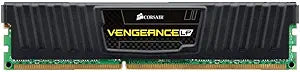
Corsair CML8GX3M1A1600C9 8GB 1600MHz DDR3 Vengeance Memory
Reliable 8GB DDR3 desktop memory with a low-profile heatspreader built for tight builds and stable 1600MHz performance.
Check availability
Affiliate Disclosure: As an Amazon Associate, Studio Supplies earns from qualifying purchases made through links on this page, at no additional cost to you. This helps support our editorial team.
Notice a mistake? Let Us Know
Overview
Specifications
Brand
Corsair
Model
CML8GX3M1A1600C9
Series
Vengeance Low Profile
Capacity
8GB
Memory Type
DDR3
Speed
1600MHz
CAS Latency
9-9-9-24
Voltage
1.5V
Form Factor
240-pin DIMM
Module Count
1
Frequently Asked Questions
What type of motherboard is this RAM compatible with?
This module fits any desktop motherboard with a 240-pin DDR3 DIMM slot that supports 1600MHz or higher speeds.
Will this fit under large CPU coolers?
Yes. The Vengeance Low Profile series uses a compact heatspreader specifically designed to clear oversized air coolers and top-mounted radiator fans.
Can I pair this with another 8GB stick for 16GB total?
Yes, you can add a second matching CML8GX3M1A1600C9 module in a dual-channel configuration for 16GB and improved memory bandwidth.
What CAS latency does this module run at?
It operates at CAS 9 with full timings of 9-9-9-24 at 1.5V, which are standard XMP-ready timings for DDR3-1600.
Does this require any BIOS configuration to reach 1600MHz?
Most motherboards will auto-detect the correct speed via the SPD profile. If your board defaults to a lower speed, enable the XMP profile in BIOS to lock in 1600MHz.
Related Products
