

Dell
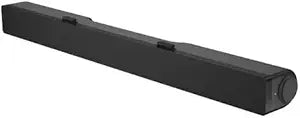
Dell AC511 USB Powered Soundbar Speaker
★★★★★
The Dell AC511 clips under your monitor and draws everything it needs from a single USB cable — instant stereo audio with no power brick and no desk clutter.
$29.99*
View on Amazon
✓ In Stock on Amazon.com
*Price sourced from Amazon.com. Last updated:Jun 27, 2026.Price and availability are subject to change.
Affiliate Disclosure: Studio Supplies may earn a commission from qualifying purchases made through links on this page, at no additional cost to you. This helps support our editorial team.
Notice a mistake? Let Us Know
Overview
Specifications
Brand
Dell
Model
520-11497
Rated RMS Power
2.5W
Connectivity
USB (wired)
Dimensions (W x D x H)
406 x 39 x 49 mm
Weight
454g
Headphone Jack
3.5mm
Cables Included
USB
Pros & Cons
👍 Pros
- Single USB cable handles both power and audio signal — zero additional cables, zero power adapters, and no desk space consumed beyond the soundbar itself
- Integrated 3.5mm headphone jack on the soundbar provides front-accessible private listening without reaching to the back of the computer
- No driver installation required — USB audio class compliance means plug-in-and-play operation on Windows, macOS, and Linux out of the box
- At 406mm wide, the soundbar fits cleanly under most 24–27-inch Dell monitors without overhanging edges, maintaining a visually tidy desk setup
- At 454g, the unit is light enough that the monitor mounting bracket holds it securely without adding detectable display tilt
👎 Cons
- 2.5W RMS output lacks the bass response and volume headroom for music listening at moderate-to-loud levels in open-plan or noisy environments
- Physical mounting bracket is designed for specific Dell monitor models — on non-Dell monitors, the soundbar requires desk surface placement rather than monitor attachment
- No physical volume control on the soundbar itself — all volume adjustments go through OS software or keyboard shortcuts, which is inconvenient during calls when quick muting is needed
- Wired USB connection limits placement to within cable reach of the USB port — repositioning requires a USB extension cable
- Stereo imaging from two drivers positioned close together at monitor-base height is narrow, without the soundstage separation that desktop satellite speakers at ear level provide
Frequently Asked Questions
Does the AC511 work with non-Dell monitors and non-Dell computers?
Yes for computers — it's USB audio class compliant and requires no drivers on Windows, macOS, or Linux. For mounting, the clip bracket is designed for specific Dell monitor models. On non-Dell monitors, it can sit flat on the desk and connect via USB to any computer, just without the clip attachment.
Does plugging in the AC511 replace my PC's existing audio, or does it appear as a separate device?
It appears as a separate USB audio output in your OS. You select it as your playback device in Windows Sound settings or macOS Sound preferences. Your onboard audio remains available — switching between them requires no hardware changes.
Is 2.5W RMS enough for music listening, or is this more of a background audio device?
It produces clear, adequate volume for a quiet desk environment — well-suited to video calls, YouTube, podcasts, and system alerts. Music listening is functional rather than immersive; bass response is limited by the compact enclosure. If rich audio for music or movies is the goal, this product isn't built for that use case.
Does the headphone jack mute the soundbar speakers automatically?
Yes. Plugging headphones into the AC511's integrated 3.5mm jack mutes the soundbar speakers and routes audio to the headphones. It functions as a convenient front-panel audio access point without reaching to the back of the PC.
Does USB bus power actually cover the full 2.5W output, or does it need a separate power source?
USB bus power covers the full 2.5W RMS output. No external power adapter is needed or included. The single USB cable handles both data and power — that's the core design intent.
Related Products


