

Elgato
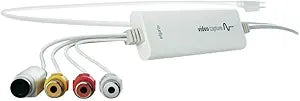
Elgato 10020840 Video Capture USB 2.0 VHS to Digital
Digitize Your Memories with Elgato Video Capture The Elgato Video Capture allows you to easily convert analog video from VCRs, DVRs, camcorders, and other devices into high-quality digital files. With user-friendly software and compatibility across Mac, Windows, and iPad, preserving your cherishe...
Search on Amazon
Affiliate Disclosure: As an Amazon Associate, Studio Supplies earns from qualifying purchases made through links on this page, at no additional cost to you. This helps support our editorial team.
Notice a mistake? Let Us Know
Overview
Digitize Your Memories with Elgato Video Capture
The Elgato Video Capture allows you to easily convert analog video from VCRs, DVRs, camcorders, and other devices into high-quality digital files. With user-friendly software and compatibility across Mac, Windows, and iPad, preserving your cherished memories has never been easier.
Key Features:
- Easy Analog-to-Digital Conversion: Convert video from VCR, DVR, camcorder, or any analog video device.
- High-Quality H.264 Format: Captures video as a high-quality H.264 file.
- User-Friendly Software: Simple and intuitive software guides you through every step.
- Versatile Compatibility: Works with Mac, Windows, and iPad.
- Easy Sharing: Sync with iPad, iPhone, edit in iMovie or Windows Live Movie Maker, or upload to YouTube.
Detailed Specifications:
- Video Format: H.264 at 1.4 MBit/sec or MPEG-4 at 2.4 MBit/sec
- Audio: AAC, 48kHZ, 128 kBit/sec
- Video Resolution: 640×480 (4:3) or 640×360 (16:9)
- Compatibility: NTSC, SECAM, PAL, PAL/60 video formats
- System Requirements (Mac): OS X 10.6.8 or later
- System Requirements (PC): Windows 7 or later, 2 GHz Intel Core 2 Duo (or comparable), sound card
Frequently Asked Questions
What USB port does this need?
This connects via USB and is compatible with most computers. Check the specific USB version required (2.0 or 3.0) as this affects maximum capture resolution.
What video sources can I digitize with this?
This device captures composite video and S-Video signals, making it suitable for VHS tapes, camcorder footage, and other analog sources. The output is standard definition (480i/576i) matching the source quality.
What software works with the Elgato 10020840 Video Capture?
Compatible with OBS Studio, Streamlabs, Elgato's 4K Capture Utility, and virtually any streaming or recording software that supports standard capture devices.
Does this device add any latency?
Some capture latency is inherent. For the lowest latency monitoring, use the device's passthrough output (if available) rather than the software preview.
Is Elgato reliable for professional video equipment?
Elgato (Corsair) is the leading brand in consumer and prosumer game capture and streaming hardware, known for reliable products with strong software support.
Related Products


