



Elgato
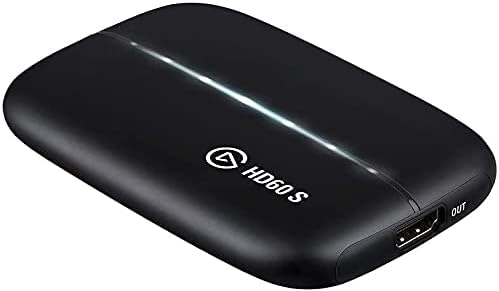
Elgato HD60 S Capture Card (Renewed)
Bring console footage into OBS at true 1080p/60fps over USB 3.0 — a proven card that still delivers clean captures without the latency tax of cheaper alternatives.
View on Amazon for pricing
Affiliate Disclosure: As an Amazon Associate, Studio Supplies earns from qualifying purchases made through links on this page, at no additional cost to you. This helps support our editorial team.
Notice a mistake? Let Us Know
Overview
Specifications
Video Capture Resolution
1080p / 60fps (maximum)
Hardware Interface
USB 3.0
Video Input
HDMI
HDMI Passthrough
Supported
Compatible Consoles
PS5, PS4/Pro, Xbox Series X/S, Xbox One
PC Compatibility
PC, Mac (driver-dependent)
Condition
Renewed (Amazon Certified)
Frequently Asked Questions
Does the HD60 S work plug-and-play with OBS Studio, or does it require Elgato's own software?
OBS Studio recognizes the HD60 S as a standard Video Capture Device source without any additional drivers on most Windows 10/11 setups. You can add it as a source directly in OBS and set it to 1080p60. Elgato's 4K Capture Utility software is optional — useful for recording locally without OBS open, but not required for a standard streaming workflow.
What's the actual latency through the HD60 S when monitoring gameplay on PC?
Passthrough latency to your TV or monitor via the HDMI passthrough is hardware-level — imperceptibly low, so you play on your display as normal. The USB 3.0 capture feed into OBS introduces a small software delay (typically 60–200ms depending on your PC), which is why you should always monitor gameplay via the passthrough output, not the OBS preview.
Will this work for capturing PS5 or Xbox Series X at 1080p?
Yes — both consoles output 1080p/60fps via HDMI, which the HD60 S captures cleanly. Note that neither console's 4K output nor HDR signal passes through for capture at native 4K; the card's ceiling is 1080p60. For viewers watching a 1080p stream, the output quality is indistinguishable from a more expensive card.
Does the HD60 S work on Mac as well as PC?
Mac compatibility exists but has historically been inconsistent across macOS versions, particularly with OBS on Apple Silicon Macs. On Intel Macs it is generally reliable. If you're on an M1/M2/M3 Mac, verify current driver compatibility before purchasing — this is the most common friction point reported in the creator community.
Is the "Renewed" unit functionally identical to new?
Amazon Renewed units are tested to meet original manufacturer specifications and include a 90-day Amazon Renewed Guarantee. Capture quality, USB 3.0 throughput, and passthrough functionality are identical to new — the hardware itself has no wear-prone components that degrade capture quality under normal streaming use.
Related Products


