

Epson
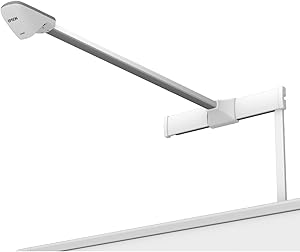
Epson V12H415020 Brightlink Solo Interactive Projector Module
Transform Any Surface into an Interactive Learning SpaceThe Brightlink Solo Interactive Mod instantly turns any whiteboard or wall into an interactive learning area. Simply connect to your computer via USB to create an engaging and collaborative environment for students and presenters alike. Key ...
Check availability
Affiliate Disclosure: As an Amazon Associate, Studio Supplies earns from qualifying purchases made through links on this page, at no additional cost to you. This helps support our editorial team.
Notice a mistake? Let Us Know
Overview
Transform Any Surface into an Interactive Learning Space
The Brightlink Solo Interactive Mod instantly turns any whiteboard or wall into an interactive learning area. Simply connect to your computer via USB to create an engaging and collaborative environment for students and presenters alike.
Key Features:
- Connects via USB
- Transforms surfaces up to 96" into interactive areas
Key Features
Premium interactive whiteboard quality and functionalityFlexibility to fit your needsMaximize classr
Specifications
Product Type
Interactive Projector Module
Brand
Epson
Model
V12H415020 Brightlink Solo
Functionality
Interactive whiteboard quality
Frequently Asked Questions
What is the Epson Brightlink Solo Interactive Projector Module designed to do?
The Epson Brightlink Solo Interactive Projector Module is designed to provide premium interactive whiteboard quality and functionality, enhancing classroom or meeting room engagement.
Is this a standalone projector?
No, this is an interactive projector module, meaning it is an add-on that works with an existing projector to provide interactive features, rather than being a standalone projector itself.
Does this module offer flexibility for different setup needs?
Yes, it is described as offering flexibility to fit various needs, allowing users to maximize classroom potential.
Are specific interactive features, like touch or pen support, detailed?
The product overview mentions "interactive whiteboard quality and functionality" but does not detail specific interactive features such as pen types or touch capabilities.
What kind of surfaces can this module make interactive?
The module is designed to allow users to transform any surface into an interactive workspace.
Is information available on which Epson projectors this module is compatible with?
The product features do not provide specific compatibility details regarding which Epson projector models this module works with.
Are there any software bundles included for educational use?
While it aims to maximize classroom potential, the provided features do not detail any specific educational software or tools included with the module.
Related Products


