



FEELWORLD
FEELWORLD LIVEPRO L1-OF-US HDMI Video Mixer USB 3.0 Streaming
USB 3.0USB3.0
Create Professional Live Streams with EaseThe FEELWORLD LIVEPRO L1 is a multi-format video mixer and switcher that simplifies live streaming and multi-camera production. With 4 HDMI inputs, USB 3.0 output, and advanced broadcast features, this device lets you produce high-quality live content for...
$221.39*
View on Amazon
✓ In Stock on Amazon.com
*Price sourced from Amazon.com. Last updated:Aug 27, 2026.Price and availability are subject to change — details.
Affiliate Disclosure: As an Amazon Associate, Studio Supplies earns from qualifying purchases made through links on this page, at no additional cost to you. This helps support our editorial team.
Notice a mistake? Let Us Know
Overview
Create Professional Live Streams with Ease
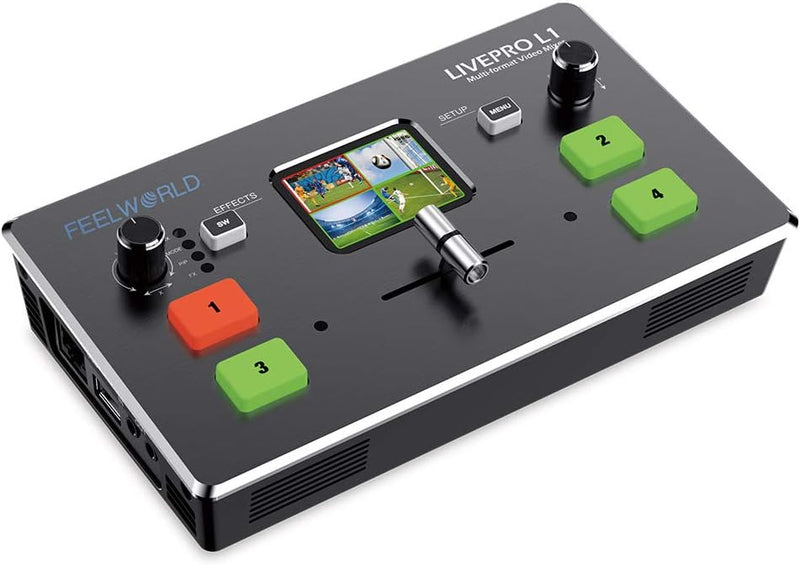
The FEELWORLD LIVEPRO L1 is a multi-format video mixer and switcher that simplifies live streaming and multi-camera production. With 4 HDMI inputs, USB 3.0 output, and advanced broadcast features, this device lets you produce high-quality live content for any platform.
- Inputs: 4 x HDMI, Audio
- Output: 1 x HDMI, Audio, 1 x USB 3.0 Type-A
- HDMI Input Support: SMPTE 720p@50/60
Key Features
【Live Streaming】The USB 3.0 output of LIVEPRO L1 connects to any computer and looks like a built in webcam, so all streaming software for social media platforms work! With up to 4 HDMI inputs you can set up multiple camera angles, view and stream images from different angles
【Exquisite and Flexible Control Panel】The 4 buttons are for selecting input signals. We can preview 4 HDMI signals and easily do menu setting. The T-Bar of LIVEPRO L1 support 14 transition effects and signal switching
【USB 3.0 Live Streaming】Multifunctional, dramatically better quality images. USB3.0 interface can connect to PC and smart phone that as a simple webcam source, can works with software and platforms make live streaming more convenient and fast
【APP Control】Download the APP on smart phone or connecting the LAN port to the computer, can remotely control the switcher. Achieve the control room be separated from the performance or interview area
【Package Include】1× 1.5A Adaptor, 1× USB 3.0 Cable, 1× Manual. 【Audio In and Out】LIVEPRO L1 with AUDIO IN and OUT. The output interface can be connected to speakers, headsets, etc.; The AUDIO IN interface is a linear input interface, which is connected to digital signal
Specifications
Brand
FEELWORLD
Model
LIVEPRO L1-OF-US
Inputs
4 HDMI, Audio In
Outputs
USB 3.0, Audio Out
Control
Buttons, T-Bar, APP Control (LAN/Smartphone)
Transition Effects
14
Power Adapter
1.5A
Frequently Asked Questions
What video resolutions does the FEELWORLD LIVEPRO L1-OF-US support for streaming?
The product description indicates USB 3.0 output and HDMI inputs for video, but specific supported resolutions or frame rates are not detailed.
Can I connect external speakers directly to this video mixer?
Yes, the LIVEPRO L1 includes an AUDIO OUT interface designed for connecting to speakers, headsets, or similar audio output devices.
Is a smartphone required to control the FEELWORLD LIVEPRO L1-OF-US?
No, control can be achieved either by downloading an app on a smartphone or by connecting the LAN port to a computer for remote operation.
What kind of audio input can be connected to the LIVEPRO L1?
The AUDIO IN interface is a linear input, intended for connecting digital audio signals.
Are there any specific requirements for the computer to recognize the LIVEPRO L1 as a webcam?
The USB 3.0 output connects to any computer and is designed to appear as a built-in webcam, working with standard streaming software.
Does the package include HDMI cables for connecting multiple cameras?
The package includes a 1.5A adaptor, a USB 3.0 cable, and a manual, but HDMI cables are not listed as included items.
Related Products


