



FEELWORLD
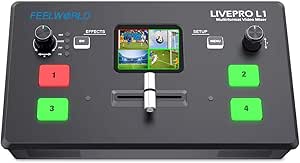
FEELWORLD LIVEPRO L1 V1 Multiformat HDMI Video Mixer
1080pUSB3.0
Compact four-input HDMI video switcher with USB 3.0 streaming output and built-in LCD preview for live multi-camera production.
$245.99*
Check availability
*Price sourced from Amazon.com. Last updated:Aug 28, 2026.Price and availability are subject to change — details.
Affiliate Disclosure: As an Amazon Associate, Studio Supplies earns from qualifying purchases made through links on this page, at no additional cost to you. This helps support our editorial team.
Notice a mistake? Let Us Know
Overview
Key Features
[High-quality multi-camera production] The LIVEPRO L1 switcher is equipped with four HDMI signal input interfaces and one HDMI output interface. All HDMI interfaces support 1080p format. The equipped USB3.0 interface can realize live streaming. One LAN interface is used for control and upgrade. The two audio interfaces are input and output respectively. These interfaces help you create professional multi-camera live productions.
[Elaborate panel design] Elaborate and compact control panel, 4 buttons used to switch input signal sources; menu buttons used to select and set menus; SW buttons used to select various functions; left knob Is used for audio control; the right knob is used for menu settings. From the front panel TFT screen, you can display four preview (PVW) screens, or display the logo and signal source name to prevent miscuts.
[Use with various streaming media software] Through the USB3.0 interface, the switcher can be connected to any computer and used with streaming media software of various social media platforms. You can also connect to PPT slides, video clip playback, and computer or game consoles with websites. It switches all content in real time, allowing you to live stream on major national and international social media platforms such as Youtube, Facebook and TikTok.
[PC control / remote control] No other software is required to connect the switcher to the computer via the LAN interface. The XPOSE broadcast control software can control the switcher over a network cable. This control operation is the same as the operation of the switch.
[Audio Input and Output] The switcher has audio input and output, and the "AUDIO OUT" output interface can be connected to speakers, headsets, audio, etc. The "AUDIO IN" interface is a linear input interface (LINE IN) that connects to digital signals. The microphone collects analog signals, so if it is directly connected to the LIVEPRO L1 audio input interface, it will not receive audio.
Specifications
Brand
Feelworld
Model
LIVEPRO L1 V1
Video Inputs
4x HDMI (1080p)
Video Output
1x HDMI (1080p)
USB Interface
USB 3.0 (for live streaming)
Control Interface
LAN (for control and firmware upgrade)
Audio Interfaces
1x Line-Level Input, 1x Output
Display
2-inch LCD
Included Accessories
USB Cable, Power Adapter
Frequently Asked Questions
How many video sources can the LIVEPRO L1 V1 handle simultaneously?
It supports four HDMI inputs and one HDMI output, all at 1080p resolution, allowing you to switch between up to four cameras or video sources during a live production.
Can I use this switcher for live streaming directly?
The USB 3.0 interface allows the switcher to connect to a computer as a video capture device, enabling you to stream through software on platforms like YouTube, Facebook, and TikTok.
Does the LIVEPRO L1 V1 accept microphone input directly?
No. The audio input is a line-level (LINE IN) interface designed for digital audio signals. Microphones output analog signals and will not be picked up if connected directly — you would need an external preamp or audio mixer between the microphone and the switcher.
Can I control the switcher remotely from a computer?
Yes. By connecting the switcher to a computer via the LAN interface, you can use Feelworld's XPOSE broadcast control software to operate the switcher over a network cable without additional software installation.
Does the built-in screen show all four inputs at once?
Yes, the 2-inch LCD display can show a quad-view of all four preview (PVW) screens simultaneously, or display signal source names and logos to help prevent accidental cuts.
Related Products


