

Korg
Korg NANOKEY-ST MIDI Controller - Black
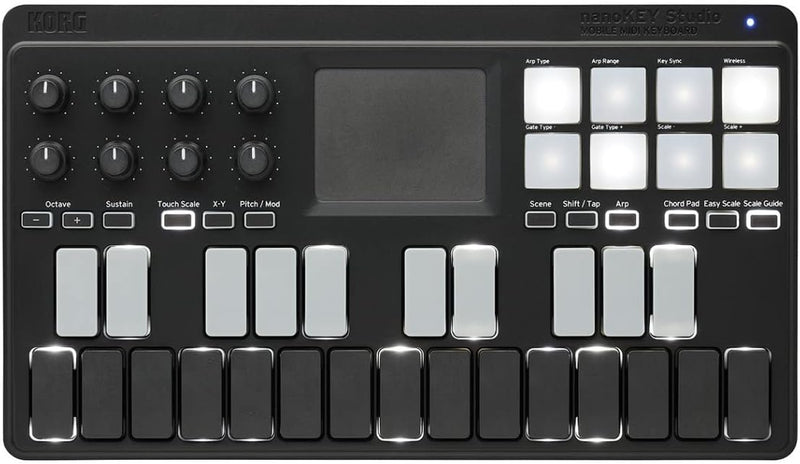
The Korg nanoKEY Studio puts 25 velocity-sensitive keys, pads, knobs, and Bluetooth MIDI into a sub-pound controller built for mobile production.
$169.99*$170.82Save 0%
View on Amazon
✓ In Stock on Amazon.com
*Price sourced from Amazon.com. Last updated:Oct 22, 2026.Price and availability are subject to change — details.
Affiliate Disclosure: As an Amazon Associate, Studio Supplies earns from qualifying purchases made through links on this page, at no additional cost to you. This helps support our editorial team.
Notice a mistake? Let Us Know
Overview
Key Features
USB/Bluetooth LE MIDI Instrument Controller with 25 Low-profile Keys
8 Velocity-sensitive Pads
X-Y Touch Pad
8 Knobs
Specifications
Keys
25 velocity-sensitive low-profile keys
Pads
8 velocity-sensitive trigger pads
Knobs
8 assignable knobs
Touchpad
X-Y touch pad
Wireless
Bluetooth Low Energy MIDI
USB Connection
Micro B type
Power
USB bus power or 2 AAA batteries
Dimensions
10.94" x 6.30" x 1.30"
Weight
1.04 lbs (without batteries)
Color
Black
Frequently Asked Questions
Does Bluetooth MIDI introduce enough latency to affect live performance or real-time recording?
Bluetooth LE MIDI latency is typically in the 5–15ms range on a well-paired connection — perceptible in latency-sensitive playing but manageable for most production workflows. For real-time recording of expressive parts where timing feel matters, the USB connection eliminates this variable entirely. Bluetooth shines for programming sequences, adjusting parameters, and sketching ideas away from a desk.
Can the nanoKEY Studio run on battery power alone, fully wireless?
Yes — the nanoKEY Studio runs on two AAA batteries with Bluetooth LE MIDI, making it genuinely untethered from a computer or USB hub. Battery life depends on usage, but MIDI data transmission over BLE is low-power and shouldn't drain cells quickly during a typical session.
How do the 25 keys handle velocity response — are they suitable for expressive keyboard playing?
The low-profile keys are velocity-sensitive but their short travel makes them fundamentally different from a full-size keyboard or even semi-weighted mini keys. They read velocity gradations reliably for programming parts and triggering synths, but players expecting the dynamic feel of a piano-style keyboard will find the shallow travel limits expressive nuance. They're designed for producers programming rather than pianists performing.
What DAWs and software synthesizers does the nanoKEY Studio work with?
As a class-compliant USB MIDI device, the nanoKEY Studio works with any DAW that receives MIDI input — Ableton Live, Logic Pro, FL Studio, Bitwig, Pro Tools, and others without driver installation. The Korg KONTROL Editor software allows deep parameter mapping for the knobs, pads, and touchpad beyond default assignments.
What does the X-Y touch pad control, and can it be reassigned?
The X-Y touch pad transmits MIDI CC data on two axes simultaneously — by default mapped to pitch and modulation, but fully reassignable via Korg's KONTROL Editor. In practice it functions as an expressive performance surface for filter sweeps, vibrato, or any dual-parameter modulation your synth or DAW accepts.
Related Products


