

Korg
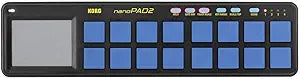
Korg NANOPAD2-BLYL USB Touchpad Controller Blue
★★★★★
Unleash Your Creativity: KORG nanoPAD2 Touchpad Controller Celebrate a decade of innovation with the KORG nanoPAD2, a slim-line USB controller designed for mobile music production. Featuring 16 velocity-sensitive trigger pads, an X-Y touchpad, and comprehensive control options, the nanoPAD2 empow...
Check availability
Affiliate Disclosure: Studio Supplies may earn a commission from qualifying purchases made through links on this page, at no additional cost to you. This helps support our editorial team.
Notice a mistake? Let Us Know
Overview
Unleash Your Creativity: KORG nanoPAD2 Touchpad Controller
Celebrate a decade of innovation with the KORG nanoPAD2, a slim-line USB controller designed for mobile music production. Featuring 16 velocity-sensitive trigger pads, an X-Y touchpad, and comprehensive control options, the nanoPAD2 empowers musicians and producers to create and edit music intuitively on their PC or tablet.
Specifications:
- Brand: Korg
- Model: NANOPAD2-BLYL
- Pads: 16 Velocity-Sensitive Trigger Pads
- Velocity Curves: 4
- Other Controls: X-Y Pad, Hold Button, Gate Arp Button, Touch Scale Button, Key/Range Button, Scale/Arp Button, Scene Button
- Memory Slots: 4
- Ports: 1 x USB mini, 1 x USB for power supply
- Dimensions: 325 x 83 x 16 mm
- Weight: 285g
Key Features
Product – KORG nanoPAD2 slim-line USB controller, colour: black with blue buttons, dimensions: 325 x 83 x 16 mm, weight: 285g, ultra-compact format, controls: 16 velocity trigger pads with 4 velocity curves (sound benches), other control buttons: X-Y pad, Holder. d eee1 D E-Arp button, touch scale button, key/range button, scale/arp button, scene button - memory slots: 4 - ports: 1 x USB mini, 1 x USB for power supply - fits this software: any host application with MIDI input
Box contents: USB cable. Free editor software package: KORG control editor with three velocity settings and control change + KORG gadget Le and M1 Le + Ozone Elements + Reason Lite version 10 + much more
KORG nanoKONTROL2 - The compact surface of the KORG nanoPAD2 USB controller offers musicians and producers comfortable ways to edit and compose music pieces or phrases on a PC or tablet. A total of 16 touch-sensitive touch pads are available, each with four sound benches. So you can play with a total of 64 different sounds and get creative. The nanoPAD2 offers you comprehensive options to control the elements of your DAW or software synthesizer. Thanks to the clean surface, you can find your way intuitively. The nanoPAD2 works with most music programs.
Quality – The fact that the KORG nanoPAD2 USB controller is thoughtfully configured can be seen by the selection of controls in combination with the functions. The 16 trigger pads are velocity-dynamic. Thus, they react sensitively to the touches of your fingertips and transfer your playing style faithfully to sequencer or DAW software. By switching between the four scenes of each pad, you can use 64 different pad assignments to give your music even more expression. Thanks to the compact and robust surface of the nanoPAD2, you can also play it comfortably in live use.
Advantages – whether in the home, in the studio, on stage or on the go, the KORG nanoPAD2 is versatile. In addition to a high-quality and intuitive product, you will receive an extensive package of editor and creative software. The USB interface allows you to connect the controller to your tools such as an Apple iPad and work with it immediately.
Specifications
Product Type
USB Touchpad Controller
Color
Black with blue buttons
Dimensions
325 x 83 x 16 mm
Weight
285g
Control Pads
16 velocity trigger pads with 4 velocity curves (sound benches)
Other Controls
X-Y pad, Holder, d eee1 D E-Arp button, touch scale button, key/range button, scale/arp button, scene button
Memory Slots
4
Ports
1 x USB mini, 1 x USB for power supply
Compatibility
Any host application with MIDI input
Box Contents
USB cable, Free editor software package (KORG control editor, KORG gadget Le, M1 Le, Ozone Elements, Reason Lite version 10)
Pros & Cons
👍 Pros
- Sixteen velocity-sensitive trigger pads allow for dynamic and expressive musical input.
- Ultra-compact and lightweight design makes the controller highly portable for musicians on the go.
- Includes an X-Y pad, hold, ee1, D, E-Arp, touch scale, key/range, scale/arp, and scene buttons for versatile control.
- Comes with an extensive free editor and creative software package, including KORG gadget Le and M1 Le.
- Robust construction is suitable for comfortable use in live performance settings.
👎 Cons
- Relies solely on a USB mini port for connection, which might require adapters for some modern devices.
- The compact size, while portable, could feel restrictive for users preferring larger pad layouts.
- Specific control buttons like "Holder. d eee1 D E-Arp" may have a steeper learning curve for new users.
- Requires a host application with MIDI input, meaning it is not a standalone music creation device.
- Only offers a black with blue buttons color scheme, limiting aesthetic choices.
Frequently Asked Questions
What are the dimensions and weight of the KORG nanoPAD2 controller?
The KORG nanoPAD2 controller has dimensions of 325 x 83 x 16 mm and weighs 285g, making it an ultra-compact and portable device.
How many velocity trigger pads does this controller feature?
It features 16 velocity trigger pads, each with four velocity curves (sound benches), allowing for expressive input.
What connectivity options are available on the nanoPAD2?
The controller offers 1 x USB mini port and 1 x USB port specifically for power supply, facilitating easy connection to a PC or tablet.
What software is included with the KORG nanoPAD2?
The package includes a free editor software package: KORG control editor, KORG gadget Le, M1 Le, Ozone Elements, and Reason Lite version 10, among others.
Can the nanoPAD2 connect to an Apple iPad?
Yes, the USB interface allows for direct connection to tools such as an Apple iPad, enabling immediate use.
How many different sounds can be accessed with the trigger pads?
By utilizing the four sound benches for each pad, users can play with a total of 64 different sounds, offering extensive creative possibilities.
What control buttons are available on the nanoPAD2 in addition to the trigger pads?
Beyond the pads, it includes an X-Y pad, Holder, E-Arp button, touch scale button, key/range button, scale/arp button, and a scene button.
Related Products


