



Kramer
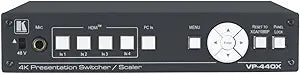
Kramer VP-440X 18G 4K HDR Presentation Switcher Scaler
The Kramer VP-440X delivers 4K HDR switching and scaling across five inputs with CATx signal extension to 40m — one box that solves the room's entire presentation routing problem.
$949.94*$1,142.00Save 16%
View on Amazon
✓ In Stock on Amazon.com
*Price sourced from Amazon.com. Last updated:Aug 28, 2026.Price and availability are subject to change — details.
Affiliate Disclosure: As an Amazon Associate, Studio Supplies earns from qualifying purchases made through links on this page, at no additional cost to you. This helps support our editorial team.
Notice a mistake? Let Us Know
Overview
Specifications
Model
VP-440X
Function
Presentation Switcher Scaler
Video Standard
18G 4K HDR
Frequently Asked Questions
How many inputs does the VP-440X support, and what signal types are accepted?
The VP-440X accepts four HDMI inputs and one VGA input — five total. This covers the common mix of laptop HDMI, legacy VGA presenters, and dedicated media sources found in boardrooms, auditoriums, and event venues. All HDMI inputs support up to 4K@60Hz with 18Gbps bandwidth.
What is the maximum CATx extension range, and does resolution affect that distance?
At 1080p, the CATx output extends up to 70m (230ft). At 4K@60Hz (4:2:0), the range drops to 40m (130ft). This is a physically significant range difference — confirm your cable run before spec'ing this unit for a 4K installation over CAT cable, as a 50m run will force you to 1080p on the CATx output.
Does the VP-440X handle audio separately from video, and what audio outputs are available?
Yes — the VP-440X includes analog stereo audio output and supports microphone embedding. This allows a presenter's mic feed to be embedded into the HDMI or CATx output stream without a separate audio mixer, simplifying AV rack design in rooms where mic reinforcement feeds the display system.
What does CEC support mean for display control in a presentation environment?
CEC (Consumer Electronics Control) allows the VP-440X to send power ON/OFF commands to a connected HDMI display without a separate control system. In a presentation room, this means the display wakes when a source is connected and sleeps when the room goes idle — reducing energy use and eliminating the need for a separate RS-232 or IP control path for basic display management.
Can the VP-440X upscale and downscale, and what does that mean for mixed-resolution presentation environments?
Yes — the VP-440X includes both upscaling and downscaling capability. In practice, this means a 1080p laptop presentation can be upscaled to 4K for a high-resolution display, and a 4K source can be downscaled for a 1080p projector, all without the presenter needing to configure their output resolution manually.
Related Products


