Lewitt

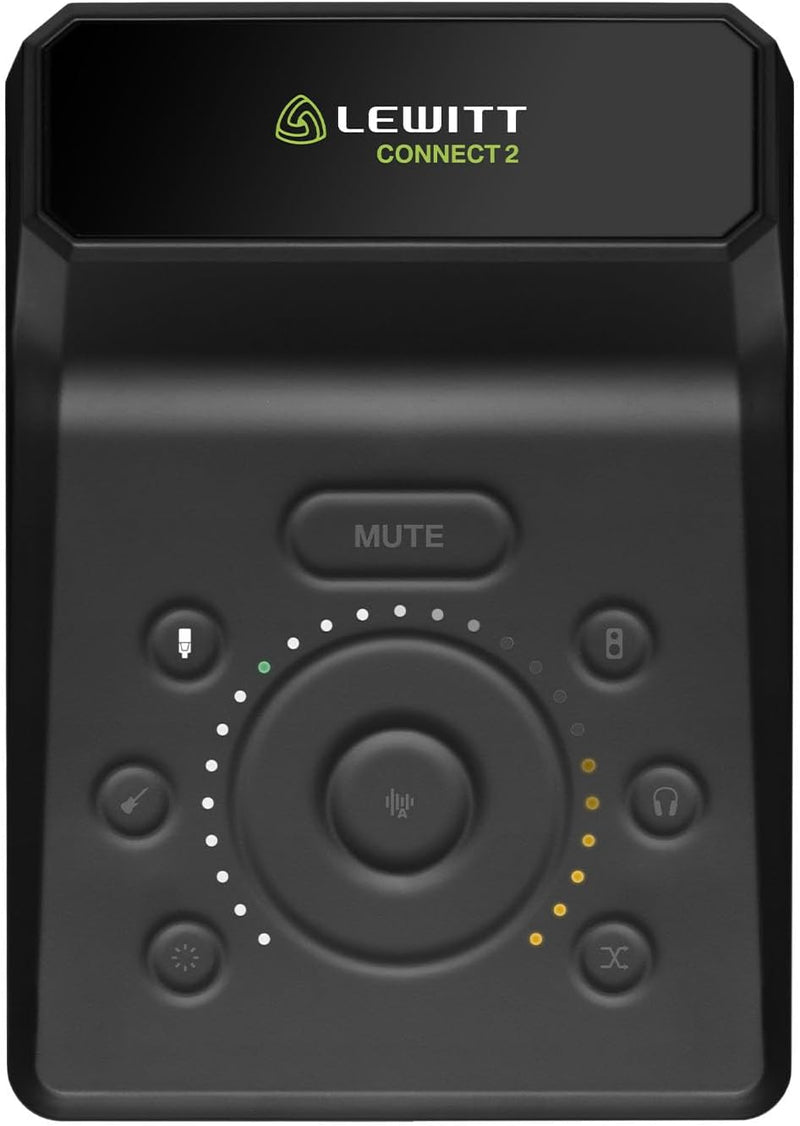
Lewitt CONNECT 2 XLR USB Audio Interface

4.4 (20 reviews)
USB-CXLR

Record studio-quality audio effortlessly with intelligent Autosetup, Clipguard protection, and built-in processing.

$149.00*$199.00Save 25%
In Stock on Amazon.com
View on Amazon

*Price sourced from Amazon.com. Last updated:Jun 08, 2026.Price and availability are subject to change.

Affiliate Disclosure: Studio Supplies may earn a commission from qualifying purchases made through links on this page, at no additional cost to you. This helps support our editorial team.

Notice a mistake? Let Us Know

Overview

The Lewitt CONNECT 2 is a USB-C audio interface built around the idea that professional sound quality should not require professional-level technical knowledge. Its headline feature, Autosetup, analyzes connected microphones and instruments to automatically configure optimal gain staging and input parameters. This is paired with Clipguard, a hardware-based protection system that captures a parallel clean signal at reduced gain, ensuring that unexpected volume spikes never result in clipped, unusable recordings — a problem that software limiters can only partially address.

Beyond the smart input management, the CONNECT 2 includes onboard compressor and denoiser processing that can be applied during recording, reducing background noise and evening out dynamics before the signal reaches your DAW. The interface provides an XLR input with phantom power for condenser microphones and a Hi-Z input for guitars or bass, covering the two most common home studio recording scenarios. Three selectable preamp sounds add tonal character options. Bundled with Steinberg Cubase LE and Cubasis LE, the CONNECT 2 delivers a complete recording chain from input to finished track without requiring any additional software purchases.

Key Features

SENSATIONAL SOUND WITH A FEW CLICKS – This USB-C audio interface makes recording easy and fun. It can do everything you need to get great recordings and makes it super easy to use. You don’t need to be an audio engineer to capture great recordings with CONNECT 2.

AUTOSETUP TO FIND THE BEST SETTINGS – To get setup with CONNECT 2 only takes a few seconds. Simply use the Autosetup function, and after a quick soundcheck you will have the perfect settings. With CONNECT 2, you don't need an audio engineering degree to sound great.

EASY TO USE TOOLS FOR PERFECT SOUND – CONNECT 2 has all the tools you need to get great sound. Autogain finds the perfect levels for you. Denoiser gets rid of unwanted background noise. Compressor creates a uniform sound image, just like your favorite record.

CLIPGUARD PROTECTS YOUR SIGNAL - Clipguard lets you perform without clipping. A single click is enough, and your signal is safe from clipping even when things get very loud. This option is fantastic for streaming, podcasting, and recording alike.

AWARD-WINNING DESIGN - LEWITT is the winner of 15 (!!!) prestigious industry awards and LEWITT products are the first choice for producers and engineers working with artists like Justin Bieber, The Rolling Stones, Halsey, Post Malone, Kehlani, Yngwie Malmsteen, or Doja Cat, be it in the studio or on stage.

Specifications

Brand
Lewitt
Model
CONNECT 2
Type
USB-C Audio Interface
Inputs
XLR, Hi-Z
Features
Autosetup, Clipguard, Compressor, Denoiser
Preamp Sounds
3
Compatibility
PC, Tablet, Smartphone
Bundled Software
Steinberg Cubase LE, Cubasis LE

Lewitt CONNECT 2 — Editorial Review

The Lewitt CONNECT 2 is a compact USB-C audio interface built for content creators, streamers, and podcasters who want clean sound and one-click polish without a learning curve. It leans on a touch interface and smart processing rather than a wall of knobs.

Featured Video Review

Lewitt Connect 2 Interface Review / Walkthrough / Explained
Podcastage · "Lewitt Connect 2 Interface Review / Walkthrough / Explained" · Watch on YouTube

High gain and creator-friendly DSP

MusicTech and The Podcast Host highlight up to 72dB of gain — enough to drive a gain-hungry SM7B without an external booster — plus Lewitt's Clipguard, which automatically tames input spikes in real time, and one-click compressor and denoiser effects for a fast, polished result. In Podcastage's review and walkthrough — featured above — the interface and its software are demonstrated end to end.

Honest cons

  • No line inputs. It's voice/instrument-focused; there's no dedicated line-level input.
  • Touch controls aren't for everyone. Some users prefer physical knobs, especially for quick volume changes.
  • Priced above basics. It costs a little more than similarly-specced entry interfaces.
  • Single mic focus. With one mic preamp, it suits solo creators more than multi-person setups.

Where this interface fits

  • Solo podcasters and streamers who want plug-and-play clean sound with minimal fuss.
  • SM7B and dynamic-mic users who need high clean gain without a Cloudlifter.
  • Creators who value built-in Clipguard, compression, and denoise over manual tweaking.
  • Not multi-input studios, knob-preferring engineers, or those needing line inputs.

Sources & Citations

  1. MusicTech, "Lewitt Connect 2 review," musictech.com (accessed 2026-05-26)
  2. The Podcast Host, "Lewitt Connect 2 review," thepodcasthost.com (accessed 2026-05-26)

Last verified: 2026-05-26

Now that you've seen the details — ready to take a closer look?

View on Amazon

Pros & Cons

👍 Pros

  • Autosetup feature eliminates the guesswork of configuring gain and input settings for beginners
  • Clipguard technology provides hardware-level distortion prevention that software limiters cannot match
  • Built-in compressor and denoiser reduce the need for external processing plugins during recording
  • USB-C connectivity works across PCs, tablets, and smartphones for flexible recording locations

👎 Cons

  • Limited to one XLR and one Hi-Z input, which restricts multi-microphone recording scenarios
  • The built-in processing effects offer convenience but may not satisfy users who prefer dedicated outboard gear
  • Only three preamp sound options, which may feel limited compared to interfaces with more extensive modeling

Frequently Asked Questions

Autosetup automatically detects connected microphones and instruments, then configures gain levels and input settings so you can start recording without manual adjustments.
Clipguard is a hardware-level safety net that captures a clean backup signal at a lower gain, preventing distortion even if your input unexpectedly peaks during recording.
Yes, the CONNECT 2 has an XLR input for microphones and a Hi-Z input for instruments like guitars, allowing simultaneous connection of both sources.
Yes, the USB-C connection is compatible with PCs, tablets, and smartphones, making it suitable for mobile recording setups.
The CONNECT 2 comes with licenses for Steinberg Cubase LE (desktop) and Cubasis LE (mobile), providing full DAW capability out of the box.