Logitech

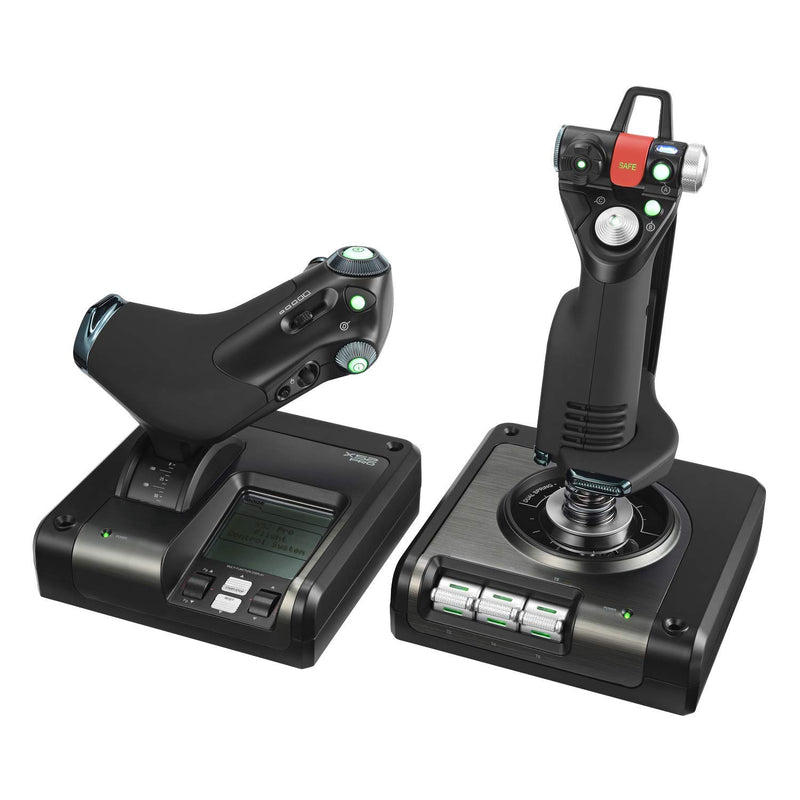
Logitech G X52 Pro 945-000066 USB Flight Control System Simulator

4.2 (768 reviews)
USB 2.0

Take Flight with Precision and Control The Logitech G X52 Pro USB Flight Control System offers an immersive and precise flight simulation experience. With advanced controls, a multifunction LCD, and ergonomic design, this system provides realistic handling and unparalleled control for flight ent...

$199.99*$229.99Save 13%
Check availability

*Price sourced from Amazon.com. Last updated:Jun 04, 2026.Price and availability are subject to change.

Affiliate Disclosure: Studio Supplies may earn a commission from qualifying purchases made through links on this page, at no additional cost to you. This helps support our editorial team.

Notice a mistake? Let Us Know

Overview

Take Flight with Precision and Control

The Logitech G X52 Pro USB Flight Control System offers an immersive and precise flight simulation experience. With advanced controls, a multifunction LCD, and ergonomic design, this system provides realistic handling and unparalleled control for flight enthusiasts.

Specifications:

  • Axis Sensors: Magnetic non-contact X and Y axis
  • Centering Mechanism: Dual spring
  • Display: Multifunction LCD
  • Rudder: 3D Twist with Rudder Lock
  • Grip System: 5-position
  • Programmable Commands: 282 over 3 modes

Key Features

Magnetic non-contact X and Y axis sensors provide enhanced longevity and improved accuracy. A dual spring centering mechanism provides a progressive, smooth movement that further aids your control

Multifunction LCD Display affords even greater control of your navigation within Flight Simulator X, thanks to direct control of the simulation’s radio panel functionality

3D Twist with Rudder Lock, essential for simulation control. For those that already have rudder pedals, you can lock off the axis in order to prevent accidental activation

5-position Grip System: Maintain excellent ergonomic comfort with no need to stretch to reach buttons

282 Programmable Commands over 3 modes: Have all of the commands in Elite Dangerous or Star Citizen under your fingertips with no need to switch back to your keyboard

Compatible with Windows 7, 8, 8.1, 10, and 11 – USB 2.0 interface ensures seamless integration with a wide range of PC setups

Specifications

Sensor Type
Magnetic non-contact X and Y axis
Centering Mechanism
Dual spring
Display Type
Multifunction LCD
Rudder Control
3D Twist with Rudder Lock
Grip System
5-position
Programmable Commands
282 over 3 modes
OS Compatibility
Windows 7, 8, 8.1, 10, 11
Interface
USB 2.0

Pros & Cons

👍 Pros

  • Features magnetic non-contact X and Y axis sensors, delivering enhanced longevity and improved accuracy in flight control.
  • Equipped with a dual spring centering mechanism that provides smooth, progressive movement, further aiding precise control.
  • Includes a Multifunction LCD Display for greater navigation control within Flight Simulator X, directly managing radio panel functions.
  • Incorporates 3D Twist with Rudder Lock, an essential feature for simulation control, allowing users to prevent accidental rudder activation.
  • The 5-position Grip System ensures excellent ergonomic comfort, minimizing the need to stretch for buttons during extended play.
  • Offers 282 Programmable Commands across 3 modes, placing extensive control at your fingertips for complex simulations like Elite Dangerous or Star Citizen.
  • Compatible with a wide range of Windows operating systems, from Windows 7 through 11, ensuring broad PC compatibility.

👎 Cons

  • The comprehensive feature set and programmability may present a learning curve for new users.
  • The 3D Twist with Rudder Lock, while useful, may not be necessary for all users, particularly those with separate rudder pedals.
  • The specific benefits for games outside of Flight Simulator X, Elite Dangerous, or Star Citizen are not detailed.
  • The USB 2.0 interface, while ensuring broad compatibility, is not the most current USB standard available.
  • Requires a USB 2.0 interface, meaning users with only USB 3.0 or higher ports might need to adjust settings for optimal performance.

Frequently Asked Questions

The Logitech G X52 Pro utilizes magnetic non-contact X and Y axis sensors, which are designed to provide enhanced longevity and improved accuracy.
It features a dual spring centering mechanism that delivers a progressive, smooth movement, specifically aiding in more precise and stable control during simulations.
The Multifunction LCD Display offers direct control over Flight Simulator X's radio panel functionality, allowing for greater navigation control within the simulation.
Yes, the 3D Twist with Rudder Lock feature allows you to lock off the rudder axis, which is beneficial if you prefer to use external rudder pedals to prevent accidental activation.
This system supports 282 programmable commands across 3 different modes, providing extensive customization for games like Elite Dangerous or Star Citizen.
Yes, the Logitech G X52 Pro is compatible with Windows 7, 8, 8.1, 10, and 11, ensuring broad compatibility with many PC setups.
The system connects via a USB 2.0 interface, ensuring seamless integration with a wide range of personal computer setups.