



Mackie
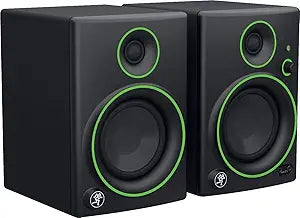
Mackie CR4BT Studio Multimedia Bluetooth Monitors
4 inch
Desktop monitors that bring studio-grade imaging to your creative workspace with 50W of clean stereo power and wireless Bluetooth convenience.
Check availability
Affiliate Disclosure: As an Amazon Associate, Studio Supplies earns from qualifying purchases made through links on this page, at no additional cost to you. This helps support our editorial team.
Notice a mistake? Let Us Know
Overview
Key Features
4 inch monitor, studio-quality design, sound and performance ideal for multimedia creation and entertainment
Stream music from any smartphone, tablet or other bluetooth enabled device
Professional-grade components for optimized sonic performance
A choice of inputs for simple connection to almost any audio source (bluetooth, 1/4", 1/8", rca)
All-wood cabinet provides a natural sonic character
Specifications
Monitor Size
4 inch
Connectivity Options
Bluetooth, 1/4", 1/8", RCA
Cabinet Material
All-wood
Frequently Asked Questions
What inputs does the CR4BT support, and can I use multiple sources simultaneously?
The CR4BT provides four input options — Bluetooth, 1/4" TRS, 1/8" (3.5mm), and RCA — but operates on a single active input at a time. You'll need to manually switch sources; there is no automatic input priority or mixing between analog and Bluetooth simultaneously.
What is the frequency response range of these monitors, and what does that mean for low-end reproduction?
The CR4BT rolls off at 70Hz on the low end, which means sub-bass content below that threshold won't be accurately represented. For music production with significant low-frequency content, a subwoofer pairing or dedicated studio monitors with larger woofers is worth considering.
Does the CR4BT require phantom power or any special power conditioning?
No — the CR4BT is a self-powered (active) monitor system with a built-in 50W amplifier. It plugs directly into a standard wall outlet. No external amplifier or phantom power supply is needed.
How does the 0.75" silk dome tweeter affect the high-frequency response in a mixing context?
The ferrofluid-cooled silk dome provides a smoother, less fatiguing high-frequency response compared to metal dome alternatives. It's tuned for extended listening sessions — you'll hear detail in upper-mid and presence frequencies without harshness, though critical mastering work still warrants larger reference monitors.
Is there a headphone output, and does it mute the speakers when in use?
Yes — there's a front-facing headphone output. Plugging into it mutes the monitor speakers, making it straightforward to switch between speaker and headphone monitoring without touching your interface or DAW routing.
Related Products


