



Mackie
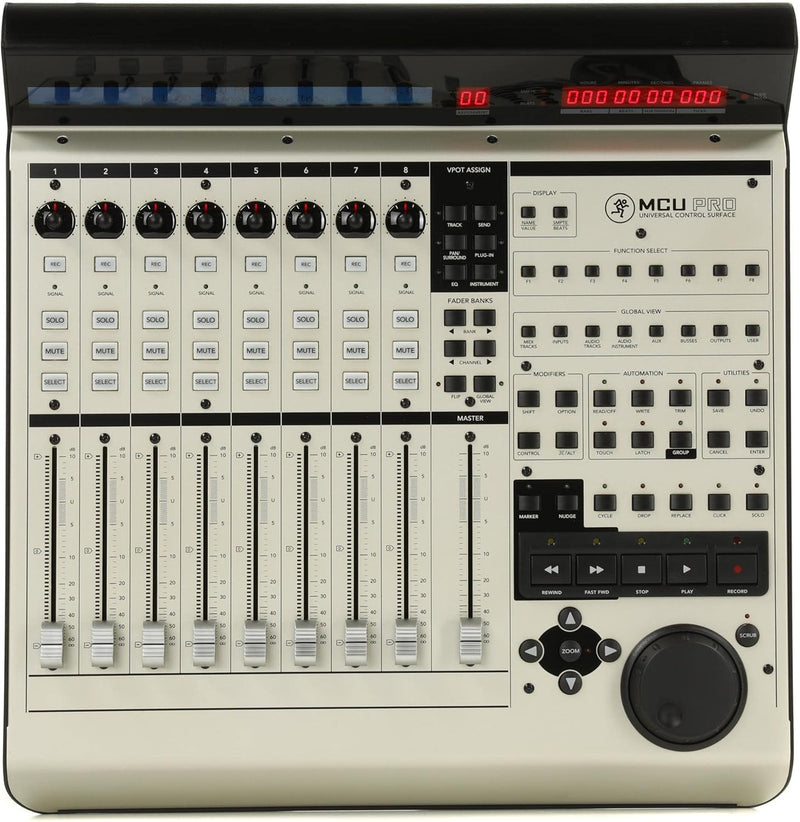
Mackie MCU Pro DAW Control Surface
A hands-on DAW control surface with motorized faders and deep software integration for serious mixing.
$1,299.99*$1,399.99Save 7%
View on Amazon
✓ In Stock on Amazon.com
*Price sourced from Amazon.com. Last updated:Aug 30, 2026.Price and availability are subject to change — details.
Affiliate Disclosure: As an Amazon Associate, Studio Supplies earns from qualifying purchases made through links on this page, at no additional cost to you. This helps support our editorial team.
Notice a mistake? Let Us Know
Overview
Key Features
Proprietary Mackie communication protocol for seamless music production software integration
100mm touch-sensitive optical Alps motorized faders
V-Pot control over software, plug-in effects and virtual instruments
More than 50 dedicated push-buttons for fine control of software parameters
Tape-style transport controls
Specifications
Brand
Mackie
Model
MCU Pro
Faders
9 x 100mm touch-sensitive motorized Alps faders
V-Pots
8 rotary V-Pots with LED collars
Buttons
More than 50 dedicated push-buttons
Display
2-line, 55-character backlit LCD
Connectivity
USB (MIDI interface)
Platform Compatibility
Windows and Mac
Transport Controls
Tape-style transport (play, stop, record, rewind, fast-forward)
Expandability
Compatible with MCU Pro XT extender units
Frequently Asked Questions
What DAWs are compatible with the Mackie MCU Pro?
The MCU Pro uses Mackie's proprietary communication protocol (Mackie Control), which is supported by most major DAWs including Logic Pro, Pro Tools, Cubase, Ableton Live, Studio One, and many others.
How many faders does the MCU Pro have?
It has 9 motorized faders — 8 channel faders plus 1 master fader. All are 100mm touch-sensitive Alps motorized faders.
Can I expand the MCU Pro with additional fader banks?
Yes. The MCU Pro is designed as an expandable system. You can add Mackie MCU Pro XT extender units to increase the number of available faders and channels.
How does the MCU Pro connect to a computer?
It connects via USB, providing a MIDI interface for communication with your DAW software on both Windows and Mac platforms.
What do the V-Pots do?
The 8 rotary V-Pots with LED collar indicators provide hands-on control over software parameters such as panning, plug-in settings, and virtual instrument controls, depending on your DAW's implementation.
Related Products


