
Mackie ProFX10v3+ 10-Channel Mixer — Editorial Review & Independent Findings
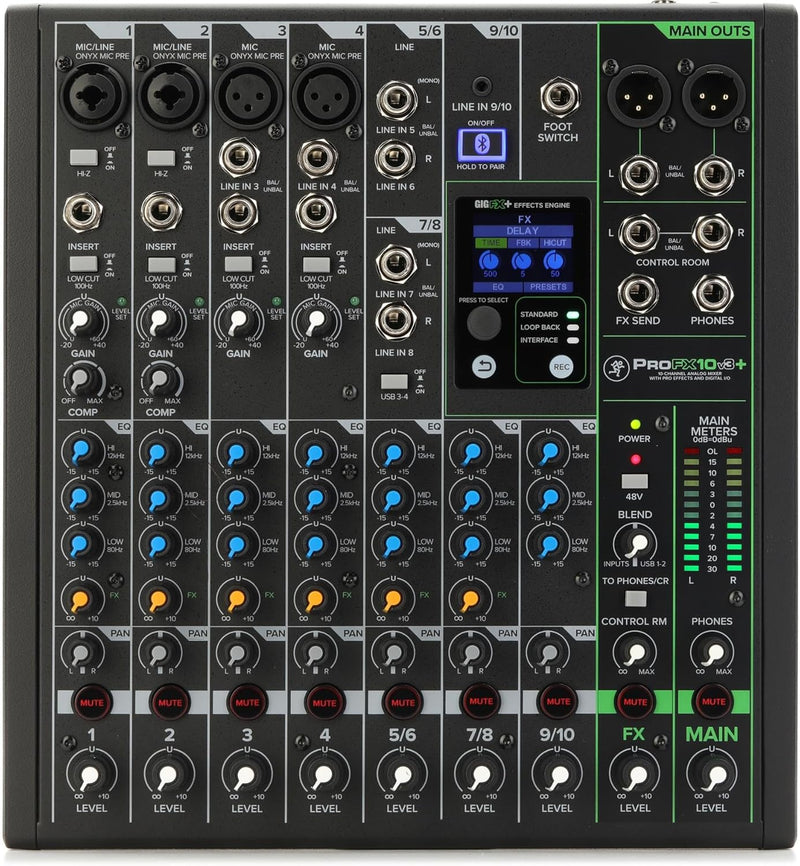
The Mackie ProFX10v3+ is the "Plus" variant of Mackie's 10-channel ProFX v3-series analog mixer, adding enhanced GigFX+ effects, multiple USB recording modes, and a dedicated Bluetooth channel to the platform's existing four Onyx mic preamps and 24-bit / 192 kHz USB-C audio interface. Per Mackie's official ProFX10v3+ product page, the kit ships with 8 channels of EQ + pan + effects (channels 1-2 add compression), Hi-Z switches and a low-cut filter on the mic channels, +48 V phantom power, a stereo 1/8-inch input on channels 9/10, and a full-color LCD for preset edit/save on the GigFX+ engine. The findings below aggregate published Sound on Sound coverage of the broader v3-series + Onyx preamp design.
The Onyx Preamps Are the Headline Feature
Sound on Sound's ProFX12v3 review (the same Onyx-preamp + GigFX architecture as the 10v3+ in a 12-channel package) documents that the v3 ProFX line "use the same Onyx design as Mackie's more expensive mixers" — meaningful because Onyx preamps are typically found on Mackie's flagship Onyx-series mixers at materially higher price points. Sound on Sound's tested findings on the v3 ProFX Onyx preamps: up to 60 dB of gain with switchable 100 Hz low-cut filters, global 48 V phantom power, and the clean transparent character that distinguishes Onyx from generic budget-tier preamps. Mackie's published spec for the 10v3+ confirms 60 dB of gain across four Onyx channels.
USB-C Audio Interface & Three Recording Modes
The integrated USB-C 2x4 audio interface — running 24-bit / 192 kHz — is the feature that turns the ProFX10v3+ from a live mixer into a hybrid studio recording tool. Per Mackie's product specifications, the v3+ revision adds three distinct USB recording modes:
- Standard: records the full mixer output (post-fader, post-effects). Appropriate for capturing finished live mixes
- Loopback: blends computer audio with the mixer signal for live streaming and podcasting workflows where the host wants to fold backing tracks, sound effects, or remote-caller audio into the mixer chain
- Interface: records channels 1-2 pre-effects, making the ProFX10v3+ behave like a dedicated 2-channel audio interface for studio multitracking workflows
The Interface mode is the meaningful upgrade for studio use — it allows recording dry tracks for later mix-time effects application, which the original ProFX10v3 (non-Plus) could not do.
GigFX+ Effects Engine
Per Mackie's product page, the GigFX+ engine offers 24 studio-quality effects (reverbs, delays, chorus, flanger, phaser) with parameter editing and preset saving via the front-panel full-color LCD. Sound on Sound's review of the related ProFX10 Go (same effects DNA in a smaller form factor) characterizes the Mackie effects suite as "workmanlike and effective" — appropriate for live sound and recording, even if dedicated studio plugins would still be the first choice for critical mix decisions. The on-board effects are the right tool for live gig + podcast + streaming workflows where running an external effects rack is impractical.
Bluetooth Channel — Practical Use Cases
Channel-dedicated Bluetooth (not just a 1/8-inch aux) means the ProFX10v3+ can receive audio from a smartphone, tablet, or laptop without cables. Per Mackie's product page, the Bluetooth channel is bidirectional, sending mix audio back to the device for capture in mobile apps. Use cases: bringing in remote-caller audio for a podcast, streaming backing tracks from a phone during live performance, or simply playing music between sets without a separate aux cable.
Where the ProFX10v3+ Specifically Fits
- Podcasters with 2-4 hosts — four Onyx mic preamps cover the host channels, USB-C Loopback mode handles intro music + remote caller audio, Bluetooth channel pulls in mobile-device-sourced content
- Small live-music venues — small clubs, coffee houses, school auditoriums where a 10-channel front-of-house mixer is the right size for the room and a four-piece band
- Solo content creators and streamers — XLR microphones for voice, instrument inputs for music, USB recording into OBS / Streamlabs / GarageBand, Bluetooth for incoming-call workflows
- Home studio with multi-instrument recording needs — Onyx preamps clean enough for professional recording, four mic channels handle vocals + drum overheads + acoustic instruments simultaneously
- Houses of worship and presentation rooms — 10 channels handle pulpit + lectern + multiple wireless mics + ambient music, with the Bluetooth channel covering announcement and music playback
Honest Cons from Independent Coverage
- Onboard effects are good but not studio-grade. Per Sound on Sound's coverage of the v3-series family, the GigFX engine is "workmanlike and effective" but for critical mix work, plugin-based effects (Waves, Universal Audio, FabFilter) deliver more nuanced results. The on-board effects are appropriate for live and live-recording use, not final-mix studio use
- Two-channel-only USB Interface mode. While the mixer has 10 input channels, the USB Interface mode captures only channels 1-2 dry. For multitrack studio recording of more than 2 sources simultaneously, a dedicated interface (Focusrite Scarlett 8i6 or 18i20, MOTU M6) is the appropriate tool
- Analog mixer at its core — no digital recall, no scene memory. Live sound engineers used to digital mixers (Behringer X32, Allen & Heath SQ-series) will find the absence of scene-recall and snapshot automation limiting for venues that run different shows with different mix setups
- Bluetooth audio quality is bus-limited. The Bluetooth channel handles voice + casual music fine but isn't appropriate for critical music playback or recording — Bluetooth codec compression caps audio quality at SBC / AAC levels regardless of the source quality
- Knob-and-fader-heavy front panel. Compact, but knobs are densely packed. Operators with larger hands may find on-the-fly mid-show adjustments awkward versus a larger-footprint mixer
Where Buyers Should Look Elsewhere
- Multitrack studio recording (4+ simultaneous channels) → Focusrite Scarlett 8i6 / 18i20, MOTU M6 / M8, PreSonus AudioBox USB 96 in a 4-mic configuration
- Larger live venues or band tracking with 8+ channels of simultaneous mic input → Mackie ProFX22v3 or ProFX30v3 (same family, more channels), or a digital console (Behringer X32 Producer / Compact, Allen & Heath SQ-5)
- Single-mic podcast hosts who don't need the mixer flexibility → a dedicated USB microphone (Shure MV7, Blue Yeti X) or audio interface + XLR mic combo (Focusrite Scarlett 2i2 Studio bundle) is simpler and cheaper
- Operators wanting digital scene-recall → digital mixers (Behringer X32 family, Allen & Heath SQ-series) are the appropriate tier; the ProFX10v3+ is analog by design
Sources & Citations
- Mackie, "ProFX10v3+ 10-Channel Analog Mixer with Enhanced FX, USB Recording Modes and Bluetooth product page," mackie.com (accessed 2026-05-18)
- Mackie, "ProFX10v3 10-Channel Analog Mixer with USB product page," mackie.com (accessed 2026-05-18)
- Sound on Sound, "Mackie ProFX12v3 review," soundonsound.com (accessed 2026-05-18)
- Sound on Sound, "Mackie ProFX10 Go review," soundonsound.com (accessed 2026-05-18)
Last verified: 2026-05-18


