

Manfrotto
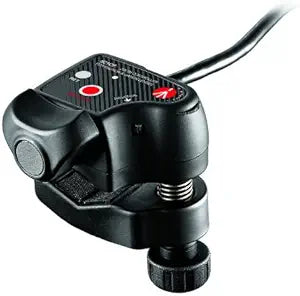
Manfrotto 521CFI Intel Zoom Remote Control
Precise Lens Control for Professional VideographyThe Manfrotto 521CFI Intel Zoom Remote Control offers precise lens control for professional videographers, providing smooth zoom, record/stop, and return functions. Specifications: Controls: Stepless progressive zoom, record/stop, RET (return...
View price on Amazon
Affiliate Disclosure: As an Amazon Associate, Studio Supplies earns from qualifying purchases made through links on this page, at no additional cost to you. This helps support our editorial team.
Notice a mistake? Let Us Know
Overview
Precise Lens Control for Professional Videography
The Manfrotto 521CFI Intel Zoom Remote Control offers precise lens control for professional videographers, providing smooth zoom, record/stop, and return functions.
Specifications:- Controls: Stepless progressive zoom, record/stop, RET (return)
- Clamp Range (Round Tube): Min 0.47 in, Max 1.38 in
- Clamp Range (Rectangular Tube): Min 1.18 in, Max 0.2 in
- Cable Length: 3.78 in
- Weight: 0.35 lbs
Key Features
Control at your Fingertips
Fits a variety of tube sizes
Specifications
Control Function
Zoom
Compatibility
Fits a variety of tube sizes
Frequently Asked Questions
What is the primary function of the Manfrotto 521CFI Intel Zoom Remote Control?
The primary function of this remote control is to provide zoom control at your fingertips, allowing for precise adjustments during video recording or photography.
What kind of equipment is this remote control compatible with?
This Manfrotto remote control is designed to fit a variety of tube sizes, suggesting broad compatibility with different camera and lens setups that support remote zoom.
Is this a wireless remote control?
The product description implies a wired connection by referring to "control at your fingertips" and doesn't specify wireless capabilities, typically indicating a physical connection.
Are there any other camera functions that can be controlled with this device?
The features specifically highlight "Zoom Remote Control," indicating its primary function is limited to zoom operations rather than broader camera controls like focus or recording.
What is the benefit of using a remote control for zoom?
Using this remote control for zoom allows for smoother, more stable zoom adjustments without directly touching the camera, which can help prevent camera shake during recording.
Related Products

