



MAONO
MAONO G3 Dual-USB Gaming Audio Mixer with XLR Input
Four physical faders and a 57dB XLR input put hands-on control of mic, game, music, and chat right on your desk
$99.98*
View on Amazon
✓ In Stock on Amazon.com
*Price sourced from Amazon.com. Last updated:Oct 08, 2026.Price and availability are subject to change — details.
Affiliate Disclosure: As an Amazon Associate, Studio Supplies earns from qualifying purchases made through links on this page, at no additional cost to you. This helps support our editorial team.
Notice a mistake? Let Us Know
Overview
Key Features
All-in-One PC Streaming Control: MAONO G3 is a desktop audio mixer and XLR interface designed for Windows PC gamers, streamers, and solo content creators who need faster control over voice, game sound, chat, and music in one compact setup. Four physical faders, mute keys, Arena routing, XLR input and dual USB help manage mic, game, music and chat from one desktop unit, so audio stays organized while your screen stays on the match
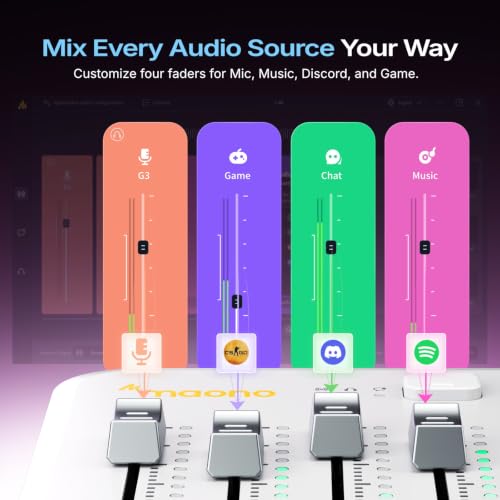
Map Any Source to 4 Faders: When you are in the middle of a match, live stream or audience interaction, fast audio adjustment matters more than deep menu diving. In MAONO Arena, assign mic, game, music, chat app, or alerts to the four faders you actually use. Letting gamers lower music, raise voice, or cut a noisy lobby without leaving the game window during live sessions
3 Submixes for Different Listeners: With three submixes, you can build separate audio experiences for yourself, your audience, and your teammates. Instead of sending the same sound to everyone, you can keep full game awareness in your headphones, send commentary and balanced music to viewers, and give the squad only callouts or key game sound, with quick switching for fast stream changes
XLR Input for Creator Voice Upgrades: With XLR input, 48V phantom power, up to 57 dB low-noise preamp, direct monitoring and AI noise reduction support. this G3 audio mixer for streaming fits desk-based scenarios like live commentary, gaming streams, reaction content, online teaching, product walkthroughs and solo creator setups where clearer spoken audio matters.
Dual PC Streaming Setup Made Easier: G3 is built around real desktop workflows with dual USB-C connectivity, hands-on routing and direct access to key controls. It is a strong fit for Windows-based gaming and streaming setups where you want to manage multiple sources without constantly switching screens. Whether you are balancing Discord, game audio and your own voice during squad play, or adjusting levels for a live product demo, the control flow is easier and faster once your routing is set
Interactive Features That Fit Live Content: The G3 live streaming audio mixer adds more than level control. Dedicated mute buttons, customizable sound pads, RGB lighting and a compact angled desktop design help creators react faster during live sessions. That makes G3 useful for reaction streams, funny sound triggers, creator commentary, audience interaction and gameplay moments where fast sound control adds energy without interrupting your flow or forcing you back into software menus
Best for Streaming, Not Every Audio Workflow: G3 is a strong fit for Windows gamers, beginner streamers, solo content creators and users building a desk-based XLR streaming setup with more hands-on control. It is best for livestreaming, game chat balance, creator commentary and multi-source audio management. Users with Mac-first workflows, highly demanding studio recording chains or very gain-hungry dynamic microphones should review compatibility and setup needs first so they choose the right mixer for their workflow
Compatibility & Package List: G3 is designed for Windows based streaming with MAONO Arena software, XLR microphones, headset monitoring, and desktop speakers. The package includes the mixer, USB cable and quick start guide, giving creators a clear start for single computer or dual PC workflows on a gaming desk
Specifications
Brand
MAONO
Model
G3 Gaming Audio Mixer
Faders
4 physical faders with dedicated mute keys
XLR Input
Dynamic or condenser, 57dB gain, 48V phantom power
Audio Resolution
48 kHz / 24 bit
USB Connectivity
Dual USB for dual-PC setups
Submixes
3 (self, audience, teammates)
Soundpads
4 customizable, with loop and reverse playback
Noise Reduction
One-tap AI noise reduction
Software
MAONO Arena
Compatibility
Windows
In the Box
Mixer, USB cable, quick start guide
Frequently Asked Questions
Does the MAONO G3 work with both dynamic and condenser microphones?
Yes. The XLR input supports dynamic or condenser mics, delivering 57dB of gain and 48V phantom power for condensers that require it, at 48kHz/24-bit audio.
Can I use the G3 for a two-PC streaming setup?
Yes. Its dual USB ports let you connect a gaming computer and a separate streaming computer, routing audio between them so gameplay and broadcast tasks stay on separate machines.
What do the four faders control on the G3?
Each fader maps to a source you choose in MAONO Arena — mic, game, music, a chat app, or alerts — and every channel has a dedicated mute key for hands-on level control.
Is the MAONO G3 compatible with Mac or consoles?
No. The G3 is designed for Windows-based streaming with the MAONO Arena software, so Mac and console workflows are not supported.
How does the G3 help reduce background noise on my voice?
It includes one-tap AI noise reduction that targets keyboard clicks, fan sound, and room tone, aiming for a cleaner voice path for both recording and live chat.
What comes in the box with the MAONO G3?
The package includes the mixer itself, a USB cable, and a quick start guide, covering the basics for either a single-computer or dual-PC workflow.
Related Products


