



Monoprice
Monoprice 600024 Studio Monitor Stands Clamp-Mounted
★★★★★
22 lbs
Elevate your near-fields 12–18 inches off the desk surface and break the boundary reinforcement that's been muddying your low-end mix decisions.
$30.38*$47.88Save 36%
Check availability
*Price sourced from Amazon.com. Last updated:Jun 27, 2026.Price and availability are subject to change.
Affiliate Disclosure: Studio Supplies may earn a commission from qualifying purchases made through links on this page, at no additional cost to you. This helps support our editorial team.
Notice a mistake? Let Us Know
Overview
Key Features
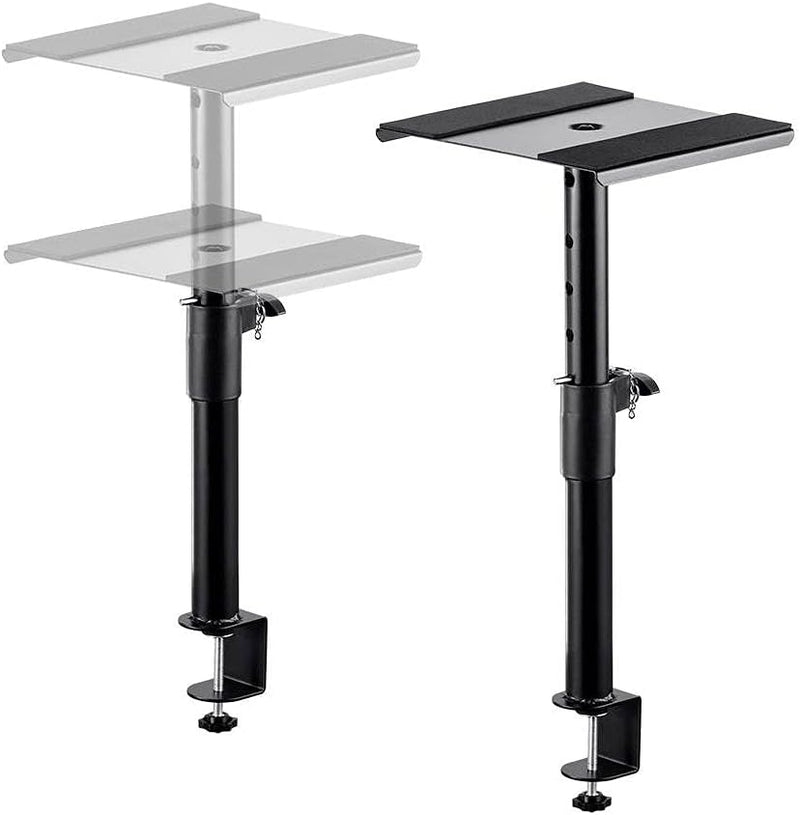
Useful at keeping your speakers secure and can make a huge difference in your sound, as monitor placement is critical for proper mixing.
Made of heavy duty steel. Includes antislip pads and can support up to 22 lbs.
Height-adjustable, allowing you to place your monitors between 12" and 18" above the height of your desk.
Clamp will work on desk surfaces up to 40mm thick.
Top platform is 9" x 9", providing sufficient surface area to support monitors up to 8".
Specifications
Material
Heavy-duty alloy steel
Platform Size
9" × 9"
Height Adjustment
12" to 18" above desk surface
Max Desk Thickness (Clamp)
40mm
Load Capacity
Up to 22 lbs per stand
Monitor Size Support
Up to 8" monitors
Anti-Slip Pads
Included
Mount Type
Desk clamp
Pros & Cons
👍 Pros
- 22 lb load capacity per stand handles monitors up to 8" driver class without flex, settling, or platform creep under continuous playback
- Height adjustment spanning 12"–18" above desk surface covers the standard seated ear-height sweet spot for near-field monitoring in most studio configurations
- Clamp-mount design eliminates floor footprint entirely — reclaims floor space in compact home studios, broadcast booths, and streaming setups where stands are impractical
- Heavy-duty steel construction damps resonance from monitor enclosure vibration rather than coupling and amplifying it the way hollow aluminum or plastic stands can
- Included anti-slip pads reduce lateral movement of the monitor cabinet under sustained bass frequencies, keeping placement consistent across long sessions
👎 Cons
- Clamp jaw maximum of 40mm desk thickness excludes thicker solid hardwood desktops, most glass-top desks, and any desk edge with a profile too wide for the clamp opening
- No platform tilt adjustment means you cannot angle monitors downward toward ear height — correct aim requires that your seated ear level falls naturally within the 12"–18" elevation window
- The 9"×9" platform is the minimum sufficient for an 8" monitor cabinet — speakers wider than 9" along either dimension will overhang the platform edge, creating instability risk
- Fixed platform orientation provides no rotation adjustment for toeing monitors inward to the mix position — correct toe-in requires repositioning the entire clamp on the desk
- Anti-slip pads reduce surface movement but do not decouple monitor vibration from the stand structure — a separate isolation pad is needed to fully break low-frequency transmission into the desk
Frequently Asked Questions
Will these clamps fit my desk? What thickness is supported?
The clamp jaw accommodates desk surfaces up to 40mm thick — approximately 1.57 inches. Standard MDF, particleboard, and solid wood desktops in the 18–25mm range fit comfortably. Thicker solid hardwood desks, glass-top desks exceeding 40mm, or desks with a lip or edge profile wider than the clamp opening will not be compatible. Measure your desk edge before ordering.
What's the usable height adjustment range, and is it enough to hit ear height at my seated position?
The stands raise your monitor between 12 and 18 inches above the desk surface. For a standard seated position at a 28–30 inch desk, this typically puts the tweeter between 40 and 48 inches from the floor — within the target ear-height window for most users. If your desk is unusually high or your chair sits very low, verify the geometry before assuming it will align without adjustment.
Can these stands hold 8-inch studio monitors — what's the weight limit?
The 22 lb capacity per stand and 9"×9" platform are sized for monitors up to 8" driver. Most common near-field monitors in the 8" class — including typical units from Yamaha, Focal, Adam, and KRK — fall within both the weight limit and platform footprint. Confirm your specific monitor's dimensions: cabinets wider than 9" along any side will overhang the platform edge.
Do the anti-slip pads actually hold the monitor steady under continuous bass playback?
Yes, within their design intent. The anti-slip pads increase friction at the contact point between the monitor base and the steel platform, preventing the monitor from creeping or shifting under sustained low-frequency vibration. They do not provide acoustic decoupling — they reduce physical movement, not resonance transmission. For true vibration isolation between the monitor and the stand, a dedicated isolation pad placed between the monitor and the platform provides an additional mechanical break.
Can I tilt or rotate the platform to angle the monitors toward my listening position?
No — the platform is fixed flat with no tilt or rotation adjustment. Monitor aim is controlled entirely by the placement of the clamp on the desk edge and your seated position relative to the stand. If you require precise tweeter-aimed-at-ear angling, a wedge isolation pad placed on the platform can introduce a small tilt angle as a workaround.
Related Products


