



Philips
Philips SPP9068BF/37 6-Outlet Wi-Fi Surge Protector
★★★★★
Control, schedule, and protect six outlets from your phone — the Philips SPP9068BF turns a standard power strip into a genuinely smart home hub.
$29.99*
Check availability
*Price sourced from Amazon.com. Last updated:Jul 14, 2026.Price and availability are subject to change.
Affiliate Disclosure: Studio Supplies may earn a commission from qualifying purchases made through links on this page, at no additional cost to you. This helps support our editorial team.
Notice a mistake? Let Us Know
Overview
Key Features
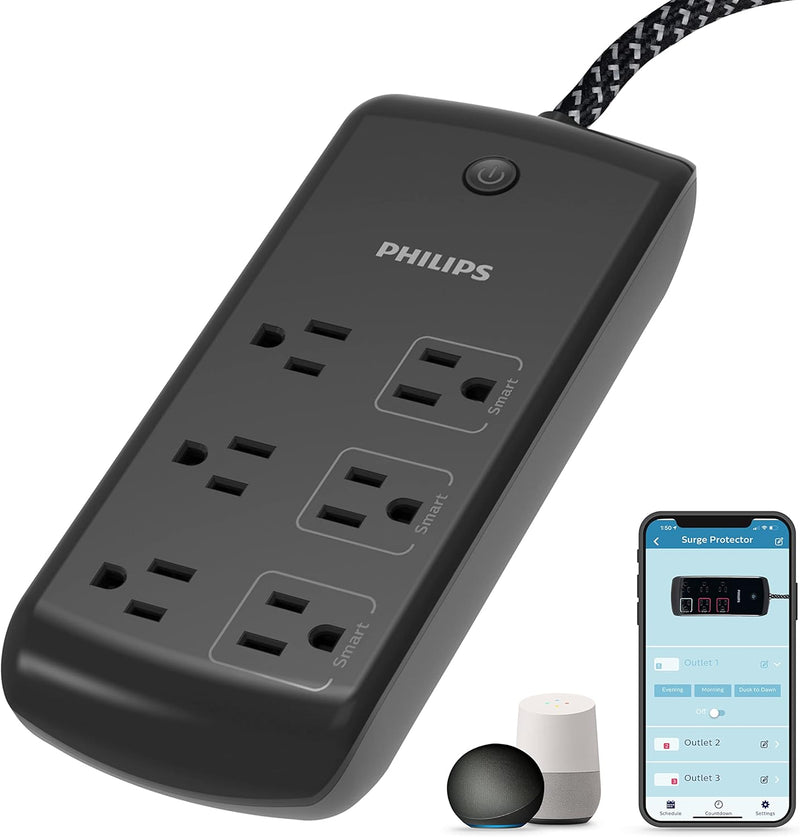
Power More – 3 always-on outlets provide continuous power to household electronics while 3 Wi-Fi outlets offer independent mobile operation. The easy-to-use Philips SmartSelect app, available in the Apple App Store and on Google Play, features unique control options.
2.4GHz Wi-Fi Compatible – Connects to 2.4GHz networks of single-, dual- and tri-band routers through effortless pairing options for use with the latest home Wi-Fi equipment.
Voice Control – No hub required for voice commands through Amazon Alexa and Google Assistant.
Simple Setup – Schedules and automations support full customization based on times, presets, weather, location and other factors. Organize devices by rooms and homes to control several locations from one app.
Protection – Featuring a surge protection rating of 1,080 Joules, the Wi-Fi outlet extender with 8ft. braided cord is the ultimate safeguard against voltage spikes.
Specifications
Total Outlets
6 (3 Always-On, 3 Wi-Fi Controlled)
Surge Protection
1,080 Joules
Cord Length
8 ft Braided
Wi-Fi Compatibility
2.4GHz (Single-, Dual-, and Tri-Band Routers)
Voice Control
Amazon Alexa, Google Assistant
Hub Required
No
App
Philips SmartSelect (iOS and Android)
Automation Features
Schedules, Presets, Weather Triggers, Geofencing
Pros & Cons
👍 Pros
- Three independently controlled Wi-Fi outlets let you cut standby power to devices remotely without unplugging anything
- No hub required — direct Wi-Fi connection to Alexa and Google Assistant simplifies setup compared to hub-dependent smart home systems
- 8-foot braided cord reaches outlets in awkward room layouts without an extension cable
- Scheduling and geofencing automation options go well beyond basic on/off switching for hands-free routines
- Always-on outlets ensure critical devices (routers, NVRs, cable boxes) stay powered regardless of any app or automation activity
👎 Cons
- Only 2.4GHz Wi-Fi compatible — setup requires identifying and connecting to the correct band on dual/tri-band routers, which trips up some users
- Three of the six outlets have no smart functionality, limiting remote control flexibility if you need more than three independently switched devices
- 1,080 Joule surge rating is functional but on the lower end compared to premium surge protectors designed specifically for high-value equipment like home theater or professional audio setups
- The SmartSelect app ecosystem is less widely adopted than competing platforms, which may present fewer third-party automation integrations compared to Kasa or Wemo alternatives
Frequently Asked Questions
Do all six outlets have Wi-Fi control, or just some of them?
Three of the six outlets are Wi-Fi controlled via the Philips SmartSelect app — the other three are always-on standard outlets with no remote switching. This split design is practical: you keep your NVR, router, or other always-on devices on the fixed outlets while controlling lamps, chargers, or entertainment devices remotely.
What Wi-Fi standard does this surge protector require?
It requires a 2.4GHz Wi-Fi network. It works with single-, dual-, and tri-band routers, but the device itself connects only on the 2.4GHz band — if your router separates bands by name, connect it to the 2.4GHz network during setup. 5GHz-only networks will not work.
Does it require a separate smart home hub?
No hub is required. It connects directly to your Wi-Fi network and works with Amazon Alexa and Google Assistant natively, without a Philips Hue bridge or other intermediary device.
How good is the surge protection rating for sensitive electronics?
The 1,080 Joule rating provides meaningful protection against typical household voltage spikes — adequate for TVs, computers, and audio equipment. It's not in the same tier as dedicated whole-home surge protection, but it's a solid rating for a smart power strip and covers standard consumer electronics reliably.
Can I set schedules to turn the smart outlets on and off automatically?
Yes — the SmartSelect app supports time-based schedules, presets, weather triggers, and location-based automations (geofencing). You can also organize outlets by room and manage multiple locations from one app, which is useful if you're managing devices across a home and a secondary property.
Related Products


