



Pioneer DJ
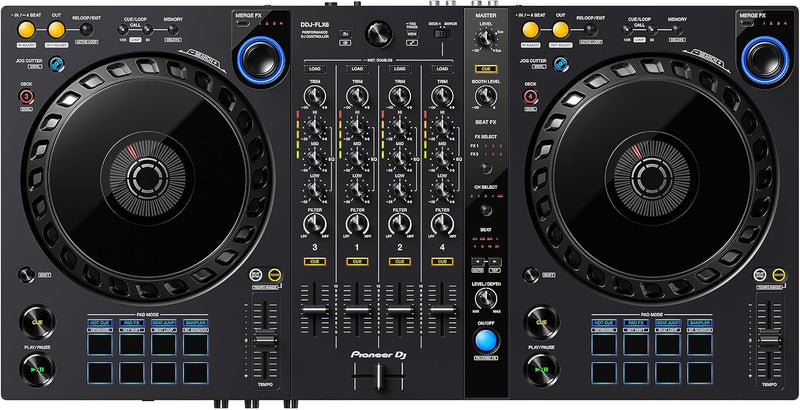
Pioneer DJ DDJ-FLX6PDJ 4-Deck Rekordbox Serato Controller
Four decks, full-size jogs, and dual-software support — the DDJ-FLX6 bridges bedroom practice and club-ready performance in a single unit.
View price on Amazon
Affiliate Disclosure: As an Amazon Associate, Studio Supplies earns from qualifying purchases made through links on this page, at no additional cost to you. This helps support our editorial team.
Notice a mistake? Let Us Know
Overview
Key Features
Turn on Jog Cutter and move the jog wheel to apply a professional-sounding scratch effect to the last Hot Cue or playback position you used on the deck
Pitch bending and scratching feels natural thanks to the large jog wheels with On Jog display so that you can keep an eye on the play head position
Get creative with your favorite sound and Sample Scratch to choose sounds you’ve assigned to the sampler and load them onto the decks
Plug and play with the built-in sound card and support for DJ Performance functions that are compatible with rekordbox and Serato DJ Pro
The layout of the controls on the DDJ-FLX6 is similar to that on our club-standard CDJ + DJM setup, so you can perform intuitively
Specifications
Model
DDJ-FLX6PDJ
Channels
4
Jog Wheels
Full-size with On Jog Track Position Display
Audio Interface
Built-in USB
Software Compatibility
rekordbox, Serato DJ Pro
Dimensions
13.61 x 26.61 x 2.7 inches
Weight
7.92 pounds
Brand
Pioneer DJ
Frequently Asked Questions
Does the DDJ-FLX6 work with both rekordbox and Serato DJ Pro out of the box?
Yes — it's plug-and-play compatible with both. The built-in USB audio interface handles routing without any additional hardware, and you can switch between software without reconfiguring the controller. A license for rekordbox Performance mode is included; Serato DJ Pro requires its own license.
Does the DDJ-FLX6 work with both rekordbox and Serato DJ Pro simultaneously, or do you have to choose one?
You choose one at a time — the controller switches between rekordbox and Serato DJ Pro, but you run one software per session. Both are fully supported without needing additional drivers or mapping files, and the controller layout is optimized for both workflows.
What does the built-in sound card output quality mean practically for a live set or recording?
The integrated USB audio interface eliminates the need for a separate audio interface, and for the DDJ-FLX6's price tier the onboard sound card delivers clean enough output that signal degradation through the card itself won't be your problem on most systems. Connect directly to a mixer or powered speakers via the RCA or headphone outputs.
How does the Jog Cutter feature actually work in a live set?
Engaging Jog Cutter mode turns the jog wheel into a dedicated scratch tool tied to your last active Hot Cue or playback position. Moving the wheel applies the scratch effect to that specific point rather than the playhead, which gives you repeatable scratch patterns without hunting for the right spot in the waveform.
Are the jog wheels on the FLX6 comparable to professional club CDJs?
They're full-size wheels with on-jog track position displays, and the layout mirrors Pioneer's CDJ+DJM club setup intentionally. The tension and feel won't match a CDJ-3000, but for practice and club-to-home workflow transfer, the muscle memory carries over better than most controllers in this class.
How does the Jog Cutter scratch feature actually work, and is it useful for non-scratch DJs?
Jog Cutter applies a scratch effect to the last Hot Cue or playback position when activated — you enable it via a button and then move the jog wheel to trigger the effect. For non-scratch DJs, it's a performance tool for adding texture to transitions without requiring practiced scratch technique; the effect is generated by the software rather than requiring vinyl-accurate hand positioning.
How do the jog wheels on the DDJ-FLX6 compare to CDJ jog wheels for practicing club transitions?
The DDJ-FLX6's full-size jog wheels with On Jog display are specifically referenced as mirroring the CDJ + DJM club layout, making muscle memory transfer more direct than smaller-wheel controllers. The tension and response won't be identical to a CDJ-3000, but the positioning and size are deliberately analogous for practice purposes.
Can I connect external audio sources like a turntable or CD player to the FLX6?
The DDJ-FLX6 is a software controller with a built-in USB audio interface. It does not include phono preamp inputs for turntables or analog line inputs for external hardware in the way a standalone mixer would. Signal routing goes through the connected laptop running rekordbox or Serato.
What is the Sample Scratch function and how does it fit into a live performance?
Sample Scratch lets you load sounds from the software's sampler banks directly onto a deck's jog wheel for scratching. Instead of scratching a track, you're scratching a custom sample — a vocal hit, a drum sound, a sound effect — which opens up performance possibilities that go beyond traditional scratch technique.
What are the physical connection requirements — does this controller need a power outlet?
The DDJ-FLX6 is USB bus-powered, meaning it draws power through the USB connection to your laptop — no separate power cable required for the controller itself. The built-in sound card routes audio back through the same USB connection for plug-and-play setup.
Related Products


