



PreSonus
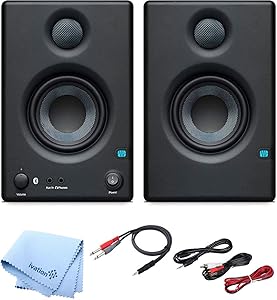
PreSonus Eris E3.5 Bluetooth Studio Monitor Pair
Bluetooth 5.0
Compact nearfield monitors that bring balanced-input accuracy and Bluetooth convenience to desktop studios and home tracking rooms.
$149.99*
Check availability
*Price sourced from Amazon.com. Last updated:Aug 30, 2026.Price and availability are subject to change — details.
Affiliate Disclosure: As an Amazon Associate, Studio Supplies earns from qualifying purchases made through links on this page, at no additional cost to you. This helps support our editorial team.
Notice a mistake? Let Us Know
Overview
Key Features
3.5" woven composite woofers deliver solid low-end sound with minimal bass distortion
50-watt Class AB amplification (25 Watts per speaker) provides plenty of volume and headroom for nearfield monitoring
RCA and balanced 1/4" inputs provide all the connections you may need
Aux input for connecting your smartphone or media player
Stereo Bluetooth 5.0 wireless input
Specifications
Woofer
3.5" woven composite
Amplification
50W Class AB (25W per speaker)
Inputs
Balanced 1/4" TRS, RCA stereo, 3.5mm Aux
Wireless
Bluetooth 5.0
Configuration
Active/passive pair
Frequently Asked Questions
Can I connect these directly to my audio interface using the balanced inputs?
Yes — the balanced 1/4" TRS inputs accept a standard balanced output from any interface, which keeps your noise floor clean and rejects ground-loop interference that unbalanced connections can introduce. This is the preferred connection method for any mixing or tracking session.
Is the Bluetooth 5.0 connection suitable for mixing or critical listening?
Bluetooth introduces codec-dependent latency and compression artifacts that make it unsuitable for real-time tracking or critical mix decisions. Use it for casual reference listening — playing back a reference track from your phone — not as your primary monitoring path.
How much headroom do 25 watts per speaker actually give you at nearfield distances?
At typical nearfield distances of 3–4 feet, 25 watts of Class AB amplification delivers plenty of clean SPL for monitoring. You'll hit the limits of the 3.5" woofer's low-frequency extension before you clip the amp — the headroom is appropriate for the driver size.
Do the Eris E3.5 BTs have any acoustic tuning controls for room correction?
No — unlike larger Eris models, the E3.5 BT omits the high-frequency and mid-frequency trim controls. What you hear is a fixed voicing. Position them carefully relative to walls and your listening position; you can't compensate with onboard EQ.
What's the best way to integrate these into a DAW-based studio setup?
Run a balanced TRS cable from your interface's monitor output directly into the active (left) speaker's 1/4" input, then use the included speaker cable to link the passive right unit. Set your DAW's output to your interface and control monitor level from the front-panel knob on the active speaker.
Related Products


