



PreSonus
PreSonus S15 ART UPG CARD Studio One 5 Professional Upgrade Download Card
★★★★★
Unleash Your Sonic Potential with Studio One 5 Professional Step into a world where creativity knows no bounds with PreSonus Studio One 5 Professional. More than just a digital audio workstation (DAW), Studio One 5 is your all-in-one creative environment that takes you from the first spark of ins...
View price on Amazon
Affiliate Disclosure: Studio Supplies may earn a commission from qualifying purchases made through links on this page, at no additional cost to you. This helps support our editorial team.
Notice a mistake? Let Us Know
Overview
Unleash Your Sonic Potential with Studio One 5 Professional
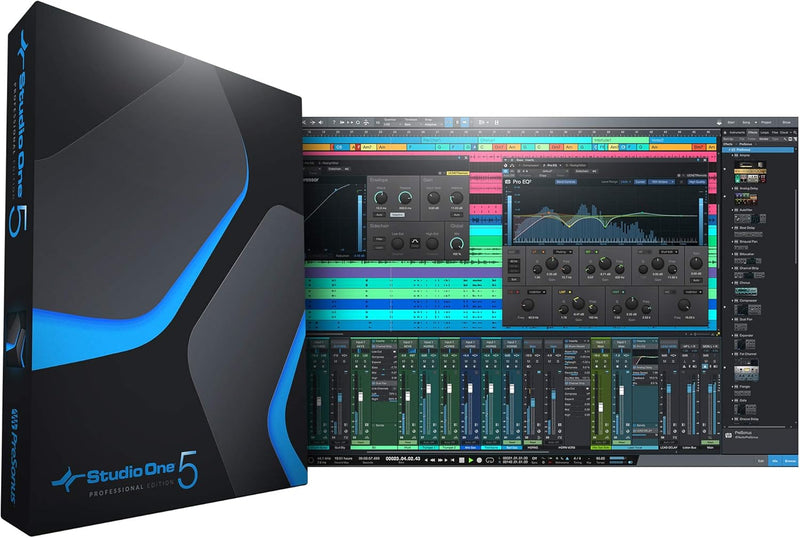
Step into a world where creativity knows no bounds with PreSonus Studio One 5 Professional. More than just a digital audio workstation (DAW), Studio One 5 is your all-in-one creative environment that takes you from the first spark of inspiration to the final mastered product, and even onto the stage. Experience unparalleled ease of use with its intuitive single-window interface and groundbreaking drag-and-drop functionality.
Specifications
- Application: Complete suite for recording, producing, composing, mixing, mastering, and live performance.
- Workflow: Intuitive single-window work environment with drag-and-drop functionality and multi-touch support.
- Tracks: Unlimited audio and instrument tracks, buses, and FX channels.
- Console Shaper: Emulates analog console sound with drive, noise, and channel crosstalk control via Mix Engine FX.
- Live Performance: Dedicated Show Page for live performance, including backing tracks, virtual instruments, and plug-in effects.
- Item Weight: 0.81 ounces
- Package Dimensions: 7 x 3.5 x 0.03 inches
- Country of Origin: China
- Hardware Interface: USB 2.0
- Hardware Platform: PC
- Manufacturer: Presonus
- UPC: 673454009174
Key Features
The only DAW that lets you compose, record, produce, mix, master, and perform all from a single, intuitive application
NEW! Perform live with Studio One! Use your recorded assets to bring your studio sound to the live show; play virtual amps live; sequence and re-arrange your Setlist
Intuitive single-window work environment with quick and easy drag-and-drop functionality and multi-touch support.
Unlimited audio and instrument tracks, advanced automation features, virtual instruments, buses, and FX channels
Console Shaper emulates the sound of an analog console with control over drive, noise, and even true channel crosstalk, thanks to Mix Engine FX’s cross-channel processing
Specifications
Brand
PreSonus
Software Type
DAW Upgrade
Version
Studio One 5 Professional
Delivery Method
Download Card
Key Features
Single-window work environment, Drag-and-drop functionality, Multi-touch support, Unlimited tracks, Advanced automation, Virtual instruments, Buses, FX channels, Console Shaper, Mix Engine FX
Pros & Cons
👍 Pros
- Allows users to compose, record, produce, mix, master, and perform within a single, integrated application.
- Introduces new live performance capabilities, enabling the use of studio assets in a live setting.
- Features an intuitive single-window work environment with drag-and-drop functionality and multi-touch support.
- Provides unlimited audio and instrument tracks, advanced automation, virtual instruments, buses, and FX channels.
- Includes Console Shaper with Mix Engine FX, offering analog console emulation for enhanced sonic character.
👎 Cons
- Being an upgrade, it requires a previous version of Studio One to be owned for installation.
- The download card format means physical media is not included, requiring an internet connection for installation.
- The extensive features and capabilities may present a steep learning curve for new users of the DAW.
- Compatibility with all third-party plugins and hardware may vary and require specific driver installations.
- The analog console emulation feature, while powerful, might not appeal to users preferring a purely digital sound.
Frequently Asked Questions
What does this product include?
This product is an upgrade download card for PreSonus Studio One 5 Professional, enabling users to transition from an eligible previous version to the latest professional edition.
Can I use Studio One 5 Professional for live performances?
Yes, Studio One 5 Professional introduces new features that allow you to perform live using your recorded assets, virtual amps, and to sequence and re-arrange your Setlist in real-time.
Is Studio One 5 Professional difficult to use for beginners?
Studio One 5 Professional features an intuitive single-window work environment with drag-and-drop functionality and multi-touch support, aiming for ease of use, though mastering its comprehensive features may take time for new users.
Are there limitations on the number of tracks I can use?
No, Studio One 5 Professional offers unlimited audio and instrument tracks, alongside advanced automation features, virtual instruments, buses, and FX channels, allowing for extensive creative freedom.
What is Console Shaper with Mix Engine FX?
Console Shaper is a feature in Studio One 5 Professional that emulates the sound of an analog console, offering control over drive, noise, and true channel crosstalk, thanks to its unique Mix Engine FX cross-channel processing.
Is this a full version or an upgrade?
This is an upgrade download card for Studio One 5 Professional, meaning it requires ownership of a previous eligible version of Studio One to be activated.
Related Products


