
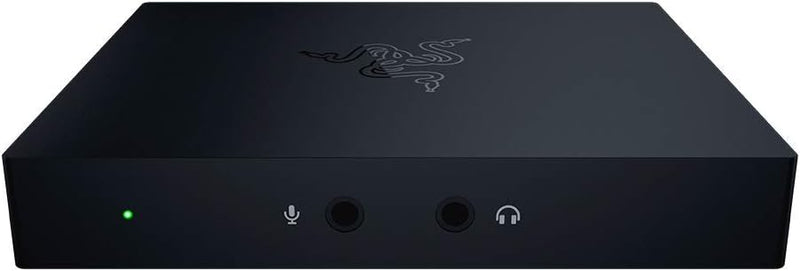


Razer Ripsaw HD Capture Card — Where It Fits
The Razer Ripsaw HD (RZ20-02850100-R3U1) is Razer's external USB 3.0 capture card aimed at console and PC streamers who want 1080p60 streaming with 4K60 passthrough. Per Razer's official Ripsaw HD product page, the device captures 1080p at up to 60 fps, supports 4K 60 fps HDMI passthrough, includes a 3.5 mm audio mixing input for combining game + party-chat + microphone signals on the device, and operates with native plug-and-play recognition in OBS / Streamlabs / XSplit without proprietary driver installation. This module walks through where the Ripsaw HD specifically fits.
Use Case 1 — Console Streamers Prioritizing 4K60 Passthrough
Per Tom's Guide's Razer Ripsaw HD review, the headline differentiator versus competing capture cards in the same price tier is the smooth 4K 60 fps passthrough. Tom's Guide specifically called out that the Ripsaw HD "works without a hitch, with no need to mess with settings through Razer Synapse" — the card is plug-and-play class-compliant for OBS / Streamlabs / XSplit out of the box. For gamers who play on a 4K 60Hz display (most modern OLED / LED gaming TVs) but stream at 1080p60 (the de facto Twitch / YouTube Gaming streaming resolution for the broad audience), the Ripsaw HD's 4K passthrough means the gaming experience on the display is uncompromised.
Use Case 2 — Two-PC Streaming Setups
The classic two-PC streaming workflow (one gaming PC + one streaming/encoding PC) benefits from external capture cards that don't share resources with the gaming machine. The Ripsaw HD plugs into the streaming PC's USB 3.0 port and accepts HDMI from the gaming machine. The encoding work happens entirely on the streaming PC — the gaming PC's GPU and CPU are uncontested. For streamers who want the highest possible in-game frame rates while still broadcasting at solid stream quality, the two-PC + external capture card configuration is the right architecture.
Use Case 3 — Direct-Audio-Mixing Workflows
The Ripsaw HD's onboard 3.5 mm audio mixer is a meaningful feature for streamers who want to manually balance game audio + party-chat audio + microphone audio + music without managing those mixes in software. Per Razer's product page, the audio input on the device allows source-level mixing — useful for streamers using analog headsets or external audio sources alongside the HDMI-captured game audio.
Use Case 4 — Multi-Console Streamers
The Ripsaw HD's HDMI input + 4K60 passthrough accepts PS4, PS5, Xbox One, Xbox Series X/S, Nintendo Switch, and Switch 2 sources without console-specific drivers or setup. Streamers who rotate between multiple console platforms (one day PS5, next day Xbox, weekend Switch) can use the same capture chain across all platforms.
Use Case 5 — Beginner / Mid-Tier Streamers
For streamers who don't yet need 4K60 capture (which would require stepping up to the Elgato 4K X or 4K60 Pro MK.2 tier), the Ripsaw HD's 1080p60 capture + 4K60 passthrough hits the value tier where most non-professional streamers operate. The streaming audience on Twitch and YouTube Gaming overwhelmingly watches at 1080p60 — capturing higher resolution and downscaling produces marginally better visual quality but at meaningfully higher cost. The Ripsaw HD's tier matches the actual delivered-to-audience quality.
Honest Limits Buyers Should Know
- 1080p60 is the capture ceiling. Per Razer's specifications, the device captures up to 1080p60. For streamers who want to record 4K60 gameplay for upload to YouTube (where 4K60 source quality matters for the long-tail VOD audience), the Elgato 4K X is the appropriate tier
- No HDR capture path. The Ripsaw HD captures SDR; HDR signals are typically tonemapped or fail. For streamers who specifically want HDR-tagged 4K capture, the Elgato HD60 X (HDR10 at 1080p60) or Elgato 4K X (HDR-on-4K) is the right tier
- No VRR passthrough support. Variable Refresh Rate is not supported on the Ripsaw HD passthrough. Gamers on VRR-capable displays + consoles may experience VRR-disabled gameplay when the capture card is in-line. The Elgato HD60 X is the alternative for VRR-needed workflows
- Tom's Guide noted the older driver experience. Tom's Guide's review specifically called out that no Razer Synapse install is needed (an advantage), but some users may want Razer Synapse for additional configuration features that the Ripsaw HD's hardware doesn't expose
- USB 3.0 (not USB-C) interface. The Ripsaw HD uses a USB Type-B port on the device side with a USB Type-A or USB-C cable to the host. Modern thin laptops with only USB-C ports require an adapter; the Elgato HD60 X uses USB-C native
- Build quality is consumer-tier, not pro broadcast tier. The Ripsaw HD's plastic housing is appropriate for desk-mounted streaming use but not for portable / on-location / pro broadcast deployments where the metal-housed Elgato 4K60 Pro Plus or Blackmagic ATEM Mini is more appropriate
Best-Fit Buyer Profiles
- Console streamers on Twitch / YouTube Gaming who stream at 1080p60 and want clean 4K60 passthrough on their gaming display
- Two-PC streaming setups wanting to offload encoding from the gaming machine to a dedicated streaming PC
- Multi-console rotating streamers who switch between PlayStation / Xbox / Switch platforms on the same capture chain
- Streamers wanting hardware-level audio mixing via the device's 3.5 mm audio input without software-side mix routing
- Beginner / mid-tier streamers hitting the value tier where 1080p60 capture matches the actual delivered-to-audience stream quality
Where Buyers Should Look Elsewhere
- 4K60 capture (not just passthrough) → Elgato 4K X — the next tier up with native 4K60 capture
- HDR-tagged capture → Elgato HD60 X (HDR10 at 1080p60) or Elgato 4K X (HDR-on-4K)
- VRR passthrough support → Elgato HD60 X (VRR + up to 1080p240 / 1440p120 / 4K60 passthrough)
- PCIe internal capture for dedicated streaming PCs → Elgato 4K60 Pro MK.2 or AVerMedia Live Gamer 4K
- Pro broadcast / multi-source mixing → Blackmagic ATEM Mini Pro / Pro ISO for hardware multi-source switching, recording, and streaming
Sources & Citations
- Razer, "Razer Ripsaw HD Game Capture Card product page," razer.com (accessed 2026-05-18)
- Tom's Guide, "Razer Gets Game Capture Right With the Ripsaw HD," tomsguide.com (accessed 2026-05-18)
- Windows Central, "Razer Ripsaw HD review: The new king of affordable capture cards," windowscentral.com (accessed 2026-05-18)
Last verified: 2026-05-18


