



Roku
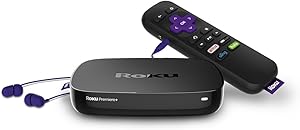
Roku 4630R Premiere 4K UHD Streaming Media Player
4KUHD
The Roku Premiere upgrades any 4K TV to a full streaming platform with HDR10 support and a quad-core processor — no sluggish smart TV firmware required.
View price on Amazon
Affiliate Disclosure: As an Amazon Associate, Studio Supplies earns from qualifying purchases made through links on this page, at no additional cost to you. This helps support our editorial team.
Notice a mistake? Let Us Know
Overview
Key Features
Powerful quad core processor and fast dual band wireless. 8x more processing power than before
Access to amazon, vudu, Netflix, Hulu, google play, and more
Portable for different HDTVS in your home, hotel, and dorm rooms
Unbiased search results Across top channels to find where it's free or cheapest to watch
Free mobile app for iOS and android with voice search and private listening
Specifications
Processor
Quad-core
Wireless
Dual band
Streaming Services
Amazon, Vudu, Netflix, Hulu, Google Play
Search Feature
Unbiased across top channels
Mobile App Compatibility
iOS and Android
Mobile App Features
Voice search, private listening
Frequently Asked Questions
Does the Roku Premiere support 4K and HDR, and what TV do I need to use those features?
Yes — 4K UHD output at 2160p/60fps and HDR10 support are both included. To use 4K, your TV needs a 4K-compatible HDMI input. To use HDR10, your TV must support HDR10 — check your TV's spec sheet for "HDR10" or "HDR" support. A standard 1080p TV will still work with the Premiere but will output at 1080p maximum.
How does the Point Anywhere Remote work, and does the Roku box need line-of-sight?
The Point Anywhere Remote uses RF (radio frequency) rather than IR (infrared), so you can point it in any direction and it will communicate with the Roku unit — the device does not need line-of-sight to the remote. However, the Roku unit still needs to be connected to your TV's HDMI port, and the TV itself must have an unobstructed IR sensor if you're using HDMI-CEC TV power commands.
What streaming services are available on the Roku Premiere?
The Roku platform supports thousands of channels including Netflix, Prime Video, Hulu, Disney+, HBO Max, Peacock, Tubi, Pluto TV, and YouTube, among others. Roku's channel availability is platform-wide and not limited by this specific model. Content availability within each service requires a valid subscription.
How does private listening work on the Roku Premiere?
Private listening routes audio to headphones plugged into your smartphone via the free Roku mobile app (iOS and Android). The app connects to the Roku Premiere over your home Wi-Fi network and streams audio to your phone in real time. This model's standard remote does not have a built-in headphone jack — private listening requires the companion app and a charged phone.
Is it worth upgrading from an older Roku stick or streaming device to the Premiere?
If your current device lacks 4K or HDR10 output and your TV supports those features, the Premiere is a meaningful upgrade — you will see a visible improvement in picture quality with 4K HDR content. If your TV is 1080p only, the primary benefit is the faster quad-core processor, which makes navigation and channel loading noticeably more responsive than older single or dual-core Roku hardware.
Related Products


