
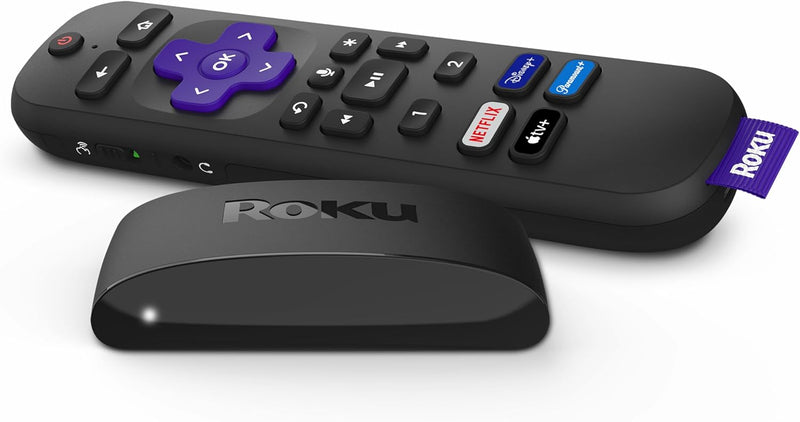


Roku Express HD Streaming Device (829610003252) — Editorial Review & Use Cases
The Roku Express HD (model 829610003252) is Roku's entry-tier 1080p HD streaming media player — designed as the cheapest entry point to the Roku platform's 700+ streaming channels (Netflix, Disney+, Apple TV+, YouTube, Prime Video, HBO Max / Max, Peacock, Paramount+, etc.). Per Roku's official Express product page, the unit ships with HDMI cable, IR remote control, USB power cable + AC adapter, and supports 1080p HD output, Wi-Fi (802.11n / b/g/n single-band), HDMI 1.4, and the full Roku OS with channel store + voice search via mobile app.
What the Roku Express HD Specifically Wins
- Lowest-cost entry to Roku platform — at $25-40 retail, the cheapest path to add streaming to any TV with HDMI
- 700+ free + paid streaming channels — Netflix, Disney+, Apple TV+, YouTube, Prime Video, Hulu, HBO Max / Max, Peacock, Paramount+, Tubi (free), Pluto TV (free), The Roku Channel (free), etc.
- Roku OS is platform-neutral — vs Amazon Fire TV (heavily Amazon-promoted) or Apple TV (Apple-ecosystem), Roku presents all streaming services equally without preferential ranking
- Voice search via Roku mobile app — voice commands "Find action movies starring Tom Cruise" work across all installed channels
- HDMI cable + IR remote + power adapter all included — out-of-box ready; no separate purchases needed
- 1080p HD output — fine for older 1080p TVs, projectors, dorm room screens, kitchen TVs, RV / cabin setups
- Single-band Wi-Fi (2.4 GHz) — works in nearly any Wi-Fi network without configuration
- Roku ecosystem familiar to existing Roku TV / Premiere / Streaming Stick owners
- No subscription required to access free streaming — Pluto TV, Tubi, The Roku Channel, Crackle, FreeVee all free
- Voice search integration with Alexa + Google Home (via Roku mobile app pairing)
Where the Roku Express HD Specifically Fits
- Adding streaming to older 1080p HD TVs without smart TV apps — common in many homes with TVs purchased 2015-2018
- Bedroom / kitchen / dorm secondary TV setup
- RV / cabin / vacation home with portable / shared TV use
- Gift to parents / grandparents new to streaming
- Hotel / Airbnb portable streaming — bring own Roku for personalized account access
- Office break room / conference room TV streaming
- Kids' room TV streaming with Kids profile parental controls
- Cord-cutting starter device — initial replacement for cable on a single TV
- Older projector / display use for movie nights
- Backup streaming device when smart TV apps fail or are outdated
- Budget upgrade for older 720p devices to 1080p HD
Honest Limits Buyers Should Know
- 1080p HD only — no 4K, no HDR. 4K TVs benefit from the higher-tier Roku Express 4K+, Roku Streaming Stick 4K, or Roku Ultra. The Express HD outputs 1080p maximum
- Wi-Fi 4 (802.11n) — slower than Wi-Fi 5/6. Modern Wi-Fi 6 routers see lower throughput on this device than newer Roku Ultra (Wi-Fi 6). 1080p streaming bandwidth is adequate; 4K would not be
- 2.4 GHz single-band Wi-Fi. No 5 GHz support; congested 2.4 GHz networks may have buffering. Ethernet is NOT available on the Express HD — needs Wi-Fi mandatory
- HDMI 1.4 — not HDMI 2.0/2.1. No 4K HDR, no Dolby Vision, no eARC support. Adequate for 1080p streaming; not for premium audio/video pass-through
- IR remote requires line-of-sight to device. Remote control beam needs to point at the Roku; obstruction (TV stand, cabinet) blocks signal. The Streaming Stick 4K and Ultra have Wi-Fi remotes that work through obstruction
- USB-powered from TV USB port or AC adapter. Some older TVs' USB ports don't deliver enough current; AC adapter is the reliable power source. Most modern TVs work fine
- No headphone jack or wireless audio output. Audio comes only via HDMI. For late-night listening with headphones, Roku Streaming Stick 4K+ or Ultra have remote with headphone jack
- No native local file playback. Local USB drive media playback is limited; for local media server use, Plex / Jellyfin channels are workarounds
- Limited channel customization vs Apple TV. Apple TV's UI customization is more granular; Roku's interface is more locked-down
- Ad-supported home screen. Roku's home screen displays Roku ads + sponsored channel placements. Some users find this intrusive; Apple TV is ad-free
Where Buyers Should Look Elsewhere
- 4K + HDR TV with no smart apps → Roku Express 4K+, Roku Streaming Stick 4K, Roku Ultra
- Dolby Vision + Dolby Atmos premium audio/video → Roku Ultra, Apple TV 4K, Amazon Fire TV Cube
- Ad-free streaming home screen → Apple TV 4K, Apple TV HD
- Wi-Fi 6 home network leveraging → Roku Ultra (Wi-Fi 6), Apple TV 4K (Wi-Fi 6)
- Ethernet wired connection → Roku Ultra (has Ethernet), Apple TV 4K
- Voice remote on the remote itself → Roku Voice Remote variants, Apple TV Siri Remote
- Gaming + streaming combo → Apple TV 4K (Apple Arcade) or Amazon Fire TV Cube (Luna)
- Casting from phone (Chromecast functionality) → Google TV / Chromecast with Google TV (4K + Chromecast built-in)
- Older 720p devices → Roku Express (non-HD) at slightly cheaper price
Sources & Citations
- Roku, "Roku Express HD product page," roku.com (accessed 2026-05-18)
- The Verge, "Roku Express HD review and streaming device buying guide," theverge.com (accessed 2026-05-18)
- Tom's Guide, "Best streaming devices buying guide," tomsguide.com (accessed 2026-05-18)
- The Wirecutter (NYT), "Best streaming media player buying guide," nytimes.com/wirecutter (accessed 2026-05-18)
Last verified: 2026-05-18


