

Roland
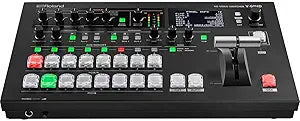
Roland V-60HD Video Switcher - Live Event Streaming & Audio Mixing
Roland V-60HD: Versatile HD Video Switcher for Live Events and Streaming The Roland V-60HD is a professional HD video switcher designed for live events and streaming applications. Featuring SDI and HDMI inputs, an 18-channel audio mixer, and versatile output options, this switcher provides the to...
$249.00*$2,495.00Save 90%
Check availability
*Price sourced from Amazon.com. Last updated:Aug 28, 2026.Price and availability are subject to change — details.
Affiliate Disclosure: As an Amazon Associate, Studio Supplies earns from qualifying purchases made through links on this page, at no additional cost to you. This helps support our editorial team.
Notice a mistake? Let Us Know
Overview
Roland V-60HD: Versatile HD Video Switcher for Live Events and Streaming
The Roland V-60HD is a professional HD video switcher designed for live events and streaming applications. Featuring SDI and HDMI inputs, an 18-channel audio mixer, and versatile output options, this switcher provides the tools you need to create dynamic and engaging productions.
Specifications:
- Video Switching: HD Video Switcher with SDI and Scaled HDMI Inputs
- Audio Mixing: 18-channel Audio Mixer with Effects
- Outputs: Program, Preview, AUX buses
- Audio Features: Audio auto-mixing
- Control: Remote-Control Software via LAN port
- Ports: USB Port for Still Image Upload, Saving Program Files
Key Features
HD Video Switcher with SDI and Scaled HDMI Inputs
18-channel Audio Mixer with Effects
Wireless Tally System
Multi destination outputs include Program, Preview and AUX buses and make it easy to send the main output to the primary screen or live stream and presenter notes to a presenter’s monitor.
Audio auto-mixing automatically adjusts audio level based on weighting ensuring even levels for the room mix, presenter to send to recording, live stream or in-room speakers.
The V-60HD’s user interface is easy for students, novices and can be controlled remotely through the LAN port using Roland’s Remote-Control Software from PC or Mac.
USB Port ‒ Still Image Upload, Saving Program Files
SDI inputs and 2 HDMI inputs make are the perfect for switching cameras and computers at the same time for dynamic presentations.
The dedicated Aux buttons make switching to a second destination as easy as switching to the main screen
Specifications
Product Type
HD Video Switcher
Audio Mixer Channels
18-channel with Effects
Video Inputs
SDI inputs, 2 x Scaled HDMI inputs
Outputs
Multi destination outputs (Program, Preview, AUX buses)
Audio Features
Audio auto-mixing
Control
LAN port for Remote-Control Software (PC or Mac)
USB Port Functions
Still Image Upload, Saving Program Files
Included Feature
Wireless Tally System
Frequently Asked Questions
How many audio channels does the Roland V-60HD Video Switcher have?
It features an 18-channel audio mixer with built-in effects for comprehensive audio control.
What types of video inputs does this switcher support?
The V-60HD supports SDI inputs and two HDMI inputs, which are scaled for flexible camera and computer integration.
Can I send different video feeds to multiple screens simultaneously?
Yes, it has multi-destination outputs including Program, Preview, and AUX buses, making it easy to route video to various displays.
Does the audio mixer have an automatic level adjustment feature?
Yes, it includes audio auto-mixing, which automatically adjusts audio levels to ensure even sound for all outputs.
How can I control the Roland V-60HD remotely?
The switcher can be controlled remotely through its LAN port using Roland’s Remote-Control Software, available for PC or Mac.
What is the purpose of the USB Port on this device?
The USB port allows for still image uploads and saving program files for convenient management of your event configurations.
Related Products


