



Samson
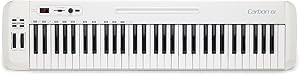
Samson SAKC61 Carbon 61 USB MIDI Controller
Sixty-one semi-weighted keys and full MIDI I/O in one controller that bridges traditional instrument feel with modern DAW and iPad production workflows.
$199.99*
View on Amazon
✓ In Stock on Amazon.com
*Price sourced from Amazon.com. Last updated:Oct 24, 2026.Price and availability are subject to change — details.
Affiliate Disclosure: As an Amazon Associate, Studio Supplies earns from qualifying purchases made through links on this page, at no additional cost to you. This helps support our editorial team.
Notice a mistake? Let Us Know
Overview
Key Features
61-key velocity-sensitive, semi-weighted keyboard
Assignable Data encoder and Volume slider
Includes traditional MIDI Out, Sustain pedal input and USB connections
Dedicated Transpose and Octave buttons, Pitch Bend and Modulation wheels
Integrated iPad slot
Specifications
Model
SAKC61
Keys
61-key velocity-sensitive, semi-weighted
Connectivity
USB, 5-pin DIN MIDI Out, Sustain pedal input (1/4")
Controls
Assignable Data encoder, Volume slider
Performance Controls
Pitch Bend wheel, Modulation wheel
Navigation
Dedicated Transpose and Octave buttons
Additional Features
Integrated iPad slot
USB Class-Compliance
Yes (no driver required)
Brand
Samson
Frequently Asked Questions
Does the Carbon 61 require driver installation, or is it class-compliant over USB?
The Carbon 61 is USB class-compliant on both Mac and Windows — it appears as a MIDI device without any driver installation. Plug it into your DAW host via USB and your software will recognize it immediately. This eliminates the driver stability issues that plague some MIDI controllers under OS updates.
The spec lists both USB MIDI and traditional MIDI Out — can both be used simultaneously?
Yes. The Carbon 61 provides a traditional 5-pin DIN MIDI Out port alongside USB connectivity. You can route MIDI to a hardware synth or drum machine via the DIN Out while simultaneously running the USB connection to your DAW or iPad. This dual-path routing is a meaningful advantage over USB-only controllers in hybrid hardware/software rigs.
How does the semi-weighted action compare to full-weighted or synth-action keys?
Semi-weighted action sits between the light, springy feel of synth-action keys and the full hammer-weighted resistance of a digital piano. For keyboard players coming from an acoustic background, it won't replicate the mass of a weighted action — but for MIDI production, synth programming, and performance where fast articulation matters, the semi-weighted response is a practical middle ground that reduces hand fatigue over extended sessions.
What does the assignable Data encoder control, and how is it mapped in practice?
The Data encoder is a continuous rotary control that can be mapped to any CC (MIDI Continuous Controller) parameter — filter cutoff, plugin parameters, transport scrubbing, or mix fader levels. The assignment is configured either through the controller's own setup or via MIDI learn in your DAW. It adds hands-on parameter control without requiring a dedicated hardware control surface.
Is the integrated iPad slot functional for live performance use?
The iPad slot is a physical cradle built into the controller chassis — it holds an iPad at a readable angle while you play. It is a hardware slot, not an electronic dock; there is no pass-through charging. For live performance with iPad-hosted synth apps connected via USB Camera Adapter, it keeps your iPad positioned without a separate stand.
Related Products


