

Sony
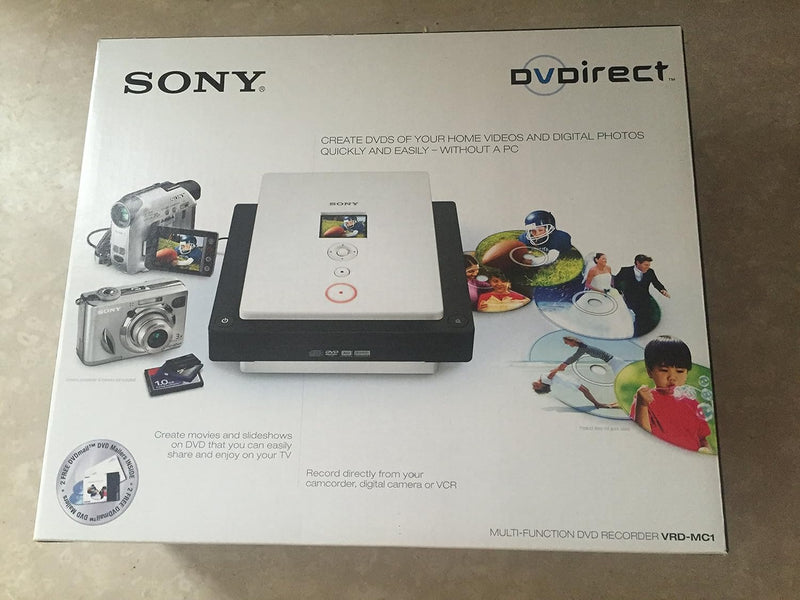
Sony VRD-MC1 DVDirect USB 2.0 DVD Recorder
★★★★★
USB 2.0
Archive your home videos and digital photos directly to DVD in minutes — no computer required, no software headaches.
$235.23*
View on Amazon
✓ In Stock on Amazon.com
*Price sourced from Amazon.com. Last updated:Jun 04, 2026.Price and availability are subject to change.
Affiliate Disclosure: Studio Supplies may earn a commission from qualifying purchases made through links on this page, at no additional cost to you. This helps support our editorial team.
Notice a mistake? Let Us Know
Overview
Key Features
Records video and digital stills from camcorders, digital cameras and audio-visual sources to DVD without computer
Includes memory stick duo slot and a multi-card slot for memory stick, an SD memory card, xD picture card and compact flash for digital stills
4-pin i.LINK (IEEE1394) port for a camcorder connection, and composite video, S-video and L/R audio connections for audio-video recording
Prints images directly to PictBridge compatible printers
Includes Nero software suite for managing and editing of digital imagery
Specifications
Media Type
DVD
Write Speed
22.16 MB/s
Connector Types
USB 2.0, 4-pin i.LINK (IEEE 1394), Composite Video, S-Video, L/R Audio
Memory Card Slots
Memory Stick Duo, Memory Stick, SD, xD Picture Card, CompactFlash
Supported Video Formats
AVI, MP4
Supported Photo Formats
JPEG, BMP, GIF
Supported Audio Formats
MP3, WAV, WMA, AAC
Print Support
PictBridge
Included Software
Nero Suite
Dimensions
8.74 x 8.03 x 2.56 inches
Weight
3.86 pounds
Color
Black
Pros & Cons
👍 Pros
- Fully standalone operation means anyone in the family can archive camcorder footage without touching a computer
- i.LINK (FireWire) port enables direct digital transfer from MiniDV and Digital8 camcorders — no quality loss from analog conversion
- Multi-format card slot covers Memory Stick, SD, xD, and CompactFlash in a single device, reducing the need for separate card readers
- PictBridge support enables direct photo printing to a compatible printer without a PC in the loop
- Nero software suite included for users who want PC-based editing and DVD authoring beyond basic transfer
👎 Cons
- i.LINK (FireWire) is a legacy interface — modern camcorders, smartphones, and cameras do not use this connection, significantly limiting compatibility with anything made after approximately 2010
- No support for HDMI or USB-C input means the VRD-MC1 cannot capture from contemporary video sources
- Maximum write speed of 22.16 MB/s reflects DVD-era hardware — recording long-form HD footage is not supported, and SD footage from modern sources may not be compatible
- No HDMI output for reviewing recordings on a modern TV; relies on standard-definition AV connections
- DVD as an archival medium has fallen out of mainstream use — disc availability, player compatibility, and long-term storage durability are practical concerns for new archiving projects
Frequently Asked Questions
Do I need a computer to use the VRD-MC1, or can it work completely standalone?
The VRD-MC1 is designed to work entirely without a computer. You connect your camcorder via the i.LINK (FireWire) port or your AV source via composite/S-video, insert a blank DVD, and record directly. The included Nero software is there for PC-based editing and management, but the core recording function is fully standalone.
What camcorder connection does the VRD-MC1 use, and will it work with my older MiniDV or Digital8 camcorder?
The VRD-MC1 includes a 4-pin i.LINK (IEEE 1394 / FireWire) port, which is the standard digital connection on MiniDV and Digital8 camcorders from the late 1990s through mid-2000s. For camcorders without i.LINK, composite video and S-video inputs accept analog AV connections — covering a wide range of older camcorder formats.
What memory card formats does the VRD-MC1 accept for recording digital photos to DVD?
The unit includes a Memory Stick Duo slot plus a multi-format card slot that accepts Memory Stick, SD Memory Card, xD Picture Card, and CompactFlash. This covers the major card formats in use at the time of the product's design, including cards from Sony, Canon, Olympus, and Fujifilm cameras.
Can the VRD-MC1 print photos directly, or is it only for DVD recording?
Beyond DVD recording, the VRD-MC1 supports direct printing to PictBridge-compatible printers. If your printer has a PictBridge port, you can connect it to the VRD-MC1 and print photos from memory cards without ever touching a computer.
What file formats does the VRD-MC1 support for playback and recording from memory cards?
For video, it supports AVI and MP4. For photos, it handles JPEG, BMP, and GIF. For audio associated with photo slideshows, it supports MP3, WAV, WMA, and AAC. Note that this is a legacy product — newer formats like HEIC, AVCHD, or H.265 are not supported.
Related Products


