

Tamron
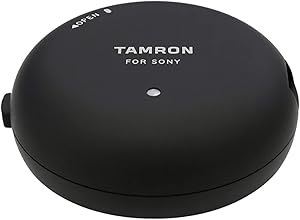
Tamron 5737 Tap-in Console for Sony Lenses
Customize and Update Your LensesThe Tamron TAP-in Console allows you to update firmware and customize settings for select Tamron lenses, ensuring optimal performance and personalization. Compatibility: Sony Lenses Functionality: Firmware updates, lens customization Customization Options: Focus...
$120.12*
Check availability
*Price sourced from Amazon.com. Last updated:Oct 23, 2026.Price and availability are subject to change — details.
Affiliate Disclosure: As an Amazon Associate, Studio Supplies earns from qualifying purchases made through links on this page, at no additional cost to you. This helps support our editorial team.
Notice a mistake? Let Us Know
Overview
Customize and Update Your Lenses
The Tamron TAP-in Console allows you to update firmware and customize settings for select Tamron lenses, ensuring optimal performance and personalization.
- Compatibility: Sony Lenses
- Functionality: Firmware updates, lens customization
- Customization Options: Focus distance limiter, Full-time Manual Focus override, VC adjustment
- Software: Tamron TAP-in Utility (Mac & Windows)
- Power: USB bus powered
Key Features
Update firmware of compatible Tamron lenses
Allows you to customise various lens functions to meet your needs
Free Tamron TAP-in Utility, available for Mac and Windows OS
TAP-in Console for Tamron lenses, USB cable, Protective cap
Specifications
Brand
Tamron
Model Name
Tap-in Console
Compatibility
Compatible Tamron Lenses (Sony mount)
Operating System Support
Mac OS, Windows OS
Included Accessories
USB cable, Protective cap
Frequently Asked Questions
What is the primary function of the Tamron Tap-in Console for Sony Lenses?
The Tamron Tap-in Console is primarily designed to update the firmware of compatible Tamron lenses and allow users to customize various lens functions to better suit their individual shooting needs.
Is the Tamron TAP-in Utility software included with the console?
No, the Tamron TAP-in Utility software is not physically included but is available for free download. It supports both Mac and Windows operating systems.
Which operating systems are compatible with the Tamron TAP-in Utility?
The Tamron TAP-in Utility is compatible with both Mac OS and Windows OS, providing broad accessibility for users with different computer setups.
Can this console be used with non-Tamron lenses?
No, the Tamron Tap-in Console is specifically designed for use with compatible Tamron lenses and will not work with lenses from other brands.
What items are included when purchasing the Tamron TAP-in Console?
The Tamron TAP-in Console includes the main console unit, a USB cable for connection, and a protective cap to keep the unit safe when not in use.
Related Products


