

Tamron
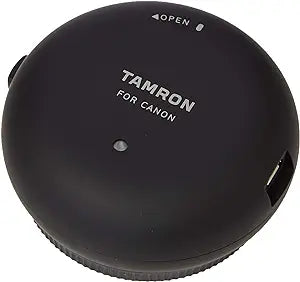
Tamron TAP-01E TAP-in Console for Canon Lenses
Customize Your Lenses with the Tamron TAP-in ConsoleThe Tamron TAP-in Console allows you to easily update firmware and customize the settings of compatible Tamron lenses, ensuring optimal performance and compatibility. What's Included: TAP-in Console for Tamron lenses USB cable Prote...
$45.79*
Check availability
*Price sourced from Amazon.com. Last updated:Oct 25, 2026.Price and availability are subject to change — details.
Affiliate Disclosure: As an Amazon Associate, Studio Supplies earns from qualifying purchases made through links on this page, at no additional cost to you. This helps support our editorial team.
Notice a mistake? Let Us Know
Overview
Customize Your Lenses with the Tamron TAP-in Console
The Tamron TAP-in Console allows you to easily update firmware and customize the settings of compatible Tamron lenses, ensuring optimal performance and compatibility.
What's Included:
- TAP-in Console for Tamron lenses
- USB cable
- Protective cap
Key Features
Update firmware of compatible Tamron lenses
Allows you to customise various lens functions to meet your needs
Free Tamron TAP-in Utility, available for Mac and Windows OS
TAP-in Console for Tamron lenses, USB cable, Protective cap
OS - Windows - Windows 10,Windows 8,Windows 8.1,Windows 7. Mac - Mac OS X 10.10 – 10.11
Specifications
Product Type
TAP-in Console
Brand
Tamron
Lens Compatibility
Tamron Lenses for Canon
Software Compatibility
Tamron TAP-in Utility
OS Compatibility (Mac)
Mac OS X 10.10 – 10.11
OS Compatibility (Windows)
Windows 10, Windows 8, Windows 8.1, Windows 7
Connectivity
USB cable
Included Accessories
USB cable, Protective cap
Frequently Asked Questions
What is the primary function of the Tamron TAP-in Console?
The primary function of the Tamron TAP-in Console is to allow users to update the firmware of compatible Tamron lenses.
Can I customize lens functions with this device?
Yes, in addition to firmware updates, this console allows you to customize various lens functions to better suit your photographic needs.
Is there software required to use the TAP-in Console, and if so, is it compatible with my computer?
Yes, there is a free Tamron TAP-in Utility available. It is compatible with Windows operating systems including Windows 10, 8, 8.1, and 7, as well as Mac OS X 10.10 and 10.11.
What items are included with the TAP-in Console?
The console comes with the TAP-in Console itself for Tamron lenses, a USB cable for connection, and a protective cap.
Is this console compatible with all Tamron lenses?
The description specifies that it is for "compatible Tamron lenses," meaning it works with a range of Tamron lenses that support this functionality.
Related Products


