



Tascam
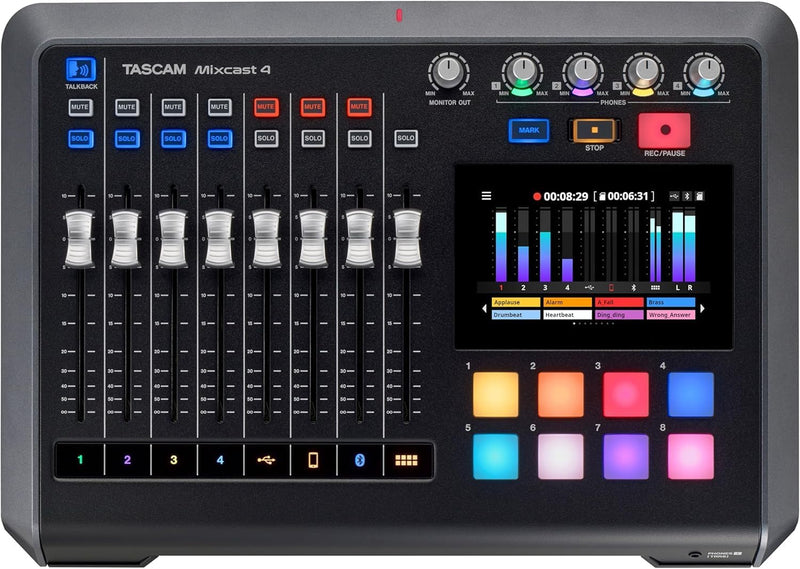
Tascam MIXCAST4 Podcast Streaming Mixer Recorder USB Interface
An all-in-one podcast production station with touch-screen mixing, 14-track recording, and sound pads built right in.
$499.00*
View on Amazon
✓ In Stock on Amazon.com
*Price sourced from Amazon.com. Last updated:Aug 27, 2026.Price and availability are subject to change — details.
Affiliate Disclosure: As an Amazon Associate, Studio Supplies earns from qualifying purchases made through links on this page, at no additional cost to you. This helps support our editorial team.
Notice a mistake? Let Us Know
Overview
Key Features
Features: Mixcast 4 makes professional content creation easy. For podcast creation, live streaming, event production or voice-over, Mixcast 4 can mix and record mic input with internal background music, effect sounds and jingles via the trigger pads, and external audio input from your phone, PC or Bluetooth device
Versatile: From audio recording to the mixing of recorded audio, the Mixcast 4 offers a complete production environment with multiple convenient functions such as 14-track recording direct to the unit’s SD card, Bluetooth audio input, an Aux input connector to easily mix and record phone conversations (with mix-minus) or other sound sources, and USB connectivity that allows the unit to add sounds from a computer
Stress-Free Touch Panel Control: Equipped with four mic inputs and four individual headphones outputs, the Mixcast 4 is always ready for podcast production without complicated settings. It provides all audio-related operation and workflow needed for live-streaming, events, podcasts, and other applications
Enhance Content With Real-Time Sound Effects: The Mixcast 4 comes with eight banks of fully customizable, illuminated sound pads which can be triggered during a podcast production or live broadcast. In addition to preset sound effects, users can flexibly assign new sounds, music or even mic sounds that have been pre-recorded on the unit
Tascam Podcast Editor Available for Post-Editing and Control: The Tascam Podcast Editor offers simple and practical editing of audio content, track arming, as well as easy configuration and assignment of sound effects and background music to the sound pads
Specifications
Brand
Tascam
Model
MIXCAST4
Mic Inputs
4 (XLR/TRS Combo)
Headphone Outputs
4
Channels
8
Recording
14-Track Multitrack to SD Card
Sound Pads
8 (Multiple Banks)
Connectivity
USB 2.0, Bluetooth, Aux (TRRS)
Display
5-inch Color Touch Panel
Software
Tascam Podcast Editor
Power Source
12V DC (Corded Electric)
Wattage
12.5 Watt-hours
Dimensions
10.5"D x 14.76"W x 2.8"H
Weight
5.62 lbs (2550g)
Color
Black
Frequently Asked Questions
How many microphones can I connect to the Mixcast 4 at once?
The Mixcast 4 supports up to four XLR/TRS microphone inputs, each with its own dedicated channel fader and individual headphone output, making it ideal for podcast panels of up to four people.
Can I record multitrack audio directly on the Mixcast 4 without a computer?
Yes, the Mixcast 4 records up to 14 tracks directly to an SD card inserted into the unit. This lets you capture each microphone and audio source on its own track for flexible post-production editing without needing a connected computer.
How do the sound pads work on the Mixcast 4?
The unit features eight illuminated trigger pads across multiple banks. They come pre-loaded with sound effects and can be customized with your own audio clips, jingles, or background music. You press a pad during recording or a live stream to instantly play the assigned sound.
Can I connect a phone call or remote guest to the Mixcast 4?
Yes, you can connect a smartphone via the 4-pole TRRS aux input, Bluetooth, or USB. The built-in mix-minus function automatically prevents echo for the remote caller, so they only hear the studio audio without their own voice fed back.
Does the Mixcast 4 work as a USB audio interface for my computer?
Yes, it functions as a USB 2.0 audio interface, allowing you to use it with streaming software, DAWs, or communication apps on your computer while simultaneously recording to the SD card.
Related Products


