



Tascam
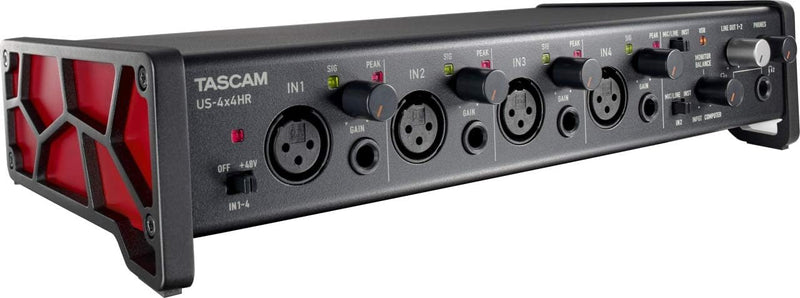
Tascam US-4x4HR USB Audio Interface - High Resolution 4x4 for Recording
XLR48Vphantom power
Four Ultra-HDDA preamps, 192kHz resolution, and a 4-sample minimum buffer make the US-4x4HR a low-latency recording hub for serious studio and streaming work.
$219.00*$249.00Save 12%
Check availability
*Price sourced from Amazon.com. Last updated:Aug 29, 2026.Price and availability are subject to change — details.
Affiliate Disclosure: As an Amazon Associate, Studio Supplies earns from qualifying purchases made through links on this page, at no additional cost to you. This helps support our editorial team.
Notice a mistake? Let Us Know
Overview
Key Features
4-in/4-out USB audio interface
Supports up to 24-bit/ 192kHz audio formats
Improved TASCAM driver with selectable buffer size from 4 samples provides low-latency and stability (Windows: TASCAM native driver)
4 XLR/TRS combo inputs equipped with Ultra-HDDA mic preamps and +48V phantom power
Combo TRS line inputs with guitar input support on IN1-2
Specifications
Audio Interface Type
USB
Inputs
4
Outputs
4
Max Audio Resolution
24-bit/192kHz
Microphone Preamps
4 x Ultra-HDDA
Phantom Power
+48V
Input Connectors
XLR/TRS combo
Line Inputs
TRS combo
Guitar Input Support
IN1-2
Driver Type (Windows)
TASCAM native driver
Buffer Size (Windows)
Selectable from 4 samples
Frequently Asked Questions
What makes the Ultra-HDDA preamps sonically different from standard interface preamps?
Ultra-HDDA (High Definition Discrete Architecture) preamps are built from discrete components rather than integrated op-amp chips, which typically results in a lower noise floor, more headroom before clipping, and cleaner transient handling on dynamic sources like drums or acoustic guitar. In practice, you hear it as more air and definition at the top end and tighter low-mid reproduction — the signal sounds less compressed through the gain stage.
What is the minimum buffer size, and does the 4-sample setting cause stability issues?
The US-4x4HR supports buffer sizes down to 4 samples on Windows using the TASCAM native driver. At 4 samples and 44.1kHz, round-trip latency drops to sub-2ms — usable for tracking with software monitoring. Stability at 4 samples depends heavily on system spec; lower buffer settings are practical on modern multi-core CPUs with fast NVMe storage. On older machines, 32 or 64 samples is a more reliable working floor.
Does the interface require phantom power to be switched per-channel or globally?
The +48V phantom power is available on all four XLR/TRS combo inputs. Based on the published specification, phantom power is applied globally across inputs — this is a workflow consideration when mixing condenser microphones with ribbon mics, which can be damaged by phantom power. Verify the phantom power switching configuration before use with ribbon microphones.
Can inputs 1 and 2 accept a direct guitar signal without a DI box?
Yes — inputs 1 and 2 feature a high-impedance instrument input mode designed to receive a passive guitar or bass signal directly via a standard TS cable. This is a dedicated Hi-Z circuit, not simply a line input running at high gain, which means the impedance loading is correct for passive pickups and preserves the guitar's natural tone and dynamic response.
How does the loopback function work for podcast or streaming production?
The loopback function routes the interface's own output signal back as an additional input source — this allows computer audio, music playback, or software output to be mixed with live microphone feeds and sent to streaming software like OBS as a combined stereo source. It eliminates the need for a separate virtual audio routing application for most basic streaming and podcasting workflows.
Related Products


