



Tether Tools
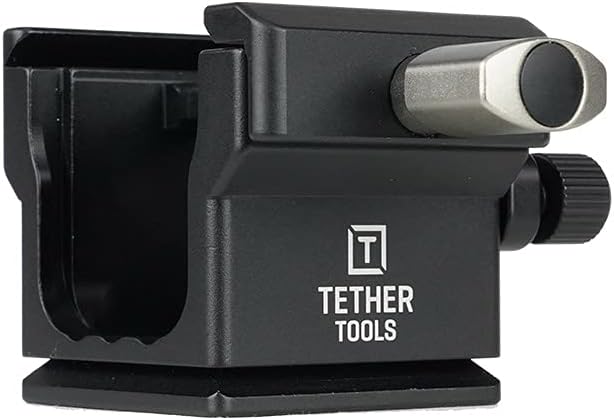
Tether Tools TA-CSLB TetherArca L-Bracket Cable Spacer
Keep tethered cables organized and ports protected through a full portrait session — without reaching for a single tool.
$59.99*
View on Amazon
✓ In Stock on Amazon.com
*Price sourced from Amazon.com. Last updated:Aug 28, 2026.Price and availability are subject to change — details.
Affiliate Disclosure: As an Amazon Associate, Studio Supplies earns from qualifying purchases made through links on this page, at no additional cost to you. This helps support our editorial team.
Notice a mistake? Let Us Know
Overview
Key Features
Protect your cables and your camera data ports with the TetherArca Cable Spacer, which is designed specifically to attach to your camera’s L-Bracket and Arca Mount by giving your camera an extra 1.25” of clearance space in vertical orientation.
The TetherArca Cable Spacer gives you the added security you need to attach up to five different cables with different diameters.
Secure and adjust by hand; no special tools required. Can secure multiple tether, video and trigger cables at a time.
Accommodates a variety of cable diameters. Cable Locking cable bar.
What’s Included: TetherArca Cable Spacer
Specifications
Feature
Detail
Clearance Space
1.25 inches
Orientation
Vertical
Cable Capacity
Up to five cables
Adjustment Method
Hand-adjustable
Tools Required
None
Included Component
TetherArca Cable Spacer
Frequently Asked Questions
Which L-brackets is the TetherArca Cable Spacer compatible with?
It's designed to attach to Arca-Swiss compatible L-brackets — the standard mounting interface used by virtually all major L-bracket manufacturers (Really Right Stuff, Kirk, Acratech, and others). If your L-bracket has an Arca dovetail slot, the TetherArca should fit.
How does the 1.25" clearance actually protect my camera's data port during tethered shoots?
When you shoot in vertical orientation with an L-bracket, the cable running into your USB or HDMI port is forced into a tight bend right at the connector — which is where port damage happens over time. The spacer pushes the camera body away from the mounting plate, creating enough room for the cable to exit at a natural angle rather than bending under pressure.
Can it handle both a tether cable and a trigger cable at the same time?
Yes — the locking cable bar accommodates up to five cables with different diameters simultaneously, so you can run a tethering USB-C cable and a sync trigger cable (or even a video cable) through the same spacer without needing separate management solutions.
Do I need any tools to install or adjust the TetherArca on my existing L-bracket setup?
No tools required. The spacer attaches and adjusts entirely by hand, which matters on a working set where you may be swapping between horizontal and vertical orientation or reconfiguring cable runs between setups.
Related Products


