

Toshiba
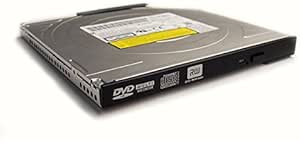
Toshiba PA3696U-1DV6 Ultra Slim Bay II DVD Super Multi Drive
Read and Write with the Toshiba Ultra Slim Bay II DVD Super Multi Drive Kit The Toshiba Ultra Slim Bay II DVD Super Multi Drive Kit offers a convenient solution for reading and writing DVDs. Its double-layer capability allows for storing larger amounts of data, making it perfect for backups and m...
Check availability
Affiliate Disclosure: Studio Supplies may earn a commission from qualifying purchases made through links on this page, at no additional cost to you. This helps support our editorial team.
Notice a mistake? Let Us Know
Overview
Read and Write with the Toshiba Ultra Slim Bay II DVD Super Multi Drive Kit
The Toshiba Ultra Slim Bay II DVD Super Multi Drive Kit offers a convenient solution for reading and writing DVDs. Its double-layer capability allows for storing larger amounts of data, making it perfect for backups and multimedia.
Specifications:
- Type: DVD Super Multi Drive Kit
- Format: Double Layer
- Compatibility: Ultra Slim Bay II
Specifications
Type
DVD Super Multi Drive
Form Factor
Ultra Slim Bay II
Brand
Toshiba
Pros & Cons
👍 Pros
- Designed as an Ultra Slim Bay II DVD Super Multi Drive, offering a compact form factor for portability.
- Provides Super Multi Drive capabilities, supporting a wide range of DVD and CD formats for playback and burning.
- Connects via an Ultra Slim Bay, which implies a specific type of internal connection for compatible Toshiba devices.
- Offers a reliable way to access and create optical media, essential for software installation or data backup.
- As a Toshiba product, it likely maintains a certain standard of quality and compatibility with Toshiba systems.
- Can be a practical solution for laptops or desktops that lack an integrated optical drive but have a compatible bay.
👎 Cons
- Specifically designed for the "Ultra Slim Bay II," limiting its compatibility to only certain Toshiba models.
- Being an internal drive, it is not a plug-and-play external device for universal use with any computer.
- The need for an Ultra Slim Bay II means it's not compatible with standard SATA or USB connections without an adapter.
- As an optical drive, it offers slower data transfer speeds compared to modern SSDs or faster USB devices.
- DVD technology is older, and many modern computers and media consumption habits have moved away from optical discs.
- Installation may require opening the laptop or desktop chassis, which can be challenging for some users.
Frequently Asked Questions
What is the primary function of the Toshiba PA3696U-1DV6?
It is an Ultra Slim Bay II DVD Super Multi Drive, designed for reading and writing various DVD and CD formats.
What kind of bay does this drive require for installation?
This drive is designed for installation into an Ultra Slim Bay II, common in specific Toshiba laptops.
Is this an external DVD drive that connects via USB?
No, it is an internal drive intended for a specific Ultra Slim Bay II, not a USB external drive.
Is this drive compatible with all laptops?
Its compatibility is limited to Toshiba laptops and devices that feature an Ultra Slim Bay II.
What types of discs can this Super Multi Drive handle?
A Super Multi Drive typically supports DVD±R/RW, DVD-RAM, and CD-R/RW formats for both reading and writing.
Does installing this drive require special tools?
Installation might require opening the computer chassis, which may involve small screwdrivers and careful handling, depending on the specific Toshiba model.
Is this drive still relevant given the shift away from optical media?
It is relevant for users who still need to access or create disc-based media, install older software, or backup data to optical discs.
Related Products


