



TP-Link
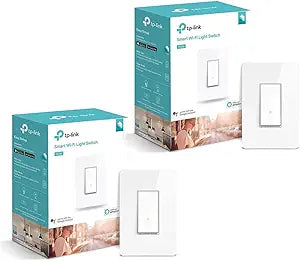
TP-Link HS200 Kasa Smart Wi-Fi Light Switch 2-Pack
Control your lights from anywhere with this 2-pack of easy-install Wi-Fi smart switches — no hub required.
Check availability
Affiliate Disclosure: As an Amazon Associate, Studio Supplies earns from qualifying purchases made through links on this page, at no additional cost to you. This helps support our editorial team.
Notice a mistake? Let Us Know
Overview
Specifications
Control Method
Kasa Smart App, Voice Control (Alexa, Google Assistant, Microsoft Cortana)
Installation Type
Single-pole, guided step-by-step
Features
Remote Control, Scheduling, Grouping, Away Mode
Pack Contents
2x HS200 Smart Switch, Face Plates, 4x Wire Nuts, Quick Start Guide
Hub Required
No
Warranty
TP-Link 2 Year Limited Warranty
Frequently Asked Questions
Do the TP-Link HS200 switches require a separate smart home hub?
No, the HS200 connects directly to your home Wi-Fi network and is controlled through the Kasa Smart app — no hub or bridge needed.
Can I install the HS200 with a 3-way switch setup?
No, the HS200 is designed for single-pole switch installations only. TP-Link offers the HS210 model for 3-way configurations.
Does the HS200 work with dimmer-controlled lights?
No, the HS200 is an on/off switch only. It does not support dimming. If you need dimming, consider the TP-Link HS220.
What is the Away Mode feature on the HS200?
Away Mode automatically turns your lights on and off at random intervals to simulate occupancy, which can help deter intruders when you're not home.
Does this switch require a neutral wire for installation?
Yes, the HS200 requires a neutral wire in the switch box, which is standard in most modern homes but may be absent in older wiring.
Related Products


