



Zoom
Zoom 1C Engraving Tool for Cricut Maker & Explore
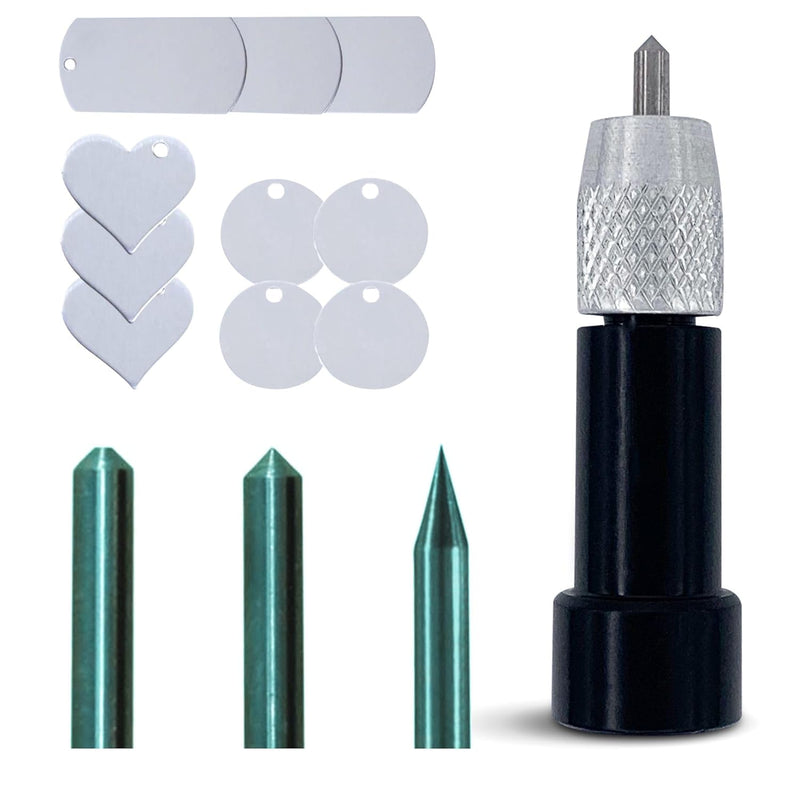
Three tungsten carbide tips let you engrave metal, acrylic, and leather on your Cricut Maker or Explore with precision that outlasts dozens of projects.
$29.99*
View on Amazon
✓ In Stock on Amazon.com
*Price sourced from Amazon.com. Last updated:Sep 05, 2026.Price and availability are subject to change — details.
Affiliate Disclosure: As an Amazon Associate, Studio Supplies earns from qualifying purchases made through links on this page, at no additional cost to you. This helps support our editorial team.
Notice a mistake? Let Us Know
Overview
Key Features
Most Versatile Engraving Tool Set – Includes three tips: Precision Tip for fine designs or small fonts, Regular Tip for general use, and Bold Tip for embossing or metal clays
Durability You Can Trust – Made from high-quality tungsten carbide for long-lasting performance. Unlike plastic alternatives, Zoom Precision tips are built to withstand heavy use
Wide Material Compatibility – Works with aluminum, brass, tin, pewter, stainless steel, plastics, acrylics, leathers, and more. Ideal for both beginners and advanced crafters
Machine Compatibility – Designed to fit select cutting machines. Compatible with Maker, Explore, and Explore Air. Not compatible with Joy or Explore Oner machines.
Lifetime Warranty – Each engraving tip is backed by Zoom Precision’s lifetime warranty for customer confidence and support
Specifications
Model
1C
Brand
Zoom
Included Tips
Precision Tip, Regular Tip, Bold Tip
Tip Material
Tungsten carbide
Compatible Machines
Cricut Maker, Cricut Explore, Cricut Explore Air, Cricut Explore Air 2
Incompatible Machines
Cricut Joy, Cricut Joy Xtra
Compatible Materials
Aluminum, brass, tin, pewter, stainless steel, plastics, acrylics, leather
Warranty
Lifetime (per tip)
Frequently Asked Questions
What Cricut machines does the Zoom engraving tool fit, and which ones won't work?
The Zoom tool fits Cricut Maker, Cricut Explore, Cricut Explore Air, and Cricut Explore Air 2. It does not fit the Cricut Joy or Joy Xtra, which use a different, smaller tool housing. Confirm your machine model before purchasing — the Maker and Explore lines use the same tool adapter housing, but the Joy line is physically incompatible.
What is the practical difference between the Precision, Regular, and Bold tips included in this set?
The Precision Tip has the narrowest point — best for fine line detail, small font engraving, and intricate designs where line width matters. The Regular Tip is the workhorse for general engraving projects with standard text and medium detail. The Bold Tip has the widest contact surface and is suited for embossing effects on softer materials like metal clays and for heavier-pressure passes on pewter or brass where a broader groove is desired.
Can these tips engrave stainless steel and aluminum without wearing out quickly?
Tungsten carbide is one of the hardest tool materials used in fabrication — it outperforms high-speed steel significantly on hard metals. For stainless steel and aluminum specifically, expect the tips to remain sharp across many projects, far longer than plastic-tipped alternatives. Tip longevity depends on depth settings and material hardness; running too deep on stainless steel will accelerate wear faster than the rated performance on aluminum or brass.
Do I need to use Design Space to engrave, or can I use third-party software?
Cricut Design Space is the native software for Maker and Explore machines and is what Zoom's tool is designed to work with. Third-party design software that can export SVG or other supported formats can be imported into Design Space, but the engraving operation itself runs through Design Space. The Zoom tool does not introduce its own software layer — it relies entirely on the Cricut machine's existing driver and software ecosystem.
Can beginners get good results with this tool, or does it require experience to calibrate?
Beginners can achieve solid results quickly, particularly on aluminum and acrylic. The main calibration variable is pressure setting in Design Space — starting with a test pass on scrap material before the final project is strongly recommended, especially for harder metals. The Maker's adaptive tool system adjusts force automatically; on Explore models, manual pressure setting in the software is required.
Related Products


